Your AI agent is mid-task, waiting on the result of a search tool call it made 30 seconds ago. The user is watching a spinner. Then a network blip drops the connection.
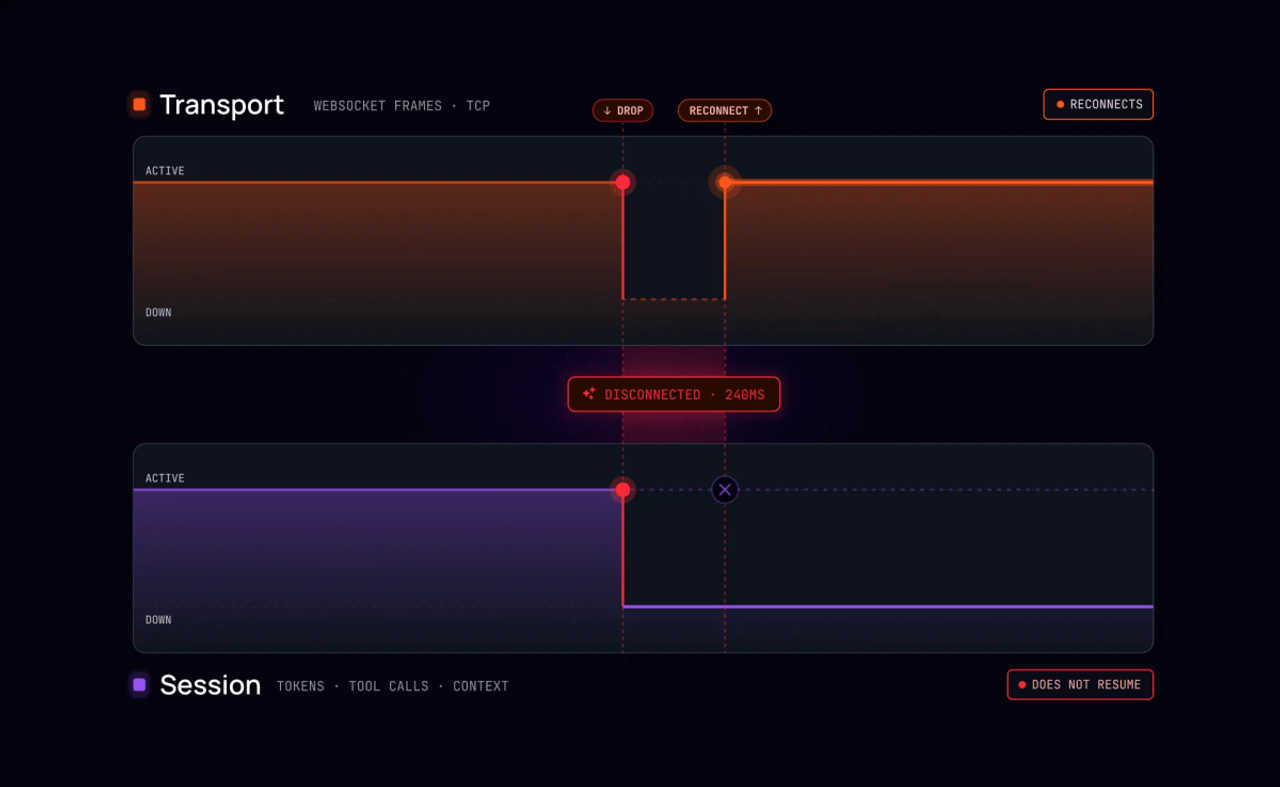
The application reconnects in under a second, fast enough that most monitoring wouldn't flag it. But the tool call result that came back during the gap is gone, and so are the 200 tokens the agent generated before the silence began.
The reconnect succeeded - but the session didn't.
This piece covers why reconnection issues are harder to anticipate for AI agents than standard WebSocket applications, how to resolve both the transport and session recovery sides of the problem, and why the bidirectional nature of agentic applications makes SSE a poor fit for this use case.
Key takeaways
- Transport reconnection re-establishes the WebSocket connection, but it does not restore the session. Tokens generated during the gap, tool call results that arrived while the client was offline, and the position in the ongoing generation are all lost without a session layer.
- Agentic applications are a poor fit for SSE because the client and agent both need to send messages on the same session while it is in flight. SSE streams server-to-client only.
- WebSocket ping frames sent every 50 seconds keep connections alive below the AWS ALB 60-second default and Cloudflare's fixed 100-second limit, with no client-side code required.
- Session recovery requires automatic reconnection, history compaction and replay, and protocol fallback. Without a session layer, these fall to application code.
The infrastructure timeout sources that hit AI agents
WebSocket reconnection has always been a challenge worth solving. AI agents make it harder because their productive silence looks like idleness to infrastructure. An agent goes quiet during tool call waits, between reasoning steps, while the LLM generates a response. Load balancers and proxies on the path see no traffic and close the connection.
Why SSE doesn't fit
The applications this post is about - customer support agents, coding agents, research agents that the user steers mid-task - also require the client to send messages back to the agent on the same session while it's in flight. A user correcting an assumption, approving a tool call, or canceling mid-implementation needs a channel in both directions. SSE streams server-to-client only, which rules it out at the transport level regardless of how well you've solved the replay problem.
For the transport requirements of bidirectional AI sessions, see token streaming.
Idle timeouts and why agentic applications are exposed
An idle timeout is a setting on network infrastructure between the client and server (load balancers, CDN edges, corporate proxies, and API gateways) that closes the connection after a configured period with no traffic in either direction. The close happens at the network layer regardless of what the application is doing. And depending on the component, it surfaces to the application as a clean close event, a connection reset, or nothing visible at all until the next send fails.
Plenty of production WebSocket applications have shipped without explicitly thinking about these timeouts. The reason is that traditional server-side workloads tend to emit a trickle of traffic on their own, such as progress events as a task runs, and periodic state updates, which keep the connection alive as a side effect. The timeouts stay invisible because something is always crossing the wire.
Agentic applications don't have that property. A customer support agent goes quiet mid-answer while the user is typing a correction. A coding agent waits for the user to approve a tool call before continuing. A research agent sits in silence for 90 seconds while a downstream API responds. None of that is idleness from the agent's perspective - but it all looks like idleness to AWS Application Load Balancer, the Cloudflare edge, a corporate proxy, or anything else sitting between the client and the server. If the application doesn't deliberately keep the connection alive, the connection will drop.
The fix: server-side ping frames
The fix is the mechanism that the WebSocket spec defined for exactly this case: server-side ping frames. The server sends a ping at a fixed interval; the browser responds automatically with a pong; both frames count as activity and reset every idle timer on the path. The interval needs to sit comfortably below the shortest idle timeout on the path - 50 seconds sits below the common limits that are covered next.
Common idle timeouts to plan around
The fix is the same in each case: configure your WebSocket server to send ping frames every 50 seconds. Browsers respond automatically with pong frames, resetting every idle timer on the path. No client-side code required.
AWS Application Load Balancer defaults to 60 seconds. It closes the connection silently - no FIN frame, no onclose event - so the failure only surfaces when the application next tries to send. The idle_timeout.timeout_seconds attribute is adjustable up to 4,000 seconds if your workload needs a longer window.
Cloudflare enforces 100 seconds on Free and Pro plans. The limit is fixed and cannot be raised. Enterprise customers can configure a custom value through their account team. If connections die at exactly 100 seconds, check EdgeStartTimestamp and EdgeStopTimestamp in Cloudflare's HTTP request logs to confirm the source.
Other proxies, gateways, and edge nodes often enforce timeouts you can't inspect or configure. The server-side ping approach covers them transparently.
Other connection challenges to consider
Not all connection failures come from timeouts. Two other patterns hit AI agent applications in production and require different handling.
Corporate VPN and enterprise proxy traversal. Many enterprise networks do not forward the HTTP Upgrade header required to open a WebSocket connection, so the connection never opens rather than dropping mid-session. The failure appears at the WebSocket handshake stage - typically a non-101 HTTP response - rather than a silent close after inactivity. The fix is protocol fallback: when a proxy blocks the WebSocket upgrade, the transport degrades automatically to HTTP streaming or long-polling without per-deployment configuration.
Mobile network handoffs. Switching from WiFi to cellular drops the underlying TCP connection immediately, and the client's onclose event does not fire - the OS terminates the connection without a clean close frame. On iOS, background TCP connections are suspended within seconds of an app moving to the background, again without notification. Don't rely on onclose to trigger reconnection; use failed-send detection and an application-level heartbeat timeout to catch silent closes.
For the full multi-device angle, including session continuity across intentional device switches, see cross-device AI sync.
What transport reconnection recovers, and what it doesn’t
Reconnecting the WebSocket connection restores the transport, but it doesn’t restore the state of the session that was in flight when the connection dropped. The distinction is worth stating precisely, because the failure looks like a transport problem, but its cost is a state problem.
For the implementation pattern behind session recovery, see resumable LLM streaming.
After a successful reconnect with only transport-layer recovery, the client is back online, but the session is in an indeterminate state. The client holds a partial response from before the disconnect. The agent continued generating on the server side. Neither side knows where the other stopped.
How session recovery works
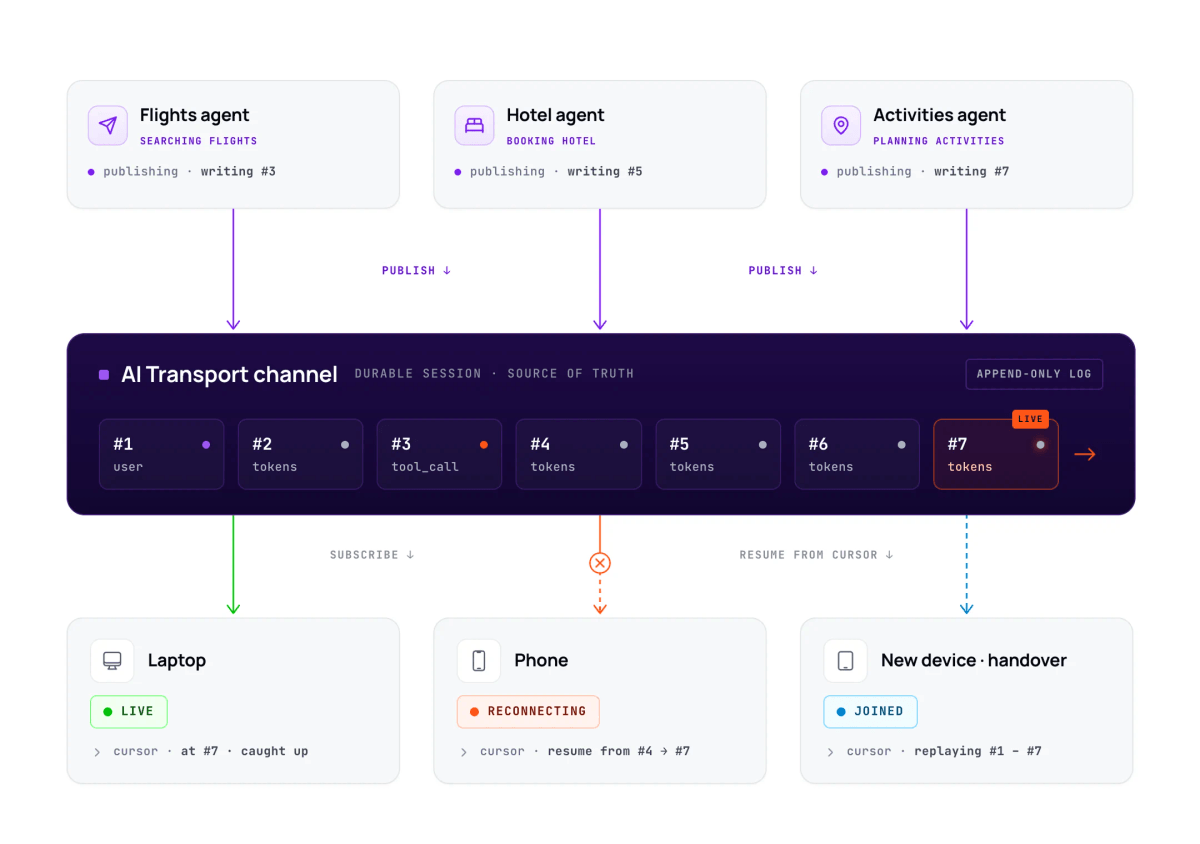
This is the problem that Ably AI Transport is built to solve. It acts as the session and delivery layer between your agent and your users, storing every event the agent publishes and ensuring the client can retrieve exactly what it missed on reconnect.
The agent publishes every event - each generated token, each tool call, each reasoning step - to a session. AI Transport stores those events and is responsible for delivering them to the client whenever the client is connected. From the agent's side, this is fire-and-forget: it doesn't care whether the client is online, offline, mid-reconnect, or freshly loaded into a new browser tab.
When a client connects or reconnects, it asks for everything it hasn't already seen. AI Transport returns the missed events, in order, before the live stream resumes. There is no "live vs. history" boundary the application needs to reason about, and no difference in how this works for a 30-second drop vs. a 30-minute disconnect vs. a fresh page load: the client tells AI Transport where it got to, and AI Transport fills in the gap.
The session doesn't store one event per token. Tokens are appended to a single message per agent response - conflation - so the session history contains one accumulated message per response, not thousands of token-sized events. A client reconnecting mid-stream receives the in-progress message in its current accumulated form and resumes streaming from there; a client loading the page fresh receives the same accumulated message as a single coherent block. The application doesn't write reconciliation logic for either case.
For more detail on how this works, see AI Transport's reconnection and recovery and history and replay documentation.
What the user should see during a disconnect
Session recovery handles the infrastructure layer, but a reconnect that works silently in the background still needs the right UI treatment to avoid looking like a failure.
AI Transport exposes well-defined connection states. The key distinction is between the disconnected state (temporarily offline, retrying automatically), and the suspended state (retry window exhausted). During disconnection, a reconnecting indicator is shown (as opposed to an error modal). In a suspended state, a retry button is shown to communicate that the session is intact and waiting.
Ably AI Transport is the session recovery layer
Building session recovery without AI Transport means writing a heartbeat loop, a reconnection manager, manual state reconstruction logic, and a connection state component to surface each phase to the user.
None of these is large in isolation, but together they constitute infrastructure. And any infrastructure that your team owns is infrastructure your team spends time and resources maintaining and extending as requirements change.
Ably AI Transport provides the session recovery layer:
- Automatic connection recovery within the two-minute window
- History compaction and replay so clients always receive clean, accumulated state on reconnect
- Protocol fallback from WebSocket to HTTP streaming to long-polling
- Bidirectional signaling on the same session
What remains in your application code is the connection state UI (surfacing the reconnecting and suspended states to the user), and that’s a handful of lines rather than a system.
The getting-started guide walks through the implementation with Vercel AI SDK.
For more on the session recovery architecture, see resumable token streaming. For the broader argument about why delivery infrastructure is the missing layer in the AI agent stack, see The model is fine. The session is broken.
Frequently asked questions
How do I stop AI chat sessions from timing out?
Configure your WebSocket server to send ping frames at a fixed interval below the shortest timeout on your path. A 50-second interval sits comfortably below both the AWS ALB 60-second default and Cloudflare's fixed 100-second limit on Free and Pro plans, with browsers responding automatically - no client-side code required. If your workload needs a longer window, raise the idle_timeout.timeout_seconds attribute in your ALB configuration; it is adjustable up to 4,000 seconds.
What happens if a user disconnects during LLM streaming?
With AI Transport, the session resumes automatically upon reconnect, with missed tokens delivered in order before new ones arrive, and no application code needed. For longer disconnects, AI Transport's history and replay feature loads the full conversation from the session history. Without a session layer, tokens generated during the dropout are lost, and the agent cannot resume from the point of interruption.
How do I avoid duplicate AI messages after a WebSocket reconnect?
With AI Transport you don't need to - the SDK handles this through history compaction. Tokens are streamed as appends to a single message per agent response, and the session history stores one message per response rather than one per token. When a client reconnects or refreshes, it receives the single accumulated message rather than individual tokens to reconstruct.
What is the AWS ALB idle timeout, and how do I raise it for WebSocket connections?
The AWS Application Load Balancer idle timeout defaults to 60 seconds and applies to all connection types, including WebSocket. Raise it by updating the idle_timeout.timeout_seconds load balancer attribute. The valid range is one to 4,000 seconds; most AI agent workloads are well served by a value between 3,600 and 4,000 seconds. The change takes effect immediately without requiring a redeployment.
Does Cloudflare close WebSocket connections? What is the timeout?
Yes. Cloudflare enforces a 100-second idle timeout on WebSocket connections for Free and Pro customers. The limit is fixed on those plans and cannot be raised. Enterprise customers can configure a custom value through their account team. To keep connections alive on Free and Pro plans, configure your WebSocket server to send ping frames every 50 seconds. Browsers respond automatically with pong frames, which reset Cloudflare's idle timer and the 60-second AWS ALB default simultaneously.
Can WebSockets work behind a corporate VPN or enterprise proxy?
They can, but many enterprise proxies do not forward the HTTP Upgrade header required to open a WebSocket connection. When that happens, the connection fails at the handshake stage rather than dropping mid-session. That failure is distinct from a timeout: the error occurs before any data flows, not after a period of inactivity. Protocol fallback to HTTP streaming or long-polling handles proxy blocking at the infrastructure layer without per-deployment configuration.
How long does Ably retain channel history for session recovery?
AI Transport replays missed messages automatically on reconnect, with no application code needed. For longer disconnects, session history loads the full conversation, persisting for 24 to 72 hours depending on your Ably plan, with extended retention available on higher tiers.