
If you're running a customer-facing AI agent on Temporal, you've probably seen this: a user refreshes the tab mid-response. When the page comes back, the response resumes, but anything they were about to send back (an interruption, a tool approval) is gone. Temporal keeps the workflow itself crash-proof, but getting its output to a browser, and taking anything back from the browser into the workflow, has always meant building it yourself.
The usual pattern is a Redis pub/sub relay (Redis acting as a lightweight message broker between the Workflow and the browser), and it comes with well-documented limitations. Workflow Streams, now in Public Preview, handles half of that well. It doesn't make the stream a durable session layer, and knowing exactly where the two diverge shapes whether you still need one alongside it.
Key takeaways
- Workflow Streams is Temporal's built-in streaming abstraction, now in public preview for Python and TypeScript, giving a single Workflow exactly-once, ordered delivery to its subscribers without a separate relay.
- Workflow Streams doesn't replace a durable session layer: it delivers by long-polling rather than pushing over a live connection, and it's one-way, output only, with no channel for a client to send anything back into the Workflow.
- To get realtime push delivery, bidirectional communication, multi-participant visibility, offline delivery, conversation branching, and human handover, you need a durable session layer alongside Temporal.
What Temporal Workflow Streams does now, in public preview
Streaming an LLM response reliably means solving two problems: delivering every chunk in order, and handling a dropped connection without gaps or duplicates. Workflow Streams solves both using primitives Temporal already has.
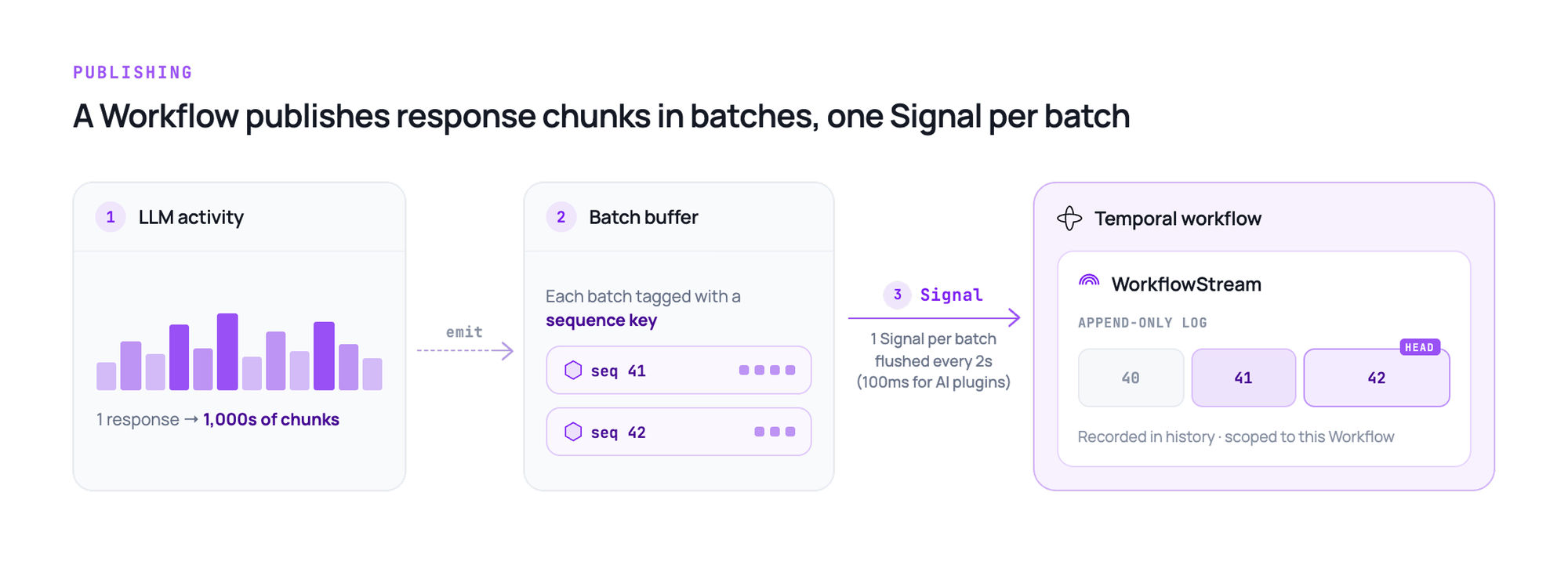
Picture one response streaming out of a running Workflow. It publishes each chunk to a WorkflowStream, a topic scoped to that Workflow, using a Signal: a one-way message Temporal records in its history. Because an LLM can emit thousands of chunks per response, Temporal batches them before writing (2 seconds by default, 100ms for its AI integration plugins) and tags each batch with a sequence key.
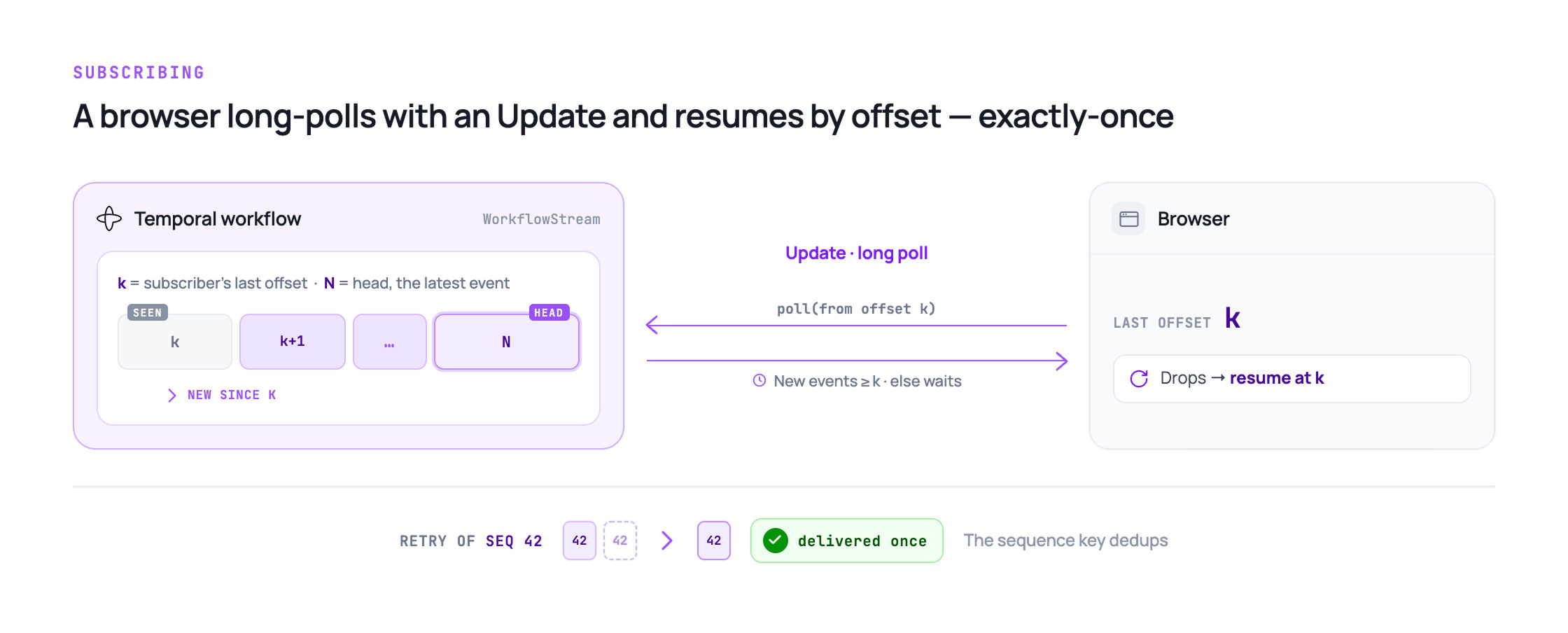
A browser subscribes to that topic using a long-polling Update: a request-response call that returns immediately if new events are waiting, and holds open if not. If the connection drops, the client reconnects and resumes from its last offset, and the sequence key stops a retried batch from being delivered twice.
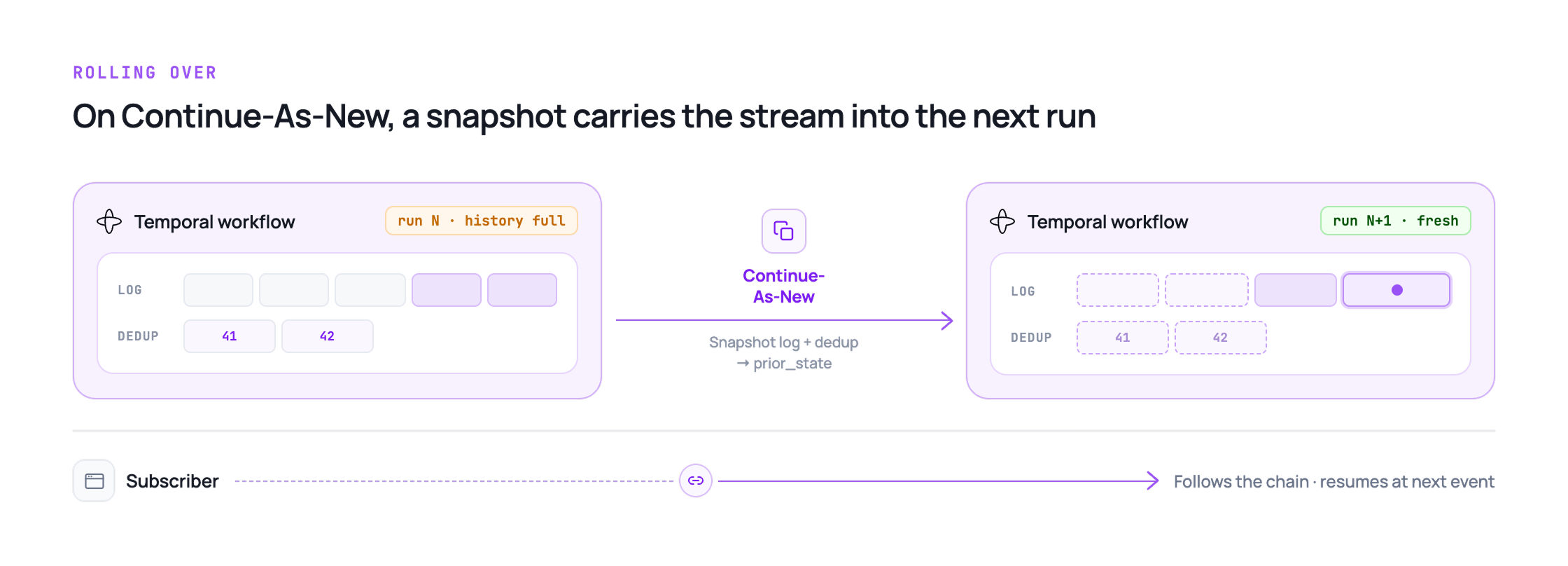
A long-running conversation will eventually force a Continue-As-New, Temporal's mechanism for restarting a Workflow into a fresh history once it grows too large. Without careful handling, that reset would break the stream along with it. Workflow Streams avoids this: a wrapper snapshots the stream's log and dedup table into the next generation, so the stream survives the rollover, as long as it stays within that Workflow's own chain.
Workflow Streams vs. a Redis pub/sub relay
Publishing an event, getting it to a subscriber, and surviving a reconnect is exactly what you'd otherwise be building by hand with a Redis pub/sub relay. Here's how the two actually compare:
| Property | Workflow Streams | Redis pub/sub relay |
|---|---|---|
| Delivery guarantee | Exactly-once, sequence-keyed dedup | At-most-once, fire-and-forget |
| Reconnect behavior | Resume from last offset via long-poll Update | Custom gap detection and backfill |
| Language support | Python and TypeScript (Public Preview); Go and Java planned | Any client that speaks Redis |
| Extra infrastructure | None beyond the Workflow itself | A Redis or Valkey cluster to run and operate |
Does Workflow Streams replace a durable session layer?
Not entirely. A natural first guess is that the boundary is about identity, whether a client knows which session to reconnect to. It isn't: a Workflow ID can be derived from something like a user ID, just as a durable session layer's channel name usually is, so any client that knows the user ID can find its way back. That's an application-level design choice both systems rely on equally.
The real difference shows up once a client is already subscribed.
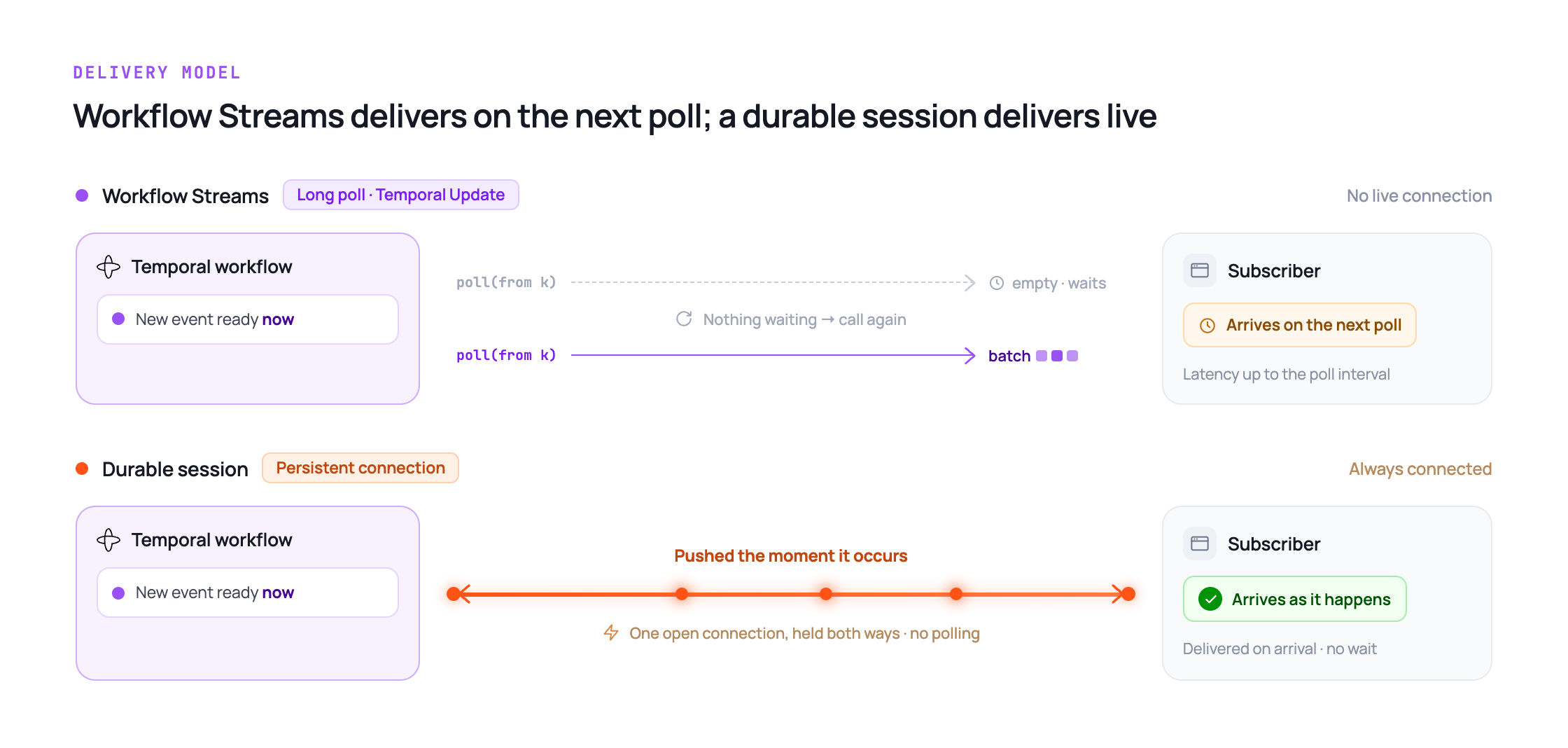
Workflow Streams delivers events through long-polling, not a live connection. A subscriber calls Temporal's Update mechanism, gets a batch of events if any are waiting, and calls again if there aren't. In contrast, a durable session layer delivers over a persistent connection, so events arrive as they happen rather than on the next poll.
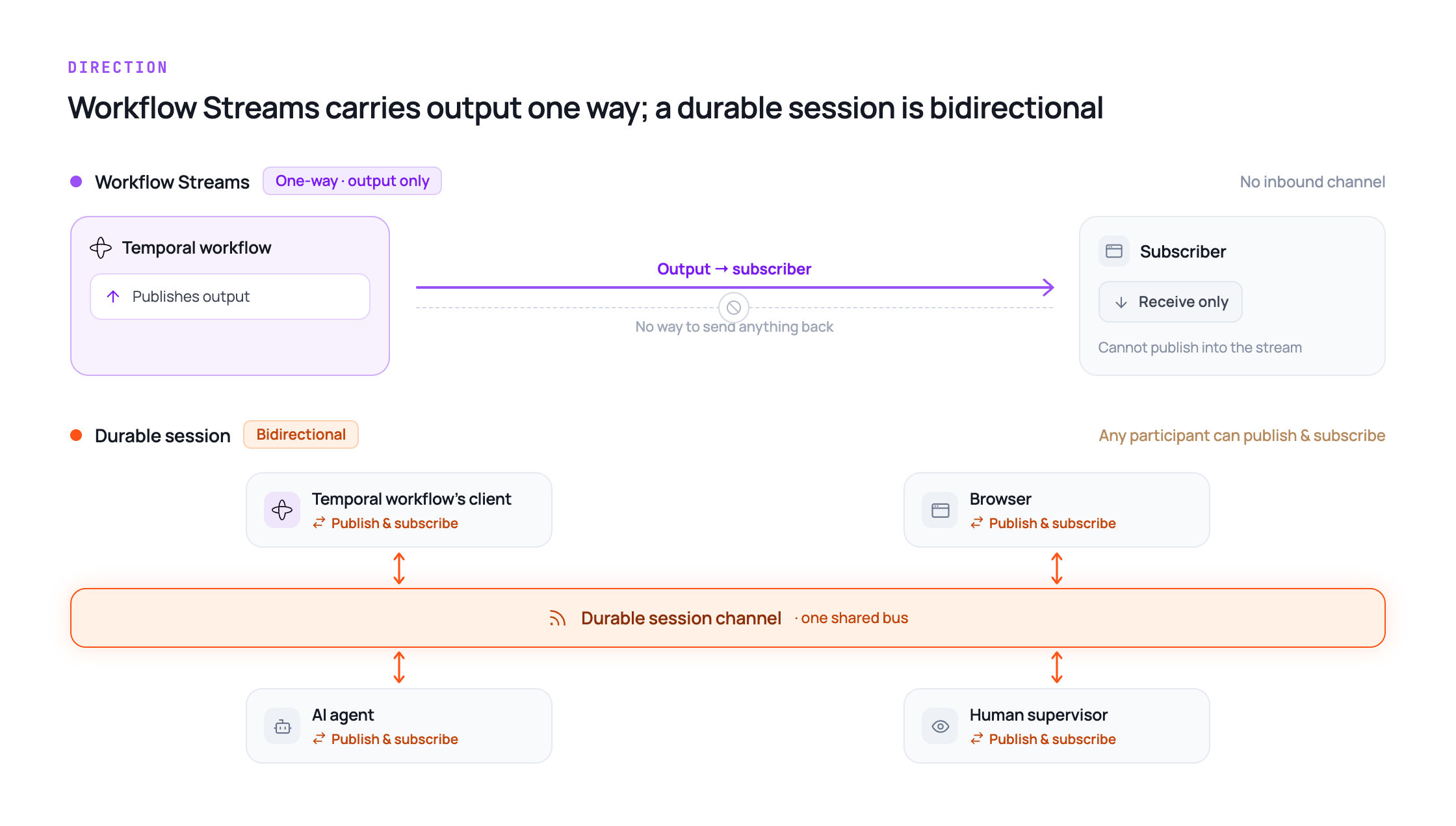
Workflow Streams is also one-way. It carries a Workflow's output to a subscriber, and has no channel for that subscriber to send anything back in. A durable session layer is bidirectional by design: any participant on the channel (including the Workflow's own client) can publish as well as subscribe.
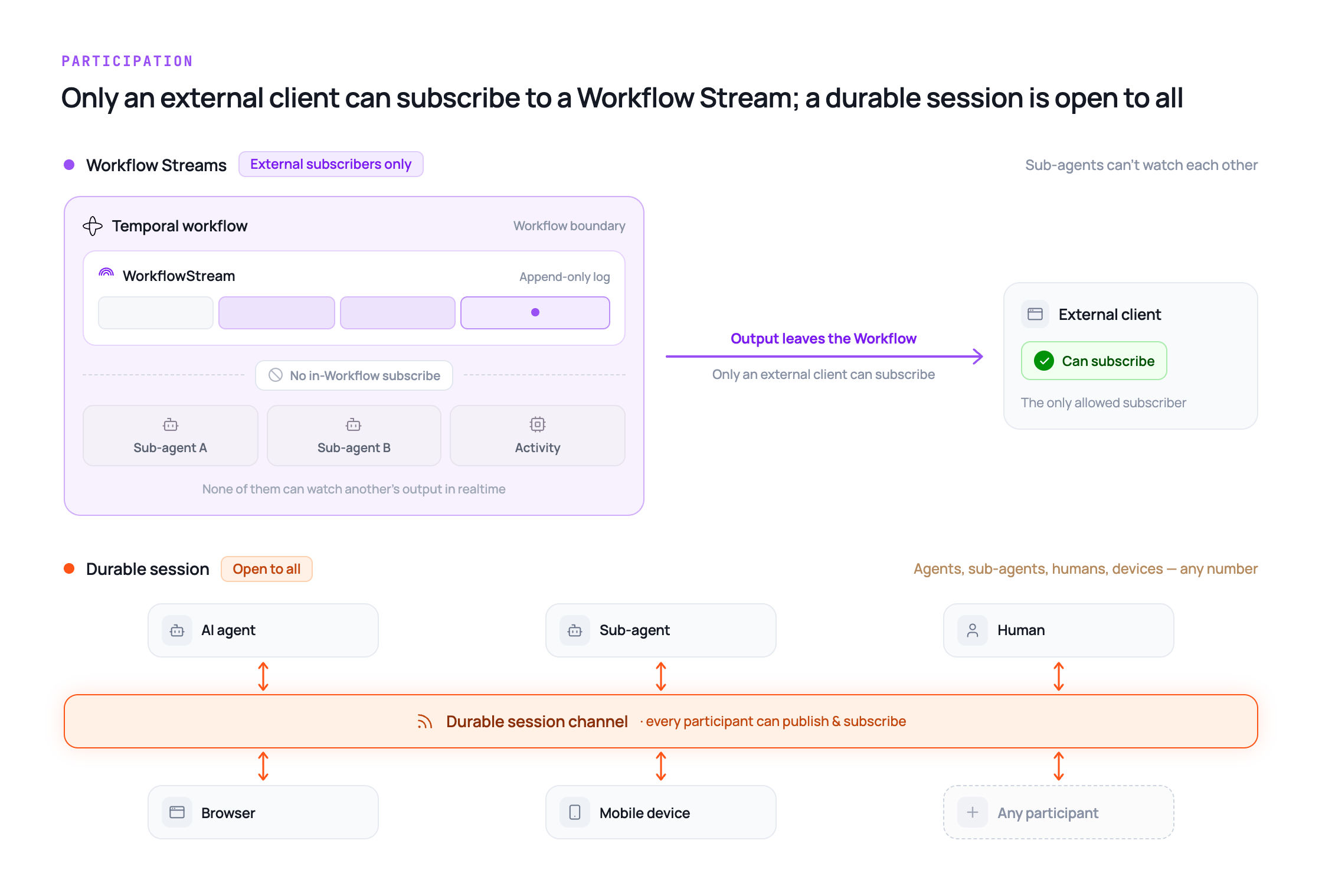
Being one-way also shapes who gets to participate. Only an external client can subscribe to a Workflow Stream. Temporal's own docs confirm this: subscribing from inside the Workflow that hosts the stream isn't supported, and subscribing from an Activity is uncommon in practice. So if a Workflow runs multiple Activities or sub-agents, none of them can watch each other's output on the stream in realtime. Conversely, a durable session layer is built around a shared channel. This allows any number of participants, agents, sub-agents, humans, or devices to subscribe and publish to the same channel.
Here's how those three differences look side by side, alongside a few more properties that a durable session layer offers but Workflow Streams don't:
| Property | Workflow Streams | A durable session layer |
|---|---|---|
| Delivery mechanism | Long-polling (Update-based) | Persistent connection, realtime push |
| Client sends input back | Not supported | Bidirectional, any participant can publish |
| Other Activities or sub-agents watching the stream | Not supported | Any participant can subscribe |
| User goes offline, agent finishes work | No delivery path | Push notification |
| Human joins mid-conversation with full context | Not covered by the stream itself | Any participant reads full channel history |
None of this is a criticism of Workflow Streams. It solves what it sets out to solve: durable, ordered delivery from a Workflow to a client that's already found the right one to subscribe to. A durable session layer solves what happens next: an agent that needs to hear back from the client, a sub-agent that needs to see a sibling agent's output, a user who goes offline, or a human operator joining an existing conversation.
What changes if you're already running a Redis pub/sub relay
If you've already built a Redis pub/sub relay to stream Temporal workflow output, Workflow Streams is worth evaluating. It isn't an automatic migration, though. The value it adds depends on how closely your setup matches the external-client, one-way case Workflow Streams is built for.
Here's what that looks like in code. A support-agent Workflow publishes a status update over its WorkflowStream, then hands off to the Activity that does the actual LLM call and streaming.
from temporalio import workflow
from temporalio.contrib.workflow_streams import WorkflowStream

@workflow.defn
class SupportAgentWorkflow:
    @workflow.init
    def __init__(self, input):
        self.stream = WorkflowStream()

    @workflow.run
    async def run(self, prompt: str) -> str:
        # Publish a status update before the long-running LLM call
        status = self.stream.topic("status", type=StatusEvent)
        status.publish("thinking")

        return await workflow.execute_activity(
            call_llm_and_stream,
            args=[prompt, self.stream],
            start_to_close_timeout=timedelta(minutes=5),
        )
Workflow Streams removes the Redis cluster, the gap-detection logic, and the dedup code your Redis relay was doing by hand. That value shows up specifically when a single external client per Workflow covers your case, and Python or TypeScript clients cover your frontend.
Outside of that case, migrating makes less sense. If your relay already handles input flowing back to the Workflow, multiple agents or sub-agents watching the same output, or a human operator joining mid-conversation, switching to Workflow Streams means trading a working system for infrastructure that solves a narrower problem than the one you actually have.
None of this answers whether you need a durable session layer, though. That's a separate question from which transport sits underneath. A durable session layer runs alongside Workflow Streams just as easily as it runs alongside a Redis pub/sub relay. It doesn't care which one is publishing events, only that something is.
The practical order of operations: decide whether you need realtime push, bidirectional input, multi-participant visibility, offline delivery, branching, or human handover first. Then decide separately whether Workflow Streams or your existing Redis pub/sub relay is the better transport underneath it.
How a durable session layer covers what Workflow Streams doesn't
A durable session layer has to solve four things Workflow Streams, by itself, can't:
- Realtime push delivery, not long-polling
- Bidirectional communication, not one-way output
- Multi-participant visibility across agents, sub-agents, and humans
- Persistence through disconnects: offline delivery and full history for anyone who joins
- Retry reconciliation, done once on the session, not left for every subscriber to detect and merge
This is the layer the rest of this piece has been pointing toward, something built around a shared channel rather than a one-way stream out of a single Workflow. Ably AI Transport is one implementation of it, running alongside Temporal rather than inside it, built to solve exactly these four things.
- Realtime push delivery means events reach a subscriber as they happen, over a persistent connection, rather than on the next poll.
- Bidirectional communication means the same channel that carries a Workflow's output also carries input back in, so an interruption, a tool approval, or a message from a human operator has somewhere to go.
- Multi-participant visibility means any number of participants, including other agents or sub-agents working on the same task, and human operators joining partway through, can subscribe to the same channel and see the same history, not just one external client at a time.
- Offline delivery uses push notifications to reach a user who's disconnected entirely, rather than only queuing messages for whenever they next reconnect. The message still waits in the session's history either way, so nothing is lost if the push doesn't land immediately.
- Retry reconciliation means a retried Activity's output supersedes the failed attempt's on the session itself, rather than requiring every subscriber to detect both versions of the same step and merge them itself. That's the pattern Temporal's own docs place on the consumer to build.
- Human takeover is worth naming honestly rather than rounding up. Any participant, including a human operator, can join the same channel and read full history immediately, which is the mechanism warm and cold transfer both depend on, though the documented transfer patterns themselves are still being built out.
The practical takeaway: don't wait for Workflow Streams to grow into something it wasn't built to be. Adopt it for what it's genuinely good at: durable, ordered delivery out of a single Workflow. Add a durable session layer wherever you need realtime push, input flowing back into the workflow, multiple participants watching the same channel, or to survive an offline user, a branch, or a handover.
Ably's docs on multi-device sessions and human-in-the-loop patterns are the place to start, covering the participant-visibility and handover cases in detail.
FAQs
Does Temporal Workflow Streams replace a durable session layer?
No. Workflow Streams delivers a single Workflow's output reliably to a subscriber that already knows which Workflow to ask for, but it does this by long-polling, one-way, to external clients only. A durable session layer adds realtime push, input flowing back into the workflow, multi-participant visibility, offline delivery, conversation branching, and human handover.
Does Temporal Workflow Streams solve multi-device sessions?
Not on its own, and not for the reason you might expect: a new device still needs to know which Workflow to subscribe to, but that comes down to whether the Workflow ID is fresh per run or derived from something like a user ID, a design choice, not a Workflow Streams-specific gap. A durable session layer's channel identifiers work the same way. What Workflow Streams doesn't give that device is a live push connection or a way to send anything back to the Workflow, which is what a durable session layer adds.
Does Temporal Workflow Streams support TypeScript?
Yes. Workflow Streams entered Public Preview for both Python and TypeScript in June 2026, alongside Temporal's integrations for OpenAI Agents SDK, Google ADK, and LangGraph. Go and Java support is planned next.
Can multiple devices subscribe to the same Workflow Streams topic?
Yes, if every device already knows the Workflow ID, the same requirement applies whether you're using Workflow Streams or a durable session layer. What differs once a device is connected is delivery: Workflow Streams delivers by polling and has no way for that device to send input back. A durable session layer pushes in realtime and is bidirectional.
What does Temporal Workflow Streams not support?
As of its public preview release, Workflow Streams doesn't provide realtime push delivery (it delivers by long-polling), a channel for a client to send input back (it's one-way), multi-participant visibility for other Activities or sub-agents, offline push notifications, conversation branching, or a documented human handover pattern. Temporal's own announcement describes it as unsuited to high-throughput, Kafka-scale streaming.
Is Workflow Streams the same as Ably AI Transport?
No. Workflow Streams is a Temporal library that streams one Workflow's events to subscribers that already know its ID. Ably AI Transport is a durable session layer that runs alongside Temporal, adding realtime push, bidirectional communication, multi-participant visibility, presence, offline delivery, and human handover on top of whatever produces the underlying events.


