
Now available on Ably Pub/Sub, with push-to-start and Apple broadcast channel support.
Live Activities let your users follow a game, a delivery, or a flight from their Lock Screen at a glance, without ever opening your app. But customers running Live Activities at large scale kept telling us the same thing - updates weren’t reliably reaching their users through their existing push providers. And those providers didn’t support Apple’s broadcast channels.
So we built Ably’s iOS Live Activities support on those broadcast channels. You send one update, Apple delivers it to every phone following the event, and Ably handles the channels, the tokens, and your Apple key. It’s available now in Public Preview and it’s already running in production at scale.
Key takeaways
- Ably now supports iOS Live Activities, including starting them from your server.
- It's built on Apple's broadcast channels, so one update reaches every phone following an event, however large the audience.
- It's already running in production at scale. Check the docs on how to get started.
What Live Activities are and where they're used
Live Activities are the widgets that keep updating on an iPhone's Lock Screen and in the Dynamic Island at the top of newer iPhones.
The data a Live Activity displays is called its content state. How your server should send updates to it depends on how many people see the same data, and how often it changes. Take these examples:
- Food delivery tracking: One person, one order. The content state holds the order status and an estimated arrival time, and changes at each stage of the delivery. Because each update concerns a single person, Apple recommends sending it to that activity's push token. A broadcast channel per order would add channel management without saving any requests.
- Live sports: Thousands of people, one game. The content state holds the score, period, clock, and last play, and a basketball game can need many updates per minute. Everyone gets exactly the same update, which is the case broadcast channels were built for.
- Flight status: Every passenger on a flight needs the same gate, boarding time, and delay. Apple's broadcast push guidance names flight status alongside sports coverage as a broadcast use case.
Why Live Activities get hard at very large scale
How updates reach every phone, and how activities get started can really impact how well Live Activities hold up for a big audience.
What Apple's broadcast channels solve, and what they leave to your server
Before iOS 18, every Live Activity had its own push token, and your server sent each update to every token separately. A basketball game followed by 100,000 people meant 100,000 identical requests for every score change.
Apple's broadcast channels, added in iOS 18, fix that part. Your server sends one update to a channel, and Apple's push notification service (APN), delivers it to every Live Activity listening on it. Apple's WWDC24 session on broadcast push explains how.
Running broadcast yourself still leaves work on your server:
- Storing your Apple push key and signing every request to APNs.
- Creating a channel for each event through Apple's channel management API, and getting its ID to the app.
- Turning on broadcast for your app in Apple's developer portal.
- Collecting a push-to-start token from every phone if you want to start activities from the server, because broadcast can't start a Live Activity.
Auto-starting a Live Activity before an event needs push-to-start
Sports apps often want this: the user picks a team once, and a Live Activity appears before each game without them opening the app. Apple calls this push-to-start, and describes the pattern in its ActivityKit push guide.
Whoever sends your pushes, your own server or a push provider, push-to-start needs three things:
- A push-to-start token from every phone (iOS 17.2 and later), stored and kept current.
- A way to match those tokens to each user's preferences, such as the team they follow.
- A start message that includes what the activity shows and a visible alert, delivered to every matching phone at the right moment.
If your push provider can't send push-to-start messages, the user has to open the app before every game, or they don't see the Live Activity at all. When you compare providers, check that they support push-to-start, and how they choose which phones to start it on.
How Ably delivers Live Activities at scale
Ably's Live Activities support is built on Apple's broadcast channels, so the fan-out happens at Apple. Each update from your server becomes one request to APNs, and Apple delivers it to every phone on the channel. Ably runs everything around that.
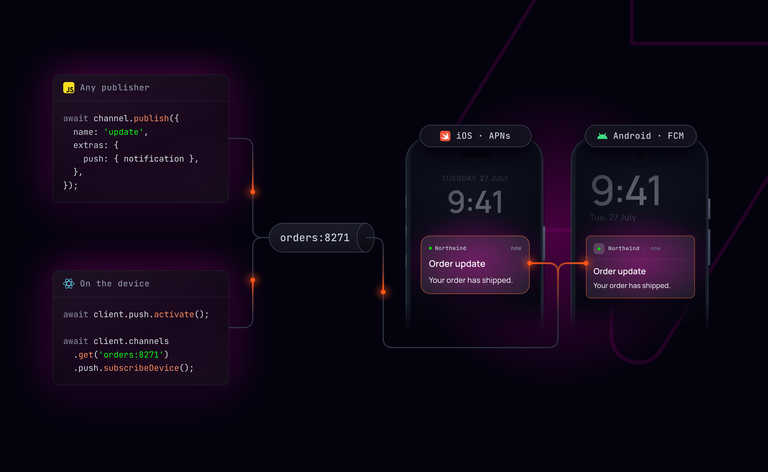
You upload your Apple push key to Ably once. From then on, your server calls Ably's push admin API rather than talking to APNs directly. Devices register through the same push activation flow you already use for ordinary push notifications.
Apple's broadcast channels already remove the need to track a token for every activity. The table compares what your backend still does in three setups: Apple's original token model, broadcast channels you run yourself, and broadcast through Ably.
Push-to-start is where Ably saves the most work. Subscribe each phone to an Ably channel for its user's team, and one start call reaches all of them before kickoff.
How Live Activities work with Ably broadcast channels
Setting up Live Activities with Ably takes four steps:
- Register the phone. The app registers for push notifications with Ably, then passes Ably its push-to-start token with
registerPushToStartToken. - Create a broadcast channel. Your server calls
createApnsBroadcastand gets back two IDs. Your server uses id for every later call, and phones listen onapnsChannelId. - Start the Live Activity. Your server can start it on every phone subscribed to an Ably channel, such as one per team, or on one phone by deviceId. The new activity listens on the broadcast channel straight away, and Apple requires the start message to include an alert. The app can also start it itself with
pushType: .channel(apnsChannelId). - Update and end it. Each change is one call using the broadcast id, and APNs delivers it to every activity on the channel.
The snippets in this section show the shape of each call, not a runnable app. Values such as id and initialState come from setup code covered in the docs.
Creating the broadcast channel is one call:
const { id, apnsChannelId } = await pubsubClient.push.admin.createApnsBroadcast({
  messageStoragePolicy: 1,
});
Setting messageStoragePolicy: 1 tells APNs to keep the most recent update. Anyone who joins mid-game sees the current score straight away.
If the app starts the Live Activity itself, it listens on the channel like this:
let activity = try Activity.request(
    attributes: GameAttributes(homeTeam: "Home", awayTeam: "Away"),
    content: ActivityContent(state: initialState, staleDate: nil),
    pushType: .channel(apnsChannelId)
)
From then on, every score change is a single update call, however many devices are following the game:
await pubsubClient.push.admin.liveActivity.update({
  apnsBroadcast: id,
  apns: {
    aps: {
      timestamp: Math.floor(Date.now() / 1000),
      event: 'update',
      'content-state': {
        homeScore: 102,
        awayScore: 98,
        gameStatus: 'live',
        period: 'Q4',
        clock: '2:14',
        lastPlay: 'Home 3PT',
      },
    },
  },
  headers: {
    'apns-priority': '10',
    'apns-expiration': String(Math.floor(Date.now() / 1000) + 3600),
  },
});
Ending the activity works the same way with event: 'end'. An optional dismissal-date controls when iOS removes the ended activity from the Lock Screen.
Support for Live Activities in Ably is available now in Public Preview. It builds on Apple's own broadcast channels, so one update reliably reaches every phone following an event, however large the audience. If you're sending updates to large audiences, or want to start activities from your server without building your own push backend, you can try it today.
Sign up for a free Ably account, then follow the Ably Live Activities docs to send your first update.
FAQs
Do I still need to manage Live Activity push tokens with Ably? Not for updates, which go through the broadcast channel. To start activities from your server, each phone registers its push-to-start token with Ably once.
Which iOS versions do Ably Live Activities need? iOS 18 or later, because broadcast channels arrived in iOS 18. Push-to-start alone dates back to iOS 17.2.
Can my server start a Live Activity without the user opening the app? Yes. Push-to-start can target an Ably channel (for example, one per team) or a single phone by device ID. Apple requires the start message to include an alert.
Should I use broadcast channels for a delivery or ride-share Live Activity? Usually not. Each of those has one subscriber, so per-device tokens fit better. Broadcast suits shared events like games and flights.