
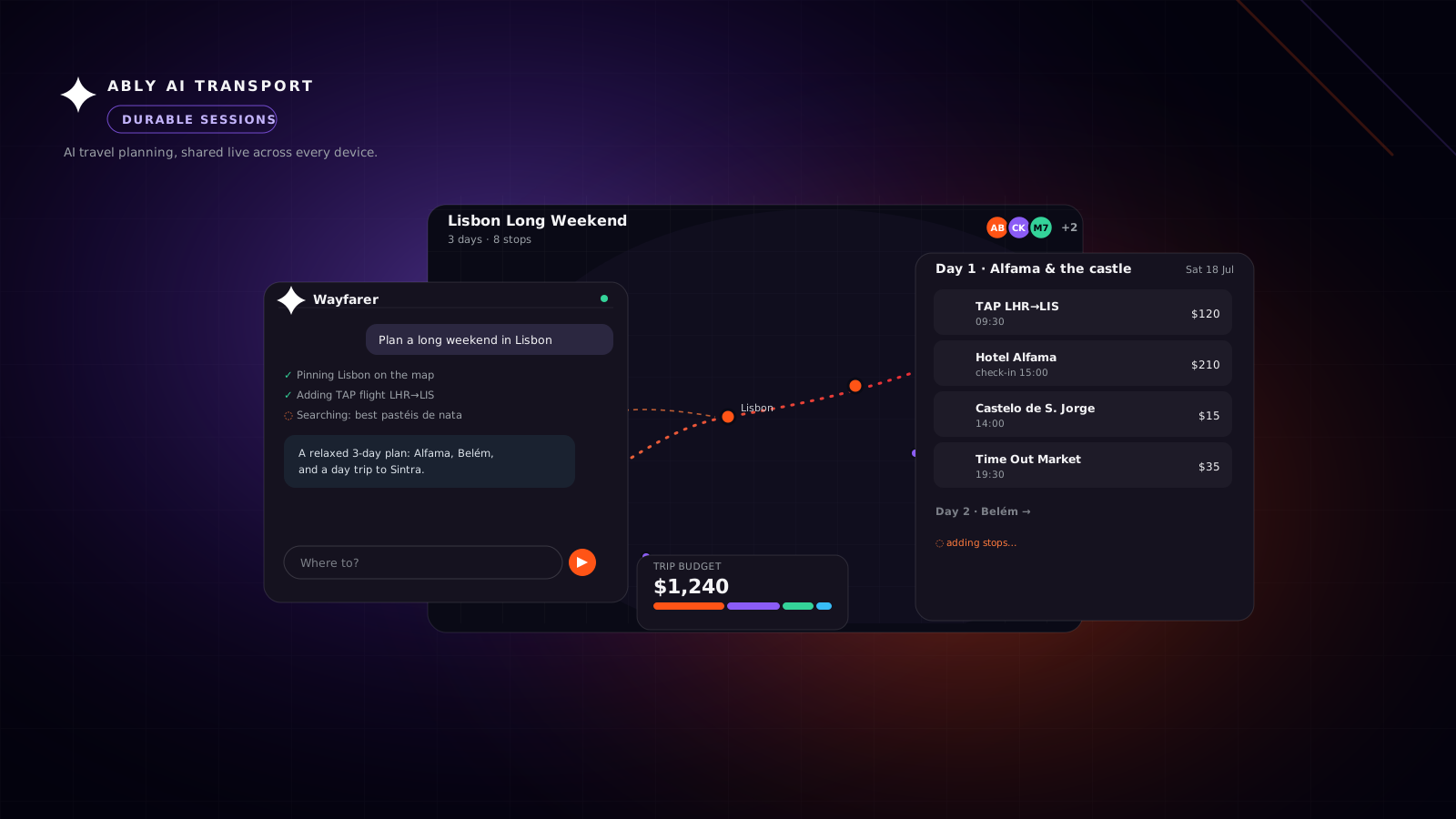
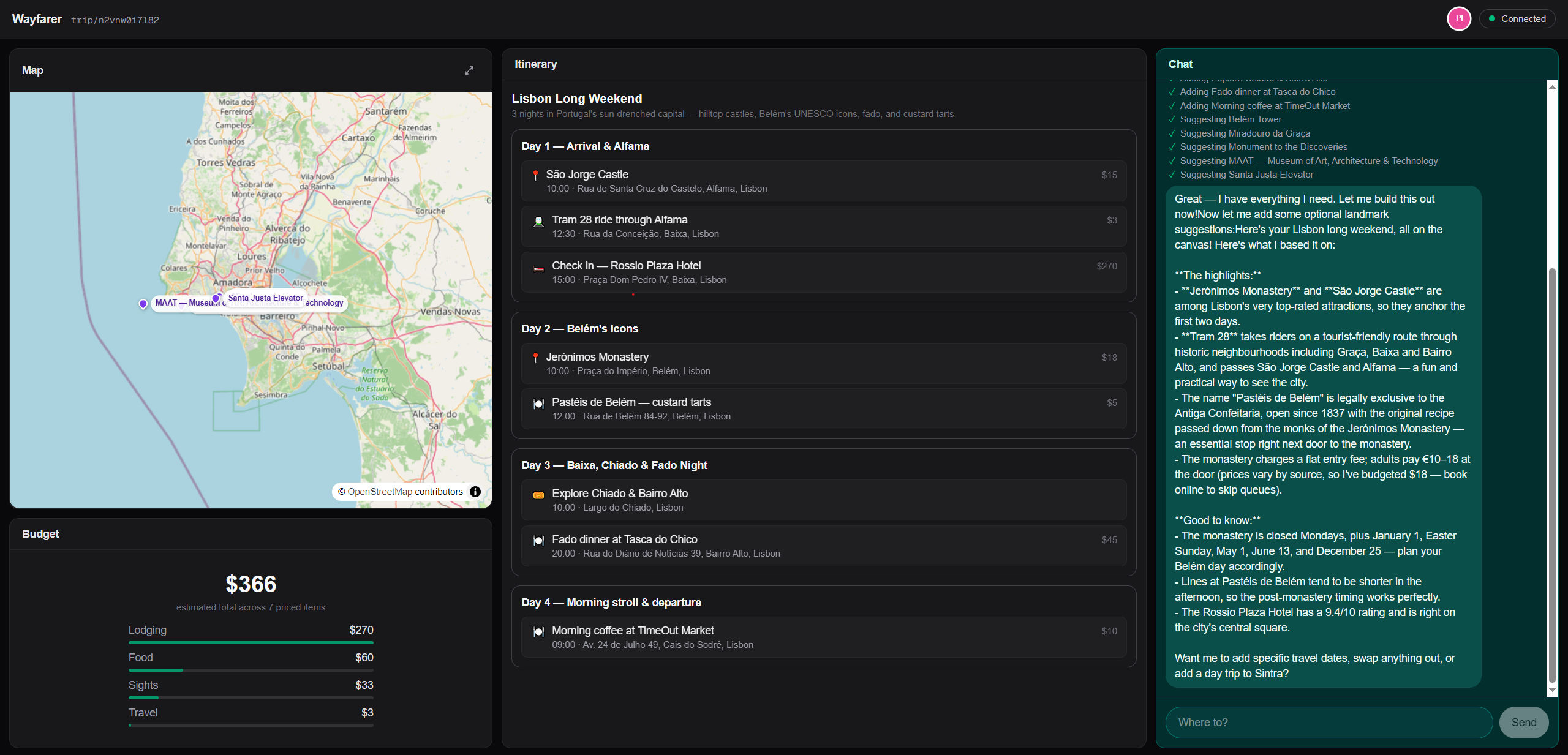
You are planning a trip with an AI assistant on your laptop. You are chatting with the agent, and as you progress it is dropping pins on a map, building a day-by-day itinerary, adding up a budget, and streaming its reasoning as it goes. The state of your interactive session is a combination of the chat history, the synthetic UI constructed by the agent during that process, and structured state, the itinerary, arising from the decisions you each make.
Building such an app has challenges beyond getting the agent and LLM to work effectively. You want the experience to be realtime and interactive: both the user and the agent can send a message or modify the shared state at any time. Those changes need to be persisted, as well as disseminated to everyone in realtime. Persisting shared trip state by itself isn’t difficult; the trip is structured data in a database behind an API, the way web apps have stored and served state since REST APIs took hold in the mid-2000s. What is hard is making it live and collaborative: a streaming agent, shared state, and several participants have to stay coherent across refreshes, devices, and people joining and leaving. Done by hand, that means stitching a realtime layer, a stream store, a state-sync system, and presence onto that stored data, and operating all of it.
Wayfarer is a working demo of exactly that, and it is a standard Vercel AI SDK app: useChat, a model, the chat UI you would write for any LLM chat app. Its transport instead points at Ably, and that one change moves the work onto a durable session. The agent's stream, the shared plan, and the people in the trip are each a property of that one addressable session, so the app attaches to it instead of building delivery, state sync, and awareness on its own.
Try it live, or read on to see how it works.
Key takeaways
- Collaborative AI apps are not just about text responses to text prompts. Beyond a minimal chat experience, even if driven by chat, apps can have complex control flow (steering, cancellation), structured state that both agent and user collaborate on, and presence.
- A durable session makes this possible by handling persisted state, and the realtime events that mutate it, in a unified way. A durable session is addressable and outlives any connection, device, or participant, so the stream, the shared state, and presence stay in one place.
- Ably AI Transport drops into the Vercel AI SDK as a custom transport, so you keep your chat UI and model and build no stream store, sync layer, or presence service.
What makes a collaborative AI app hard to build
Start from the app you would actually ship. The trip already lives in a database, keyed by id, with an API to read and update it. That is an ordinary stateful service. On top of that, the demands stack up:
- Several people open the same trip, and each one needs to see the others' changes as they happen.
- The AI agent is a participant too. It streams its reasoning token by token, and at the same time it edits the shared plan by calling tools.
- A user has to be able to stop the agent mid-run, and the stop has to reach it and actually halt the work, not just close a connection that leaves it running.
- Every surface, each person's tab, their phone, a friend's laptop, has to stay in sync through refreshes, reconnections, and people joining and leaving.
To deliver that, you assemble several systems. You add a realtime layer to fanout changes out to every client. You add a way to stream the agent's tokens to all of those clients, not just the one that made the request, and to resume a stream that drops mid-response. In practice, that means a buffer such as Redis, plus endpoints that track and replay the active stream. The Vercel AI SDK's own resumable streams guide walks through exactly that build. You add presence to show who is here. You add a back-channel so a user can stop the agent, because a one-way stream cannot carry that signal.
Keeping all of it consistent is where it gets genuinely hard. The agent's tokens and its edits to the plan have to arrive in order, on every screen, and survive a reconnect without duplicating or dropping anything. Getting that right was difficult well before AI agents, and it is much of why realtime platforms exist. An agent that streams while it rewrites the same state only makes the ordering harder to guarantee.
A better model will not fix this. It lives in the layer between the agent and the user, and most teams build and operate it themselves, piece by piece.
One durable session instead of a stitched-together stack
Wayfarer skips that stack. It runs the trip on one durable session on Ably, and attaches to it instead of building the pieces. The session even persists while no one is connected, so a traveler can step away and pick the trip up later, with any stops a friend added while they were away.
The agent runs Anthropic's Claude Sonnet 4.6, and its logic is the same as in any other Vercel AI SDK app. What changes is the transport underneath it.
The Vercel AI SDK was designed for this. useChat accepts a pluggable ChatTransport, so a different transport can take over delivery while the SDK keeps rendering the stream and managing UI state. Ably AI Transport is a custom transport that drops into that slot. On the client, the only real change is which transport you pass to useChat.
// components/chat-panel.tsx
const { chatTransport } = useChatTransport();

const { messages, setMessages, sendMessage, stop, status } = useChat({
  id: tripId,
  transport: chatTransport, // Ably AI Transport, in place of the default HTTP transport
});

// Pull channel history, other participants, and any in-progress stream
// into useChat, so a fresh tab or a new device catches up on mount.
useMessageSync({ setMessages });
useView({ limit: 30 });
The transport is configured by wrapping the trip in one provider that points at its session channel, trip:<id>:session. The chat, the shared plan, and presence all read that one session through it.
<ChatTransportProvider
  channelName={sessionChannelName(tripId)} // "trip:<id>:session"
  channelModes={OBJECT_MODES} // the object modes LiveObjects needs
  api="/api/chat"
>
On the server, the agent route no longer streams down the HTTP response body. It opens the trip's session channel, starts a run for the incoming message, reconstructs the conversation from it, and pipes the model's output back onto it. The HTTP request returns immediately, and the model keeps streaming in the background.
// app/api/chat/route.ts (simplified)
const session = createAgentSession({
  client: ably,
  channelName: invocation.sessionName,
  channelModes: OBJECT_MODES, // same object modes, for LiveObjects
});
await session.connect();

const run = session.createRun(invocation, { signal: req.signal });
await run.start();

// Full multi-turn history, reconstructed from the channel. There is no database.
const messages = await run.loadConversation();

const result = streamText({
  model: anthropic("claude-sonnet-4-6"),
  system,
  messages: await convertToModelMessages(messages),
  tools,
  abortSignal: run.abortSignal, // fires when a client cancels the run
});

// Return the HTTP response now; stream the model onto the channel afterwards.
after(async () => {
  const { reason } = await run.pipe(result.toUIMessageStream());
  await run.end({ reason });
});

return new Response(null, { status: 200 });
Because the session now lives on Ably rather than in the connection, three behaviors come from the transport rather than from application code.
Resumable streaming
A client that reconnects mid-response catches up from the last message it received, rather than starting over. Refresh the page while Wayfarer is still adding stops and the response continues from where it stopped. The model never re-runs, so there is no duplicated work and no duplicated tokens. Ably replays what the client missed and then keeps streaming live. Because the session lives on Ably rather than in the connection, there is no separate stream store or resume endpoint to run.
Multi-tab and multi-device continuity
Anyone subscribed to the session receives the same stream. Open Wayfarer in a second tab or on your phone, and both surfaces show the same response arriving token by token, then settle on the same history. A device switch just attaches another subscriber to the same session, so the conversation follows the user instead of staying behind in the tab that started it.
Cancellation
The transport is bidirectional, so a stop is an explicit signal the agent receives, not a closed socket. Wayfarer's Stop button calls stop(), the run ends with a cancelled reason, and the server can tell a deliberate stop from a dropped connection, with no separate stop endpoint or partial-response bookkeeping to maintain. That clean signal is what makes it safe to let a user stop an agent mid-response.
A shared canvas with LiveObjects
Streaming carries the agent's words, but the plan is more than a transcript. In Wayfarer the itinerary is shared, subscribable state, held in Ably LiveObjects on the trip's session channel, as a LiveMap of days and destinations and a LiveCounter for the budget. Every participant has live visibility into it and a conflict-free way to change it: clients see the plan update in realtime, the agent reads and revises the same state as it works, and concurrent changes settle to the same state on every screen. The same model lets an agent subscribe and react to what others change, not only write to it. The chat is one way to drive the plan; the state itself is the source of truth that everyone reads.
The AI edits the canvas through its tools. When the agent adds a stop, the tool writes a single conflict-free operation to LiveObjects.
// lib/trip-state-server.ts - a tool adds a stop to a day
await channel.object.publish({
  path: `days.${dayId}`,
  mapSet: { key: `stop:${stop.id}`, value: { json: { ...stop } } },
});
Every browser viewing the trip subscribes to the same object and re-renders on each change, so the board fills in stop by stop as the AI writes, in every open window at once.
// components/use-trip-state.ts
// read via the session, re-render every viewer on each change
const root = await session.object.get();
setState(root.compactJson());
root.subscribe(() => setState(root.compactJson()));
Collaborator presence in the trip header
If several people share a trip, each of them wants to know who else is here. Wayfarer shows that with Ably Presence on that same session channel. The header renders an avatar for each person currently viewing the trip.
// components/presence-avatars.tsx
usePresence(channelName); // join the presence set while mounted
const { presenceData } = usePresenceListener(channelName);
// one avatar per person, regardless of how many tabs they have open
const people = new Set(presenceData.map((m) => m.clientId));
Presence is keyed by person, not by connection, so the same traveler with the trip open in two tabs of the same browser shows up once, not twice. When they close the last tab, their avatar leaves the set. Identity here is a generated per-browser id rather than a login, so the same person on a laptop and a phone is two identities and shows as two avatars; a real login would collapse them to one avatar across every device. The result is a live read of who is planning the trip with you, with no application state to keep in sync.
One session for the whole trip
The whole trip runs on one durable session, a single Ably channel underneath. It carries three things at once: the chat stream through Ably AI Transport, the shared plan through Ably LiveObjects, and Ably Presence for who is viewing the trip.
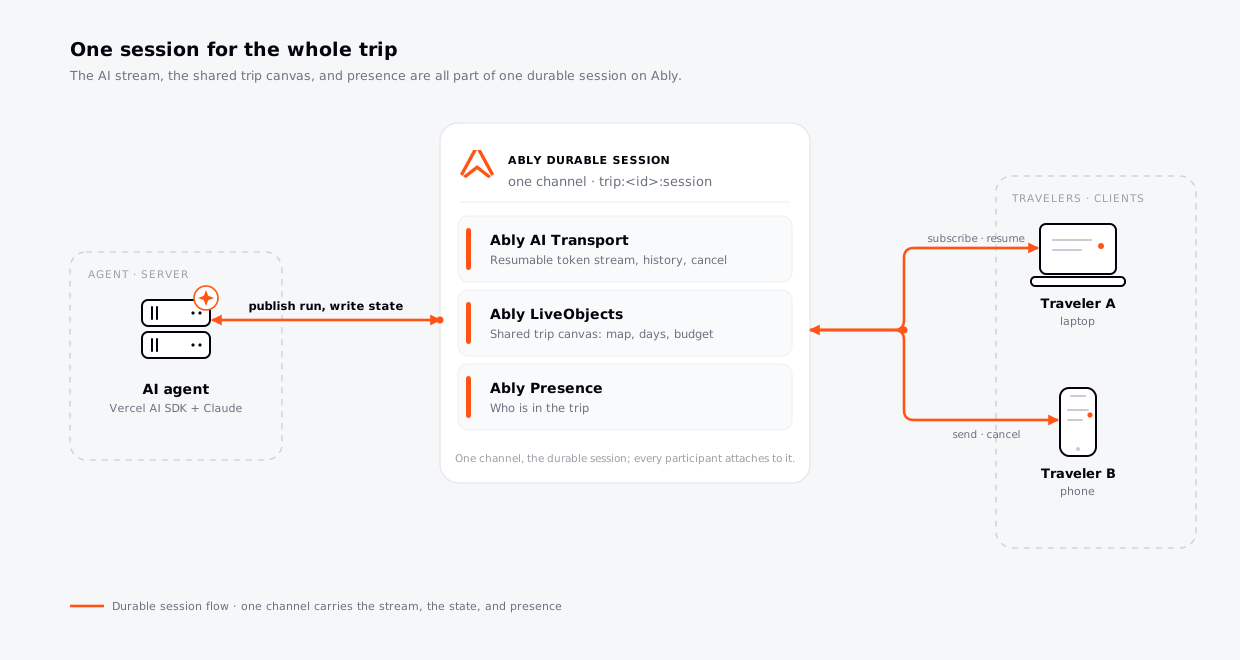
Continuity, shared state, and presence are not features bolted onto the chat. They are facets of the one session the trip runs on, and the app gets them by attaching to it rather than rebuilding each one.
Try it live
Try Wayfarer live: plan a trip, then open the same link in a second tab or on your phone and watch it stay in sync. Refresh mid-stream to see the response resume, stop the agent mid-run, and plan alongside a friend, then try to break the session. The whole demo is on GitHub, so take a look at the code and play with it. The Ably AI Transport docs go deeper on the session model, runs, and history, and the SDK is on GitHub. If you are building in this space, we would like to hear what you are hitting.
Frequently asked questions
What happens if I refresh the page in the middle of streaming?
The response continues from where it stopped. With the session held on Ably, the client that reconnects after a refresh catches up from the last message it received and then streams live again. The model does not re-run, so you do not get duplicated work or duplicated tokens, and you do not lose the partial answer the way you would with a plain HTTP stream.
How do I sync an AI session across multiple tabs in the same browser?
Every tab subscribes to the same session, so each one receives the same stream and settles on the same history. There is no cross-tab messaging to write yourself. Opening a new tab attaches another subscriber to that session, which is also how continuity across separate devices works.
What happens if a user switches from mobile to desktop mid-session?
The conversation follows them. A device switch just attaches another subscriber to the same session, so the new device loads history and any in-progress stream and continues. The session is held on Ably, independent of the connection that opened it.
I already store the trip in a database. Do I still need a durable session?
The database is still there, and the durable session does not replace it. A database holds the trip state. It does not stream the agent's reply to everyone token by token, resume that stream after a drop, keep several devices in sync, or show who is present. Those are realtime delivery problems. On a durable session, they are properties of the session itself, not a stream store, a sync layer, and a presence service you build and run next to your database.
Is a durable session just WebSockets instead of SSE?
No. WebSockets are part of it: a two-way connection carries control back to the agent, so a client can steer or stop a run mid-flight, which a one-way SSE stream cannot. But they do not, on their own, make a stream resumable. A durable session does, because it is more than the connection it runs over: it is addressable and long-lived, so it survives a dropped connection, a device switch, or an idle agent or user, and it holds conversation history, shared state, and presence in one place. The transport moves the bytes; the durable session is what keeps the interaction coherent across all of it.
Does this replace the Vercel AI SDK?
No. Ably AI Transport is complementary. The Vercel AI SDK provides useChat and a pluggable ChatTransport slot, and AI Transport drops into that slot to handle delivery while the SDK keeps rendering the stream and managing UI state. You keep the SDK and its stream format; you change what the stream runs over.
Do I need a database to store the conversation?
Not for the conversation itself in this demo. The agent route reconstructs full multi-turn history from Ably with run.loadConversation(), so the session is the conversation record. The trip's structured plan is held in Ably LiveObjects. A production app may still add a database for its own reasons, such as long-term archival or analytics.
Which models and frameworks does this work with?
Today the native framework integration is the Vercel AI SDK, which is what this demo uses. The Vercel AI SDK is model-agnostic, so AI Transport works transitively with any model the Vercel AI SDK supports, such as OpenAI, Anthropic, and Google; the demo runs Anthropic's Claude Sonnet 4.6 through it. More direct framework integrations are on the way, and the lower-level Core SDK lets you carry another stack on Ably today. See the Ably AI Transport docs for the current list.


