# MongoDB database connector
Use the MongoDB database connector to distribute document changes from a MongoDB collection to end users, at scale. It enables you to distribute document state changes to large numbers of subscribing clients, in realtime, as the changes occur.
The MongoDB database connector utilizes the MongoDB [change streams](https://www.mongodb.com/docs/v8.0/changeStreams/) feature to distribute changes from the database to clients over Ably Pub/Sub channels.
By using Ably Pub/Sub channels and SDKs, clients subscribing to messages published by the MongoDB database connector benefit from features like [connection-recovery](https://ably.com/docs/connect/states.md), [exactly-once delivery](https://ably.com/docs/platform/architecture/idempotency.md) and [ordering guarantees](https://faqs.ably.com/reliable-message-ordering-for-connected-clients) out of the box.
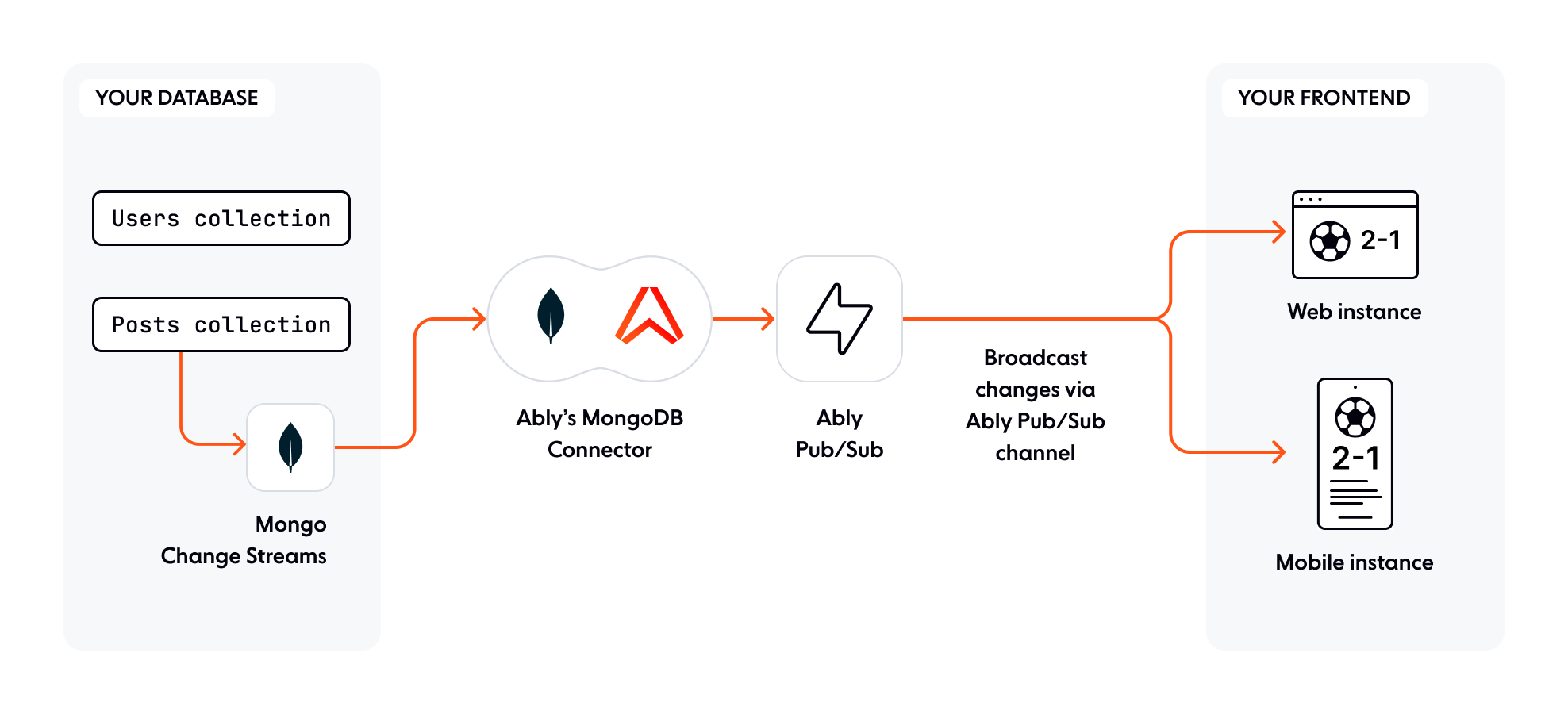
## How it works
The MongoDB database connector is enabled through an Ably integration rule. The rule will consume document changes from your MongoDB deployment via the MongoDB [Change Streams API](https://www.mongodb.com/docs/manual/changeStreams/). The integration rule exists as a "database connector" component that is entirely provisioned and managed by Ably and is fault-tolerant with automatic fail-over.
When a change event is received over the Change Streams API it is published to an Ably channel. When you configure the integration rule, you can specify how change events are mapped to individual Ably channels. Clients can then subscribe to database changes by subscribing to Ably channels. Ably [Auth](https://ably.com/docs/auth.md) and [Capabilities](https://ably.com/docs/auth/capabilities.md) control which channels a client can interact with.
## Integration rule
### Create a rule
You first need to create an integration rule in order to sync your MongoDB instance with Ably.
There are two ways to create a MongoDB database connector rule:
1. Using the [Ably Dashboard](https://ably.com/dashboard).
2. Using the [Control API](https://ably.com/docs/platform/account/control-api.md).
To create a rule in your [dashboard](https://ably.com/dashboard):
1. Log in and select the application you wish to use.
2. Click the *Integrations* tab.
3. Click the *New Integration Rule* button.
4. Choose *MongoDB* from the list.
### Rule configuration
Use the following fields to configure your MongoDB integration rule:
| Field | Description |
| ----- | ----------- |
| URL | The [connection string](https://www.mongodb.com/docs/manual/reference/connection-string/) of your MongoDB instance. (e.g. `mongodb://user:pass@myhost.com`) |
| Watch | What the connector should watch within the database. The connector only supports watching collections. |
| Database name | The database to use. |
| Collection name | The collection to watch. |
| Full Document | Controls whether the full document should be included in the published change events. [Full Document](#full-document) is not available by default in all types of change event. Possible values are `updateLookup`, `whenAvailable`, `off`. The default is `off`. |
| Full Document before change | Controls whether the full document before the change should be included in the change event. [Full Document before change](#full-document-before-change-config) is not available on all types of change event. Possible values are `whenAvailable` or `off`. The default is `off`. |
| Pipeline | A MongoDB pipeline to pass to the Change Stream API. This field allows you to control which types of change events are published, and which channel the change event should be published to. The [pipeline](#pipeline) *must set the `_ablyChannel` field* on the root of the change event. It must also be a valid JSON array of [pipeline operations](https://www.mongodb.com/docs/v8.0/changeStreams/#modify-change-stream-output). |
| Primary site | The primary site that the connector will run in. You should choose a site that is close to your database. |
| Provisioned capacity | The provisioned capacity of the connector. It is always set to 1. |
## Subscribe to change events
Use the [Ably Pub/Sub SDKs](https://ably.com/docs/sdks.md) to subscribe to changes published by the MongoDB database connector.
See the [channels documentation](https://ably.com/docs/pub-sub.md#subscribe) for further information on subscribing to channels.
The following is a simple example of instantiating a realtime client and subscribing to a channel:
### Javascript

```
// Instantiate the Realtime SDK
const ably = new Ably.Realtime('your-api-key');

// Get the channel to subscribe to
const channel = ably.channels.get('myDocuments');

// Subscribe to messages on the 'myDocuments' channel
await channel.subscribe((message) => {
  console.log('Received a change event in realtime: ' + message.data)
});
```
The following is an example of a MongoDB change event that will be carried in the message's `data` field:
### Json

```
{
   "_id": { "_data": "" },
   "operationType": "insert",
   "clusterTime": ,
   "wallTime": ,
   "ns": {
      "db": "engineering",
      "coll": "users"
   },
   "documentKey": {
      "userName": "alice123",
      "_id": ObjectId("599af247bb69cd89961c986d")
   },
   "fullDocument": {
      "_id": ObjectId("599af247bb69cd89961c986d"),
      "userName": "alice123",
      "name": "Alice"
   }
}
```
In the above example the client is using [basic authentication](https://ably.com/docs/auth/basic.md). In production applications your clients should use [token authentication](https://ably.com/docs/auth/token.md).
Clients require the `subscribe` [capability](https://ably.com/docs/auth/capabilities.md#capabilities-token) for the channels that your integration rule is publishing to.
The following is an example capability for subscribing to the `myDocuments` channel:
### Json

```
{
  "myDocuments": ["subscribe"]
}
```
## Pipeline
You must provide a MongoDB pipeline when configuring the integration rule. The pipeline controls which change events will be sent over Ably, and which channels those change events will be sent to. The pipeline must be an array of JSON objects using the [MongoDB Change Stream pipeline syntax](https://www.mongodb.com/docs/v8.0/changeStreams/#modify-change-stream-output).
### Json

```
// Pipeline to route all change events to the 'myDocuments' channel
[{ "$set": { "_ablyChannel": "myDocuments" } }]
```
The pipeline also lets you filter and modify the change events published, as well as edit their structure.
The following is an example of a pipeline that only matches certain operation types before sending the change events to the `myDocuments` channel:
### Json

```
[
  { "$match": { "operationType": { "$in": [ "update", "insert" ] } } },
  { "$set": { "_ablyChannel": "myDocuments" } }
]
```
Pipeline stages are applied in order, so putting `$match` stages first will stop the later stages from being run. This can improve the change stream performance.
For the schema and fields available on a change event, see the [MongoDB Change Events docs](https://www.mongodb.com/docs/v8.0/reference/change-events/)
### Dynamically route change events
You can route change events to Ably Pub/Sub channels dynamically based on the content of the change event received from the MongoDB Change Stream.
The following is an example of routing change events based on the `channel` field of the Full Document:
#### Json

```
// Set the _ablyChannel field statically
[{ "$set": { "_ablyChannel": "$fullDocument.channel" } }]
```
Importantly, the `_ablyChannel` field must be on the root of the change event, so you cannot solely rely on a field in your document called `_ablyChannel` as this would be nested in the chanel event as `fullDocument._ablyChannel` instead of being on the root of the change event. You must include a `$set` pipeline stage to set the `_ablyChannel` field.
The following is an example of using fields in the `fullDocument` to construct the channel name dynamically:
#### Json

```
// Set the _ablyChannel field dynamically based on the content of the change event:
[{
  "$set": {
    "_ablyChannel": {
      "$concat": [
        "todos:","$fullDocument.workspace_id",":user:","$fullDocument.user_id"
      ]
    }
  }
}]
// Example final channel name: "todos:acme123:user:alice456"
```
You can coalesce multiple fields into the channel name. For example; using `fullDocument.channel`, unless it is null, in which case falling back to `fullDocumentBeforeChange.channel`.
#### Json

```
// Set the _ablyChannel field dynamically by coalescing fullDocument and fullDocumentBeforeChange:
[{
  "$set": {
    "_ablyChannel": {
      "$ifNull": [
        "$fullDocument.channel","$fullDocumentBeforeChange.channel"
      ]
    }
  }
}]
```
### Set message properties with _ably fields
The connector looks for the following fields and copies the values of those field into the associated message property:
| Field | Required | Type | Description |
| ----- | -------- | ---- | ----------- |
| `_ablyChannel` | required | string | The Ably channel that the change event will be published to. |
| `_ablyMsgName` | optional | string | The message name the event will have when it is published to Ably. |
| `_ablyMsgHeaders` | optional | object with string keys and values | The message `extras.headers` the event will have when it is published to Ably. |
## Access the Full Document
The Full Document and Full Document before change configuration defines if the change events should include the content of the full document. Based on the [event type](#full-document-inclusion), either `fullDocument` or `fullDocumentBeforeChange` can be included in the change event.
Access to the full document can be useful for constructing the `_ablyChannel` field, or if the subscribing Ably clients need access to the full document with each change.
### Full Document
The Full Document config operates as follows:
| Option | Description |
| ------ | ----------- |
| off | There will be no "fullDocument" field on the change event |
| updateLookup | The Change Stream will perform a query to fetch the most current majority-comitted version of the updated document from MongoDB and include it as the "fullDocument" on the change event |
| whenAvailable | If you are using post-images via `changeStreamPreAndPostImages` config on the watched collection, then the "fullDocument" will be included on the event from the post image of the document |
### Full Document before change
The Full Document before change config operates as follows:
| Option | Description |
| ------ | ----------- |
| off | There will be no "fullDocumentBeforeChange" field on the change event |
| whenAvailable | If you are using pre-images via `changeStreamPreAndPostImages` config on the watched collection, then the "fullDocumentBeforeChange" pre-image will be included on the change event |
### Full document inclusion for event types
This section describes when you can expect the `fullDocument` and `fullDocumentBeforeChange` fields to be present on a change event.
Full document inclusion for common change event types:
| Event type | Description |
| ---------- | ----------- |
| Insert | `fullDocument` is already present, without needing to set the Full Document configuration. `fullDocumentBeforeChange` is not available because the data did not exist before the insert. |
| Update | `fullDocument` and `fullDocumentBeforeChange` can be made available via the Full Document and Full Document Before Change configuration. |
| Delete | `fullDocument` is not available because the data has already been deleted, but `fullDocumentBeforeChange` can be included. |
## Resume Token
The MongoDB database connector makes use of a [Resume Token](https://www.mongodb.com/docs/v8.0/changeStreams/#resume-a-change-stream) to automatically provide continuity across connector restarts and network disconnections. The token is stored in your MongoDB instance, in the database configured for the rule, but under an Ably-specific collection called `ably`.
To reduce the number of writes against your database, the connector will update the resume token on a timer interval. [Idempotent publishing](https://ably.com/docs/pub-sub/advanced.md#idempotency) means that the connector does not need to update the token on every change event. Ably can use a slightly older Resume Token and still guarantee that we will not send duplicate messages to subscribers, because duplicate messages are filtered out by our idempotent publish checks.
## Database Permissions
The MongoDB database connector needs [certain permissions](https://www.mongodb.com/docs/v8.0/changeStreams/#access-control) to open and manage the Change Stream.
| Database | Collection | Actions required | Description |
| -------- | ---------- | ---------------- | ----------- |
| `` | `ably` | find, update, insert | To persist Change Stream resume tokens so that continuity can be maintained on the Change Stream in the event of instance failure. |
| `` | `` | find, changeStream | To access the Change Stream, and to access fullDocuments when configured. |
Example MongoDB privileges to open a Change Stream on the db "products" and collection "inventory":
### Json

```
{
  "privileges": [
    // permission to access ably collection for storing resume tokens
    {
      "resource": { "db": "products", "collection": "ably" },
      "actions": [ "find", "update", "insert" ]
    },
    // permissions to access the product.inventory Change Stream
    {
      "resource": { "db": "products", "collection": "inventory" },
      "actions": [ "find", "changeStream" ]
    }
  ]
}
```