# Basic auth
Basic authentication is the simplest way to authenticate with Ably. It requires passing an [API key](https://ably.com/docs/auth#api-key) when instancing an SDK.
The following is an example of using basic authentication:
```realtime_javascript
const realtime = new Ably.Realtime({
  key: 'your-api-key'
});
```

```rest_javascript
var rest = new Ably.Rest({ key: 'your-api-key' });
```

```realtime_nodejs
const realtime = new Ably.Realtime({
  key: 'your-api-key'
});
```

```rest_nodejs
var rest = new Ably.Rest({ key: 'your-api-key' });
```

```realtime_ruby
realtime = Ably::Realtime.new(key: 'your-api-key')
```

```rest_ruby
rest = Ably::Rest.new(key: 'your-api-key')
```

```realtime_python
realtime = AblyRealtime(key='your-api-key')
```

```rest_python
rest = AblyRest(key='your-api-key')
```

```realtime_java
ClientOptions options = new ClientOptions();
options.key = "your-api-key";
AblyRealtime realtime = new AblyRealtime(options);
```

```rest_java
ClientOptions options = new ClientOptions();
options.key = "your-api-key";
AblyRest rest = new AblyRest(options);
```

```realtime_swift
let realtime = ARTRealtime(key: "your-api-key")
```

```rest_swift
let rest = ARTRest(key: "your-api-key")
```

```realtime_objc
ARTRealtime *realtime = [[ARTRealtime alloc] initWithKey:@"your-api-key"];
```

```rest_objc
ARTRest *rest = [[ARTRest alloc] initWithKey:@"your-api-key"];
```

```realtime_csharp
AblyRealtime realtime = new AblyRealtime("your-api-key");
```

```rest_csharp
AblyRest rest = new AblyRest("your-api-key");
```

```realtime_go
client, err := ably.NewRealtime(ably.WithKey("your-api-key"))
```

```rest_go
client, err := ably.NewREST(ably.WithKey("your-api-key"))
```

```realtime_flutter
final clientOptions = ably.ClientOptions(
  key: 'your-api-key'
);
final realtime = ably.Realtime(options: clientOptions);
```

```rest_flutter
final clientOptions = ably.ClientOptions(
  key: 'your-api-key'
);
ably.Rest rest = ably.Rest(options: clientOptions);
```

```rest_php
$rest = new Ably\AblyRest(['key' => 'your-api-key']);
```
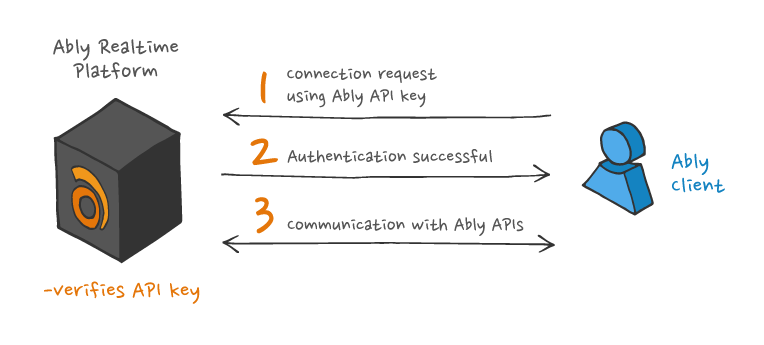
## Basic auth architecture
The process used by Ably SDKs to authenticate with Ably using basic authentication is illustrated in the following diagram:
## When to use basic auth
Ably recommends that basic authentication is only used server-side because of the following potential issues:
* The secret is passed directly by the client to Ably, so it is only permitted for connections that are over TLS, to prevent the key secret being intercepted.
* All of the configured [capabilities](https://ably.com/docs/auth/capabilities) of the key are implicitly possible in any request, and clients that legitimately obtain this key may then abuse the rights for that key.
* A client that authenticates using an API key can claim any client ID it chooses. Therefore this client ID cannot be trusted to represent the genuine identity of the client. Client IDs should be assigned by the server, once the client's credentials have been authenticated.