# Token streaming
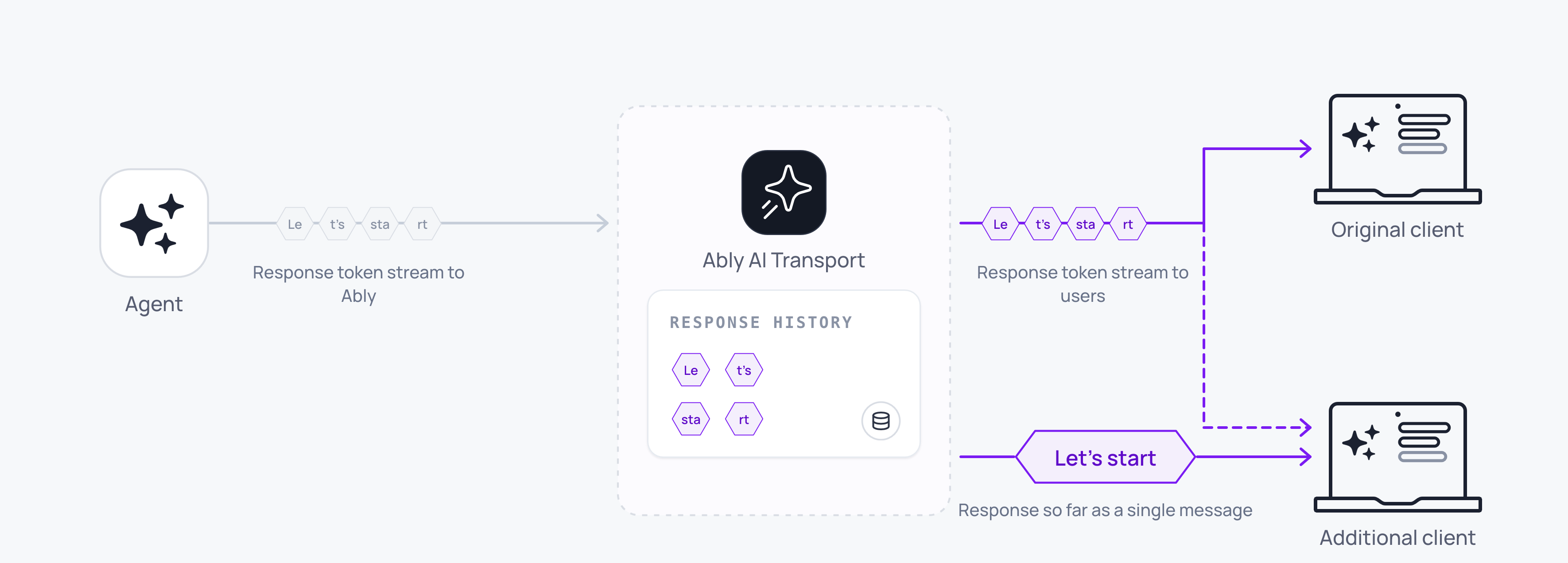
Tokens are streamed to subscribing clients in realtime, as the model generates them. The same response is available as a single aggregated message to clients connecting later. AI Transport streams tokens by appending to one durable message on the channel.
Tokens stream from the model to every connected client as the LLM generates them. The same response is also available as a single coherent message to any client that reconnects, refreshes, or loads history.
A minimal agent-side stream uses one call:
#### Javascript

```
const { reason } = await run.pipe(result.toUIMessageStream());
```
That single line reads the LLM stream, encodes tokens through the codec, publishes messages to the channel, handles abort signals, and returns when the stream completes or is cancelled.
## How it works
The transport layer treats a streamed response as one logical message built incrementally by appending each token to a single Ably channel message. A realtime subscriber receives each appended token as it arrives. A client that joins later, refreshes, or reconnects sees the accumulated content of that message up to the latest append; it does not need to replay each token to rebuild the response.
A streamed message moves through three states:
| State | Meaning |
| --- | --- |
| `streaming` | Tokens are being appended. The message grows as tokens arrive. |
| `complete` | The stream completed normally. The message is final. |
| `cancelled` | The stream was cancelled. The partial message is preserved. |
The stream status is carried in the message header `status` under the `extras.ai.transport` tier. Your client can read it to detect whether a message is still streaming.
## Implement token streaming
### Agent
The agent opens a run against the input that woke it, invokes the LLM, and streams the response:
#### Javascript

```
// Agent-side. This runs on your own infrastructure, so it holds the key.
import { createAgentTransport } from '@ably/ai-transport';

const transport = createAgentTransport({ channel, codec });
await transport.connect();

const trigger = await transport.locateInput(eventId);
const run = transport.openRun({ inputCodecMessageId: trigger?.meta.codecMessageId });

const result = streamText({
  model: anthropic('claude-sonnet-4-20250514'),
  messages: conversation,
  abortSignal: run.abortSignal,
});

const { reason } = await run.pipe(result.toUIMessageStream());
await run.end({ reason });
transport.close();
```
`run.pipe` accepts a `ReadableStream` or any async iterable of your codec's output events. For the Vercel AI SDK, `result.toUIMessageStream()` produces the right shape; for other providers, yield your codec's own event type.
### Client
Every appended token arrives as a `message` event on the subscription, carrying the `codecMessageId` of the message it belongs to:
#### Javascript

```
// Client-side.
transport.subscribe((event) => {
  if (event.kind !== 'message') return;
  for (const output of event.outputs) {
    if (output.type === 'text-delta') append(event.meta.codecMessageId, output.delta);
  }
});
```
Group by `meta.codecMessageId` so your UI renders many events as one growing message. Run status arrives separately, as a `run-lifecycle` event rather than a `message` one, so a Stop button watching only `message` never learns that the run finished.
## How the codec maps events to the channel
The codec converts domain events to Ably operations:
- Start: create a new Ably message on the channel.
- Append: append content to the existing message (Ably message append operation).
- Close: append a terminal status (`complete` or `cancelled`) to the message.
If an append fails, for example due to a transient network issue, the encoder falls back to a full message update operation to recover. The encoder tries that update once. If the update also fails, the encoder throws `StreamedMessageFinalizeFailed` and leaves the partial message on the channel.
## Append rollup
LLM token streaming produces high-rate traffic. Some models emit over 150 distinct token events per second. Ably rolls up multiple appends into a single published message, so a single response stays within the [message rate limit](https://ably.com/docs/platform/pricing/limits.md#connection) on a connection.
1. Your agent streams tokens to the channel at the model's output rate.
2. Ably publishes the first token immediately, then rolls up subsequent tokens within the rollup window.
3. Clients receive the same content, delivered in fewer discrete messages.
By default, Ably delivers a single response stream at 25 messages per second, or the model output rate, whichever is lower. Ably charges per published message rather than per streamed token.
### Configure rollup behaviour
On the client, set the rollup window for a connection using the `appendRollupWindow` [transport parameter](https://ably.com/docs/pub-sub/api/javascript/realtime/realtime-client.md#constructor-params):
| `appendRollupWindow` | Maximum message rate for a single response |
|---|---|
| 0ms | Model output rate |
| 20ms | 50 messages/s |
| 40ms (default) | 25 messages/s |
| 100ms | 10 messages/s |
| 500ms (maximum) | 2 messages/s |
#### Javascript

```
const ably = new Ably.Realtime({
  authUrl: '/api/auth/token',
  transportParams: { appendRollupWindow: 100 },
});
```
## Edge cases and unhappy paths
- A missing channel rule fails the very first append with error `93002`, and no tokens stream at all. This is the most common reason a working agent produces nothing on the client. [Configure the channel rule](https://ably.com/docs/ai-transport/setup/channel-rules.md) once per app.
- A closed tab does not stop the run. The agent keeps publishing to the channel, and the run ends normally whether or not anyone is attached.
- A retried step republishes under the same `step-id` with a newer `step-start-serial`. Text from the earlier attempt is superseded, so a consumer that keeps both renders the answer twice.
- A network drop during streaming pauses delivery to the affected client. The agent keeps publishing. On reconnect, the client receives the accumulated content of the message up to the latest append rather than a replay of every token.
- A cancelled stream leaves the partial message on the channel with status `cancelled`. Render it the same as a complete message; treat the absence of further tokens as the signal to stop animating.
- If `appendRollupWindow` is set to `0ms` to maximise model output rate, you become responsible for keeping the publish rate under your connection limit.
- An append fallback (full message update) is invisible to subscribers; the message content is consistent. If you log channel operations, you see one update at the close of any stream that had a failed append.
- A timeout that aborts the run's signal ends `pipe` with reason `'cancelled'`, and the partial message closes with status `cancelled`. Clients read whatever reason your agent passes to `run.end`, and a timeout that kills the process before that call leaves the run open on the channel.
## FAQ
### What happens to the stream when the client tab closes?
The agent keeps streaming. The channel and its messages persist. When the user returns, the client loads the accumulated content of the message and receives any further tokens in realtime.
### Does Ably charge per token?
No. Ably charges at the current [message rates](https://ably.com/docs/platform/pricing.md) per published message rather than per token. The append rollup reduces the publish rate; multiple tokens become one published message.
### How do I stream more than one message per turn?
A single `run.pipe(stream)` consumes the LLM's output stream and appends each chunk as it arrives. Multiple assistant messages, tool calls, and follow-on text within one stream all flow through the same `pipe` call. If your framework produces several discrete streams in one turn (for example a planner emits a status line, then the responder streams the answer), call `run.pipe` once per stream; the run is the unit that groups them.
### Why does my client see fewer tokens than the model emits?
The append rollup compacts multiple tokens into single published messages within the rollup window. The content is identical; the delivery is fewer, larger updates. Set `appendRollupWindow` to `0ms` to disable rollup and deliver every model token as its own message, subject to the connection rate limit.
### What status do I see on a cancelled response?
The message keeps the content it had at the time of the cancel and its `status` header transitions to `cancelled`. Use this to distinguish a partial response from a complete one.
## Related features
- [Cancellation](https://ably.com/docs/ai-transport/streaming/cancellation.md): stop a stream mid-response.
- [Reconnection and recovery](https://ably.com/docs/ai-transport/streaming/reconnection-and-recovery.md): resume streams after disconnection.
- [History and replay](https://ably.com/docs/ai-transport/streaming/history.md): load past streamed responses from channel history.
## Related Topics
- [Overview](https://ably.com/docs/ai-transport/streaming.md): Stream an agent's output to every connected client over one Ably channel, with run and step lifecycle, cancellation and steering on top, while the conversation stays in your own database.
- [Runs and steps](https://ably.com/docs/ai-transport/streaming/runs-and-steps.md): Understand runs in AI Transport: the unit of agent work for one prompt-response cycle, with explicit identity, lifecycle, and an end reason, triggered by an invocation and published as steps.
- [Cancellation](https://ably.com/docs/ai-transport/streaming/cancellation.md): Cancel AI responses mid-stream with Ably AI Transport. A cancel is a signal on the channel, scoped to one run, authorised on the agent, and idempotent.
- [Interruption and steering](https://ably.com/docs/ai-transport/streaming/interruption-and-steering.md): Let users change direction mid-response in Ably AI Transport. Steer the active run with a follow-up prompt, cancel and re-prompt, send alongside as a concurrent run, or queue the follow-up.
- [Reconnection and recovery](https://ably.com/docs/ai-transport/streaming/reconnection-and-recovery.md): AI Transport streams survive connection drops automatically. Clients reconnect and resume from where they left off with the whole response intact.
- [Multi-device and fan-out](https://ably.com/docs/ai-transport/streaming/multi-device.md): One agent run reaches every client attached to the conversation with Ably AI Transport. Fan-out comes from the channel, so a user can start on a laptop and carry on from a phone.
- [History and replay](https://ably.com/docs/ai-transport/streaming/history.md): Page conversation history backwards from the Ably channel with AI Transport. Chronological batches, a resumable cursor, and joining the channel to your own store.
- [Concurrent runs](https://ably.com/docs/ai-transport/streaming/concurrent-runs.md): Run multiple AI turns simultaneously with Ably AI Transport. Independent streams, scoped cancellation, and multi-agent support.
## Documentation Index
To discover additional Ably documentation:
1. Fetch [llms.txt](https://ably.com/llms.txt) for the canonical list of available pages.
2. Identify relevant URLs from that index.
3. Fetch target pages as needed.
Avoid using assumed or outdated documentation paths.