# Runs
A run is AI Transport's unit of work for one prompt-response cycle, with explicit identity, lifecycle, and an end reason. Each conversation turn the user sees is implemented as a single run.
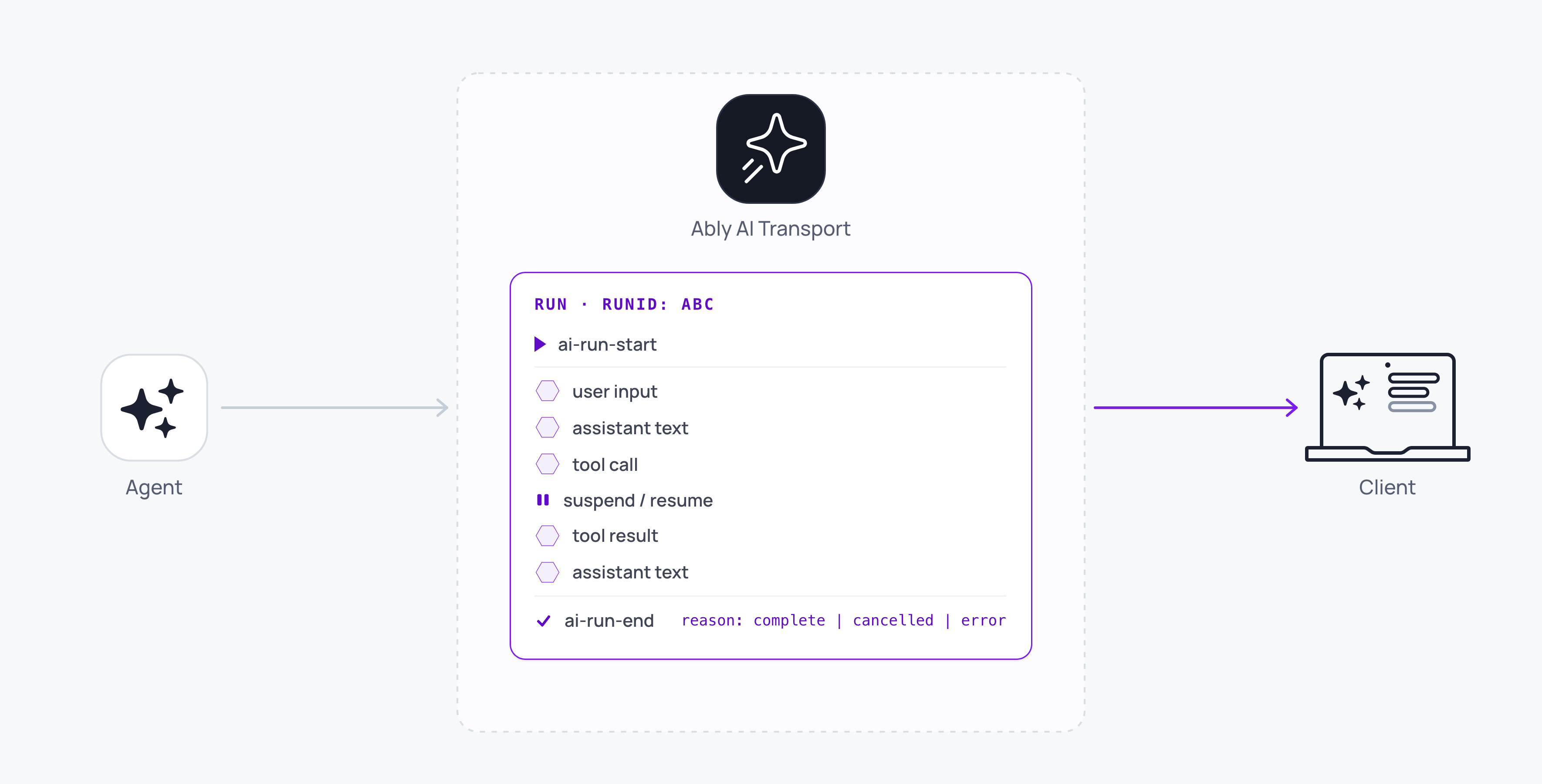
A run is one unit of agent work, started in response to something the user asked for. It covers everything that happens in service of that intent: the user's input, the agent's response, any tool calls the agent makes, the approvals and tool outputs needed to resolve them, the agent's continued work afterwards, and the final completion.
## Why runs exist
An agent's work in response to a single prompt is not atomic. It reasons over time, gathers external information, executes tools, and waits for humans or other systems to reply. Across that span several parties need to agree on which work is which, when it started, when it ended, and whether it was cancelled. Those parties include the user's other devices, a second browser tab, and any server side code that might restart mid-execution. The run is the lifecycle primitive that gives them all one identity to agree on.
## Understand the run model
A run is made up of:
- A unique `runId`.
- A number of lifecycle events for that run, including `ai-run-start` and `ai-run-end`.
- An owner, which is the `clientId` of the Ably client that published `ai-run-start`.
- An end state, which is one of `'complete'`, `'cancelled'`, or `'error'`.
Between the lifecycle events, the run owns a series of messages on the channel: the user input that triggered it, the agent's streamed output, and any tool-call or tool-result messages. The agent's output and any continuation inputs carry the run's id, which is how a consumer groups them back into one turn. The triggering user input carries no run id, because the agent creates the run id at run start; the run's own events echo that input's `codec-message-id`, so a consumer can link it to the run.
## Understand the run lifecycle
A run starts, has some content published within it, and ends. Once a run ends, it will not be started again. But runs can be suspended while waiting for external input, and resumed when that input arrives.
The run has a status which reflects each phase:
- `'active'` while the agent is working. The SDK sets this when the run first starts, and again whenever a suspended run resumes.
- `'suspended'` while the run waits for input, such as a tool approval or a human-in-the-loop response. The run is not over, and a later user input can reactivate it.
- A terminal `RunEndReason` once the run finishes. `'complete'` is the success path, `'cancelled'` is set when the run is cancelled, and `'error'` is the reason the agent passes to `run.end` when reasoning, output streaming, or a tool execution fails unrecoverably.
The run is also the unit of user-cancellation. When a user cancels a request or a prompt, they are cancelling the whole run. Internal failures such as an LLM stream dying, a retrying model call, or a serverless cold start fail do not fail a run and can be retried.
## Trigger a run with an invocation
Starting a run takes two steps, because the input and the trigger travel by different routes. The client publishes the user's input on the channel, and your application posts to your agent endpoint to wake the agent. That POST is the invocation, and the SDK never does this HTTP request for you.
The body only has to carry the input event's id. `publishInput` returns the `eventId` for exactly that:
### Javascript

```
// Client-side. Publish the input, then wake the agent.
const sent = await transport.publishInput({ kind: 'message', payload: prompt });
await fetch('/api/chat', { method: 'POST', body: JSON.stringify({ eventId: sent.eventId }) });

// The agent mints the run id, so this resolves once its run start lands.
const runId = await sent.runId;
```
### An invocation is one attempt at running the agent
A run outlives the invocation that started it. A tool result, a regenerate, a resume after a suspend, and a retry after a serverless cold start each produce another invocation against the same run.
Your agent can therefore survive a restart. A fresh process was not attached when the input was published, so the input sits in channel history rather than on its live subscription. `locateInput(eventId)` scans history for it:
#### Javascript

```
// Agent-side.
const trigger = await transport.locateInput(eventId);
const run = transport.openRun({ inputCodecMessageId: trigger?.meta.codecMessageId });
```
Interacting with [channel history](https://ably.com/docs/ai-transport/streaming/history.md) is the responsibility of your application, if you need it. But `transport.locateInput(eventId)` pages the channel history itself to find the input event the run should work on, and returns `undefined` when that event is not in history rather than waiting for it to arrive live.
Continuing an existing run rather than opening a new one is `openRun({ runId })` with the `runId` carried on the triggering event. A fresh open publishes `ai-run-start`; a continuation publishes `ai-run-resume`.
## Publish output as steps
A run publishes its output through steps rather than writing to the channel directly. A step contains one contiguous unit of output: the tokens of one model call, the payload of one tool result, or any other burst of writes the agent code publishes as a single unit. Every output message carries the id of the step it belongs to, and each step has its own `ai-step-start` and `ai-step-end` events and its own terminal reason of `'complete'`, `'failed'`, or `'cancelled'`.
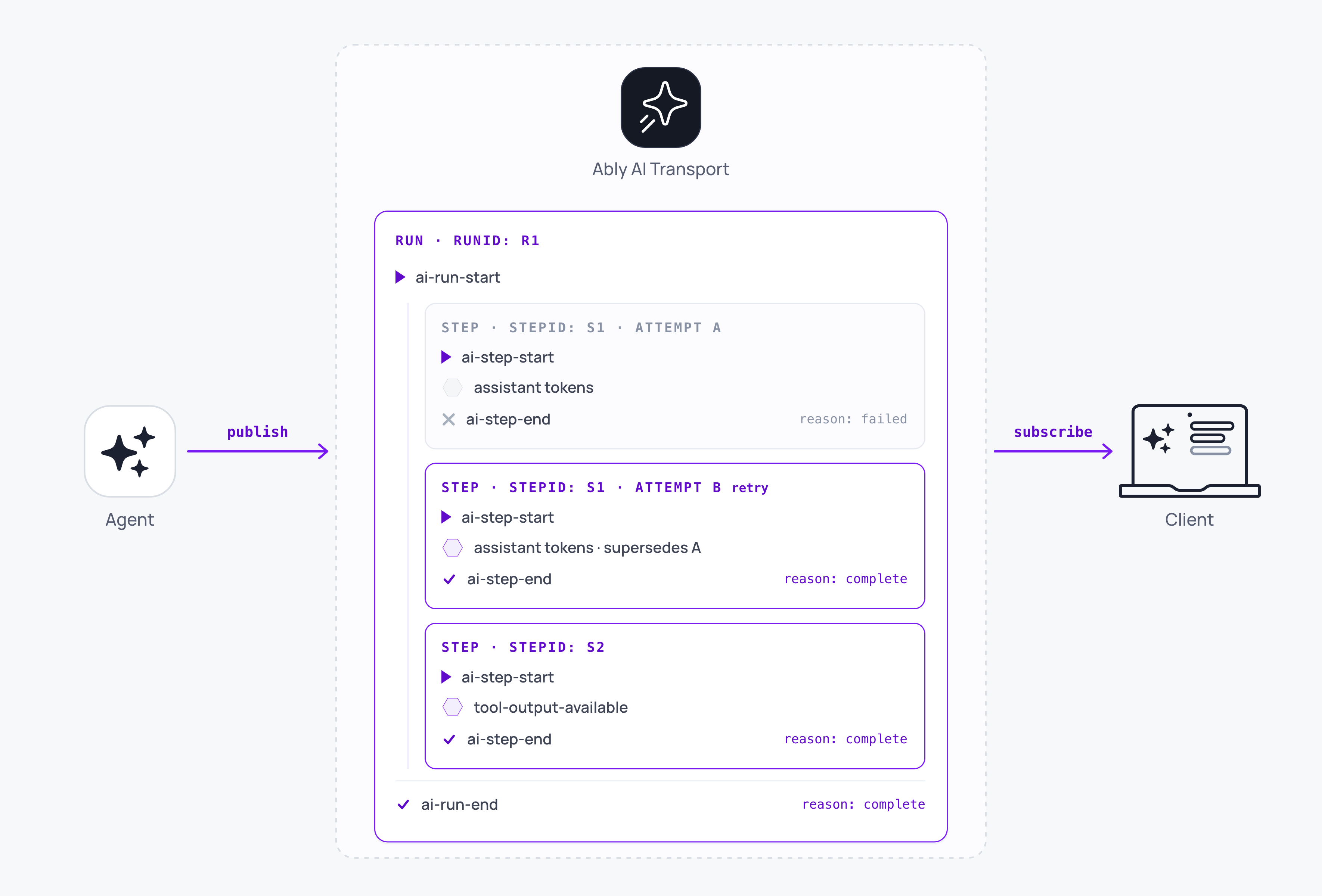
Exactly one step is active on a run at a time, and the run stays open across them. A step ending is not a run ending, so the agent code decides whether to open another step, suspend, or end the run.
Steps exist so that a retry has a safe boundary. Two `ai-step-start` events under the same `stepId` are the same step re-attempting, and the later attempt supersedes the earlier one's output rather than appending beside it. On the wire that is a newer `step-start-serial` under the same `step-id`, and it is the rule a consumer has to encode: for any step, render only the output whose `meta.stepStartSerial` is the highest you have seen. That rule lets a run execute inside a workflow engine such as [Temporal](https://ably.com/docs/ai-transport/durable-execution/temporal.md) or [Vercel WDK](https://ably.com/docs/ai-transport/durable-execution/vercel-wdk.md), where each retryable activity publishes its own step under an id the engine keeps stable. [Durable execution](https://ably.com/docs/ai-transport/durable-execution.md) covers that pattern, including how a fresh process adopts a run that another process opened. You can re-use the same steps pattern for standard LLM model request retries even if you don't use a durable execution framework.
## Suspend and resume
A run that is waiting on something outside the agent suspends rather than ends. `run.suspend()` publishes `ai-run-suspend`, and the handle stops accepting output while it is suspended. The run is not terminal: `run.resume()` re-opens it in the same process, and a later invocation continues it under the same run id with a fresh `openRun({ runId })`.
Suspend while a step is open throws, so end the step first. The `ai-run-suspend` and `ai-run-end` events both carry an `input-codec-message-ids` receipt that lists every input the run considered, so a client can answer whether its message was processed. [Interruption and steering](https://ably.com/docs/ai-transport/streaming/interruption-and-steering.md) covers reading it.
## Steer a run
Steering allows a client to send a follow-up message into a run while it is still active. The message carries the open run's id, so it joins that run rather than starting a new one, and the agent picks it up on its next loop iteration. [Interruption and steering](https://ably.com/docs/ai-transport/streaming/interruption-and-steering.md#steer) covers how to call it and how to write the agent's loop.
## Run several runs at once
One channel holds several runs in flight at once. They share the channel and nothing else, kept apart by their run ids, and [concurrent runs](https://ably.com/docs/ai-transport/streaming/concurrent-runs.md) covers what you can build with them.
## Read next
- [Streaming](https://ably.com/docs/ai-transport/streaming.md): the channel that carries runs and steps, and who implements what.
- [Interruption and steering](https://ably.com/docs/ai-transport/streaming/interruption-and-steering.md): send into a run that is already streaming.
- [Concurrent runs](https://ably.com/docs/ai-transport/streaming/concurrent-runs.md): several runs in flight on one channel.
- [Cancellation](https://ably.com/docs/ai-transport/streaming/cancellation.md): control who cancels runs and how cancel signals are routed.
- [Durable execution](https://ably.com/docs/ai-transport/durable-execution.md): keep a run open across process boundaries and workflow-engine retries.
- [Agent transport reference](https://ably.com/docs/ai-transport/api/javascript/transport/agent-transport.md): `openRun`, `locateInput`, and the run and step handles.
## Related Topics
- [Overview](https://ably.com/docs/ai-transport/streaming.md): Stream an agent's output to every connected client over one Ably channel, with run and step lifecycle, cancellation and steering on top, while the conversation stays in your own database.
- [Token streaming](https://ably.com/docs/ai-transport/streaming/token-streaming.md): Stream AI-generated tokens to clients in realtime using AI Transport. Tokens are appended to a single durable message, and the full response is served to clients that join later.
- [Cancellation](https://ably.com/docs/ai-transport/streaming/cancellation.md): Cancel AI responses mid-stream with Ably AI Transport. A cancel is a signal on the channel, scoped to one run, authorised on the agent, and idempotent.
- [Interruption and steering](https://ably.com/docs/ai-transport/streaming/interruption-and-steering.md): Let users change direction mid-response in Ably AI Transport. Steer the active run with a follow-up prompt, cancel and re-prompt, send alongside as a concurrent run, or queue the follow-up.
- [Reconnection and recovery](https://ably.com/docs/ai-transport/streaming/reconnection-and-recovery.md): AI Transport streams survive connection drops automatically. Clients reconnect and resume from where they left off with the whole response intact.
- [Multi-device and fan-out](https://ably.com/docs/ai-transport/streaming/multi-device.md): One agent run reaches every client attached to the conversation with Ably AI Transport. Fan-out comes from the channel, so a user can start on a laptop and carry on from a phone.
- [History and replay](https://ably.com/docs/ai-transport/streaming/history.md): Page conversation history backwards from the Ably channel with AI Transport. Chronological batches, a resumable cursor, and joining the channel to your own store.
- [Concurrent runs](https://ably.com/docs/ai-transport/streaming/concurrent-runs.md): Run multiple AI turns simultaneously with Ably AI Transport. Independent streams, scoped cancellation, and multi-agent support.
## Documentation Index
To discover additional Ably documentation:
1. Fetch [llms.txt](https://ably.com/llms.txt) for the canonical list of available pages.
2. Identify relevant URLs from that index.
3. Fetch target pages as needed.
Avoid using assumed or outdated documentation paths.