# Multi-device and fan-out
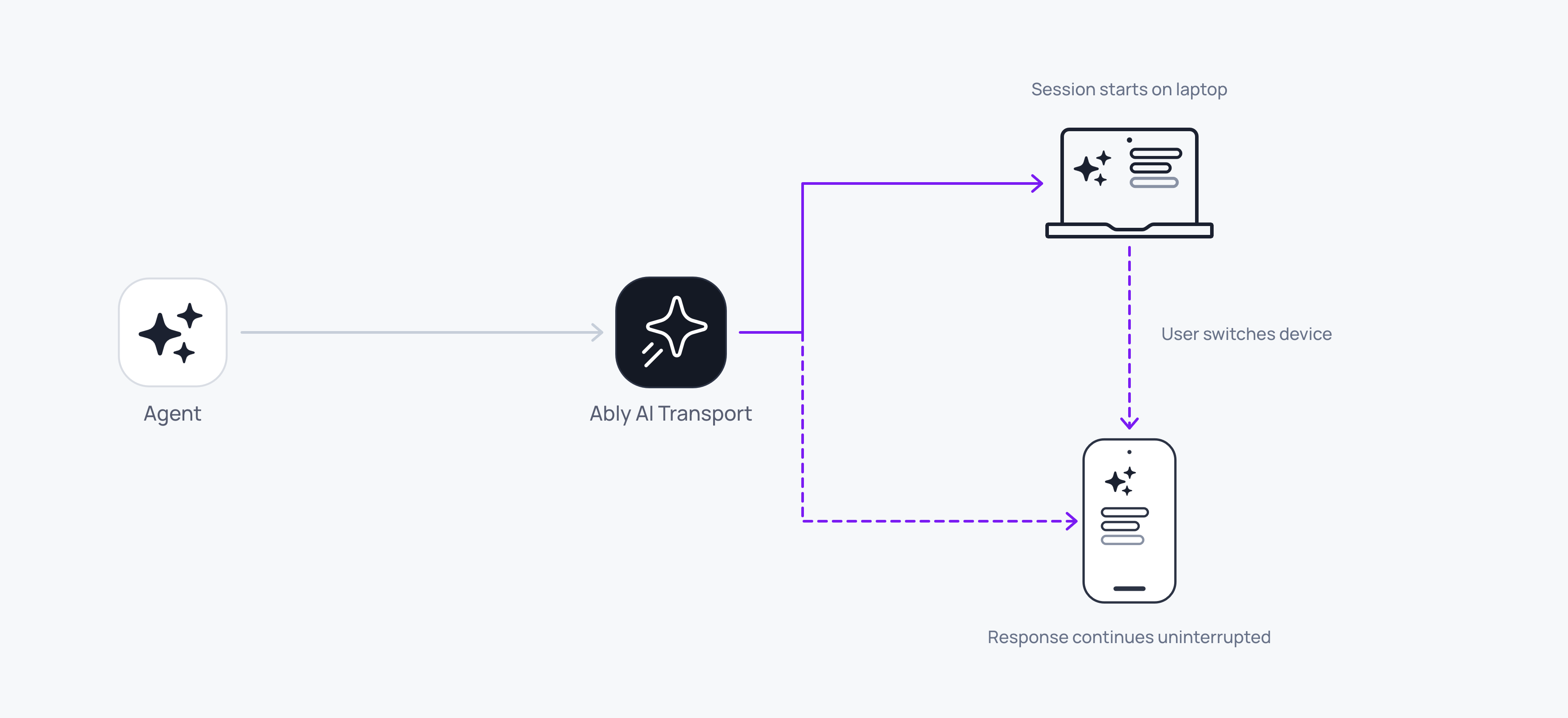
Every client attached to the conversation gets the same messages, because Ably delivers every publish to all of them. A user starts on a laptop, picks up a phone, and the response carries on where it was.
Fan-out is how one agent run reaches every device. The conversation is an Ably channel rather than a client-to-server HTTP connection, so every device attached to it receives every message: user prompts, agent responses, and control signals.
A user can start on a laptop, open the same conversation on a phone, and read the rest of the answer there. A second tab, or a colleague you share the conversation with, works the same way.
Fan-out is on by default. Two clients that use the same channel name are on the same conversation:
#### Javascript

```
// Client-side, on the laptop and on the phone alike.
const transport = createClientTransport({
  channel: ably.channels.get(conversationId),
  codec,
  clientId: 'alice-laptop',   // 'alice-phone' on the other device
});
await transport.connect();

transport.subscribe((event) => {
  if (event.kind === 'message') fold.apply(event);
});
```
## How it works
Every client attached to the channel receives every publish on it. A user message, an agent's output, a cancel, or a steering message all reach every one of them, in the same order, because Ably does the routing.
Nothing distinguishes the client that started a run from the ones watching it. A `message` event carries `meta.clientId` for the publisher and `meta.runId` for the run it belongs to, and both are the same on every device. What differs is only what a given client holds locally: the one that published owns the `runId` promise `publishInput` returned, and the others learn the run id from the `run-lifecycle` start event instead.
## Tell your own runs from other clients'
Two fields carry ownership, and they answer different questions:
| Field | Where it is | What it tells you |
| --- | --- | --- |
| `meta.clientId` | On every `message` event | Which client published this particular message. |
| `clientId` on a run-lifecycle event | On `run-lifecycle` | Which agent published the run, from the `clientId` you pass to `createAgentTransport`. Constant for the run's life. |
The run-lifecycle `clientId` is the agent's own id, so keep the `runId` promise `publishInput` returned to decide what this device offers a Stop button for:
### Javascript

```
// Client-side.
const myRuns = new Set();

transport.subscribe((event) => {
  if (event.kind !== 'run-lifecycle') return;
  const { type, runId, clientId } = event.event;
  if (type === 'start' && clientId === myClientId) myRuns.add(runId);
  if (type === 'end') myRuns.delete(runId);
});
```
## Track live runs across clients
The transport does not keep track of live runs for you, so what any device knows about live runs is what it has observed on the lifecycle stream since it attached. Two clients can legitimately disagree: one attached before a run started and saw its start, the other attached after and did not.
That matters most on a device joining mid-run. It sees the in-flight message accumulating but never saw the run start, so it has no run id to cancel. Page [`history`](https://ably.com/docs/ai-transport/streaming/history.md) on attach to recover the starts it missed, or accept that a fresh device offers no Stop until the next run begins.
## Handle late joiners
A device attaching after the conversation started reads what came before with [`history`](https://ably.com/docs/ai-transport/streaming/history.md), then merges the live stream on top:
### Javascript

```
// Client-side, on attach.
await transport.connect();
const { events } = await transport.history({ limit: 50 });
for (const event of events) fold.apply(event);
```
If a response is streaming as the device attaches, it reads the accumulated content of that message rather than a replay of every token, and the codec's lifecycle tracker synthesises the stream-start events it never saw, so the merge on the client sees a well-formed stream.
## Identify the client
Each client carries a `clientId` that identifies it on every message it publishes. Issue it from your token endpoint rather than setting it on the client, so Ably verifies it and it cannot be spoofed:
### Javascript

```
// Agent-side, in your token endpoint.
const token = jwt.sign({
  'x-ably-clientId': 'user-123',
  // ...
}, keySecret);
```
Pass the same value to `createClientTransport` as `clientId`, which sets it on the inputs this client publishes. The same value decides whether the agent's [`onCancel`](https://ably.com/docs/ai-transport/streaming/cancellation.md#authorization) accepts a cancel, and which device a message came from. [Set up authentication](https://ably.com/docs/ai-transport/setup/authentication.md) covers issuing it.
## Edge cases and unhappy paths
- Two devices sharing one `clientId` are indistinguishable on the wire. A cancel filter keyed on it cancels runs from both. Give each device its own `clientId` when ownership matters.
- A late joiner without channel history capability sees the live stream but not the conversation that came before. Capability scoping is part of [authentication](https://ably.com/docs/ai-transport/setup/authentication.md).
- A client that loses connectivity mid-stream resumes on its own. The agent never learns, and the other devices are unaffected.
- Two devices publishing at the same time produce two separate [concurrent runs](https://ably.com/docs/ai-transport/streaming/concurrent-runs.md) on one channel, kept apart by their run ids.
- A client with an anonymous connection publishes no `clientId`, so `meta.clientId` on its messages is `undefined`. Decide what your interface does with that before it happens in production.
## FAQ
### Do I need to write any sync code?
No routing code. Ably delivers every publish to every attached device, so subscribing is all the sync your code does. What each device does need is the same merge, because aggregating model output chunks into conversation messages is application-side at this level.
### How many clients attach to one conversation?
There is no fixed limit. Every client subscribes to the same channel, so usage scales with the number of subscribers, up to the [connection and message rate limits](https://ably.com/docs/platform/pricing.md) in effect.
### Can two devices show different things?
Yes, and often they will. Every device receives the same events, but what it renders is whatever its own merge produced, so a device that attached later has a shorter list until it pages history. With [durable sessions](https://ably.com/docs/ai-transport/durable-sessions.md) the divergence becomes deliberate instead: each view holds its own [branch selection](https://ably.com/docs/ai-transport/durable-sessions/branching.md) over one shared tree.
### What stops a stranger from joining the conversation?
Channel capabilities. Issue tokens that [scope](https://ably.com/docs/ai-transport/setup/authentication.md) `subscribe` and `publish` to the specific channel name for authenticated users.
### Does presence work across devices?
Yes. Each device enters presence with its own `clientId`, following the [agent presence patterns](https://ably.com/docs/ai-transport/channel/agent-presence.md).
## Related features
- [Reconnection and recovery](https://ably.com/docs/ai-transport/streaming/reconnection-and-recovery.md): each device reconnects independently.
- [Cancellation](https://ably.com/docs/ai-transport/streaming/cancellation.md): cancel from any device.
- [History and replay](https://ably.com/docs/ai-transport/streaming/history.md): late joiners load the full conversation.
- [Database hydration](https://ably.com/docs/ai-transport/durable-sessions/database-hydration.md): seed a device from your own store and reconcile it with the live session.
## Related Topics
- [Overview](https://ably.com/docs/ai-transport/streaming.md): Stream an agent's output to every connected client over one Ably channel, with run and step lifecycle, cancellation and steering on top, while the conversation stays in your own database.
- [Runs and steps](https://ably.com/docs/ai-transport/streaming/runs-and-steps.md): Understand runs in AI Transport: the unit of agent work for one prompt-response cycle, with explicit identity, lifecycle, and an end reason, triggered by an invocation and published as steps.
- [Token streaming](https://ably.com/docs/ai-transport/streaming/token-streaming.md): Stream AI-generated tokens to clients in realtime using AI Transport. Tokens are appended to a single durable message, and the full response is served to clients that join later.
- [Cancellation](https://ably.com/docs/ai-transport/streaming/cancellation.md): Cancel AI responses mid-stream with Ably AI Transport. A cancel is a signal on the channel, scoped to one run, authorised on the agent, and idempotent.
- [Interruption and steering](https://ably.com/docs/ai-transport/streaming/interruption-and-steering.md): Let users change direction mid-response in Ably AI Transport. Steer the active run with a follow-up prompt, cancel and re-prompt, send alongside as a concurrent run, or queue the follow-up.
- [Reconnection and recovery](https://ably.com/docs/ai-transport/streaming/reconnection-and-recovery.md): AI Transport streams survive connection drops automatically. Clients reconnect and resume from where they left off with the whole response intact.
- [History and replay](https://ably.com/docs/ai-transport/streaming/history.md): Page conversation history backwards from the Ably channel with AI Transport. Chronological batches, a resumable cursor, and joining the channel to your own store.
- [Concurrent runs](https://ably.com/docs/ai-transport/streaming/concurrent-runs.md): Run multiple AI turns simultaneously with Ably AI Transport. Independent streams, scoped cancellation, and multi-agent support.
## Documentation Index
To discover additional Ably documentation:
1. Fetch [llms.txt](https://ably.com/llms.txt) for the canonical list of available pages.
2. Identify relevant URLs from that index.
3. Fetch target pages as needed.
Avoid using assumed or outdated documentation paths.