# Interruption and steering
Your users can change direction mid-response. AI Transport gives you four patterns for a follow-up that arrives while the agent is still working: steer the active run, cancel and re-prompt, send alongside as a concurrent run, or queue it.
A user changes direction while the agent is still working. They narrow the scope, add a constraint, press Stop and start over, or simply type a second message before the first response has finished. The channel is bidirectional, so the client can send a follow-up into the same active run, cancel the run and start a new one, open a parallel run on the same conversation, or hold the follow-up until the current run finishes.
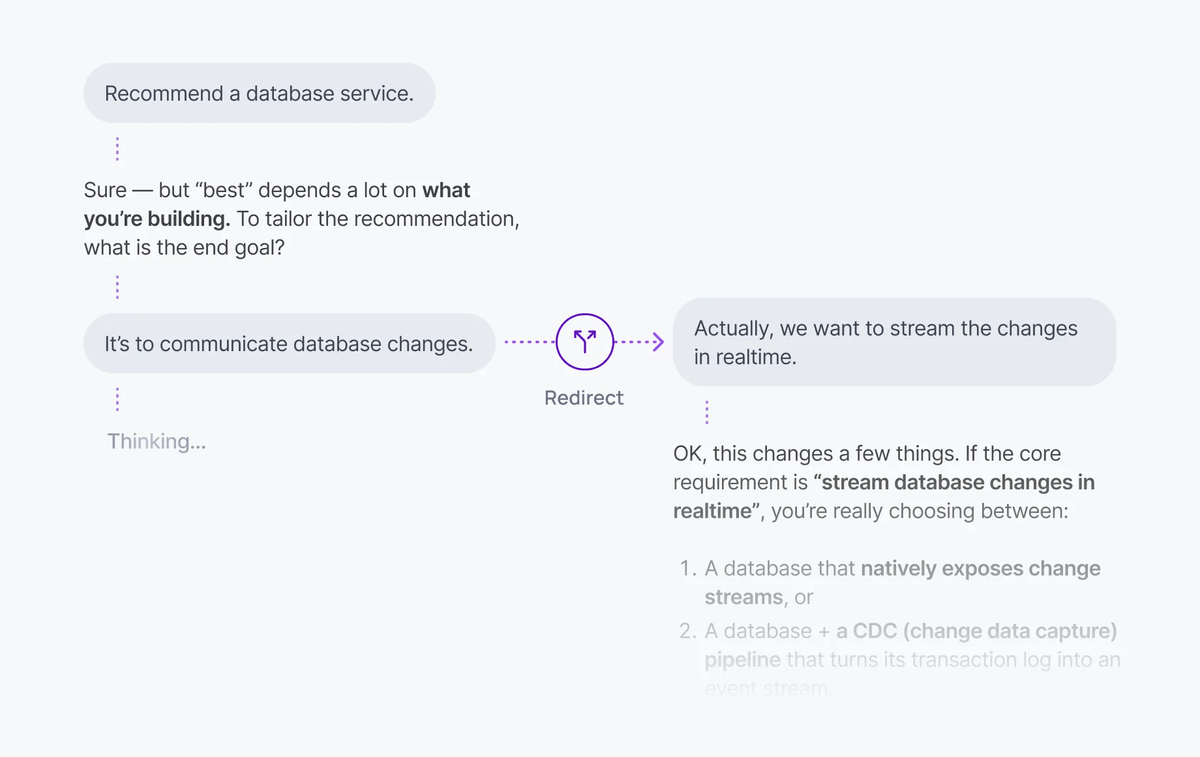
On the client, publish an input, then steer the run it triggers:
#### Javascript

```
// Client-side.
const sent = await transport.publishInput({
  kind: 'message',
  payload: { id: crypto.randomUUID(), role: 'user', parts: [{ type: 'text', text: 'Plan a 3-day trip to Lisbon.' }] },
});

// `sent.runId` is a promise. `steer` takes it directly and publishes once it
// resolves, so a follow-up typed before the agent opened its run still lands.
const { published, outcome } = transport.steer(sent.runId, {
  kind: 'message',
  payload: { id: crypto.randomUUID(), role: 'user', parts: [{ type: 'text', text: 'Make it 5 days, and keep it under £800.' }] },
});
```
## How it works
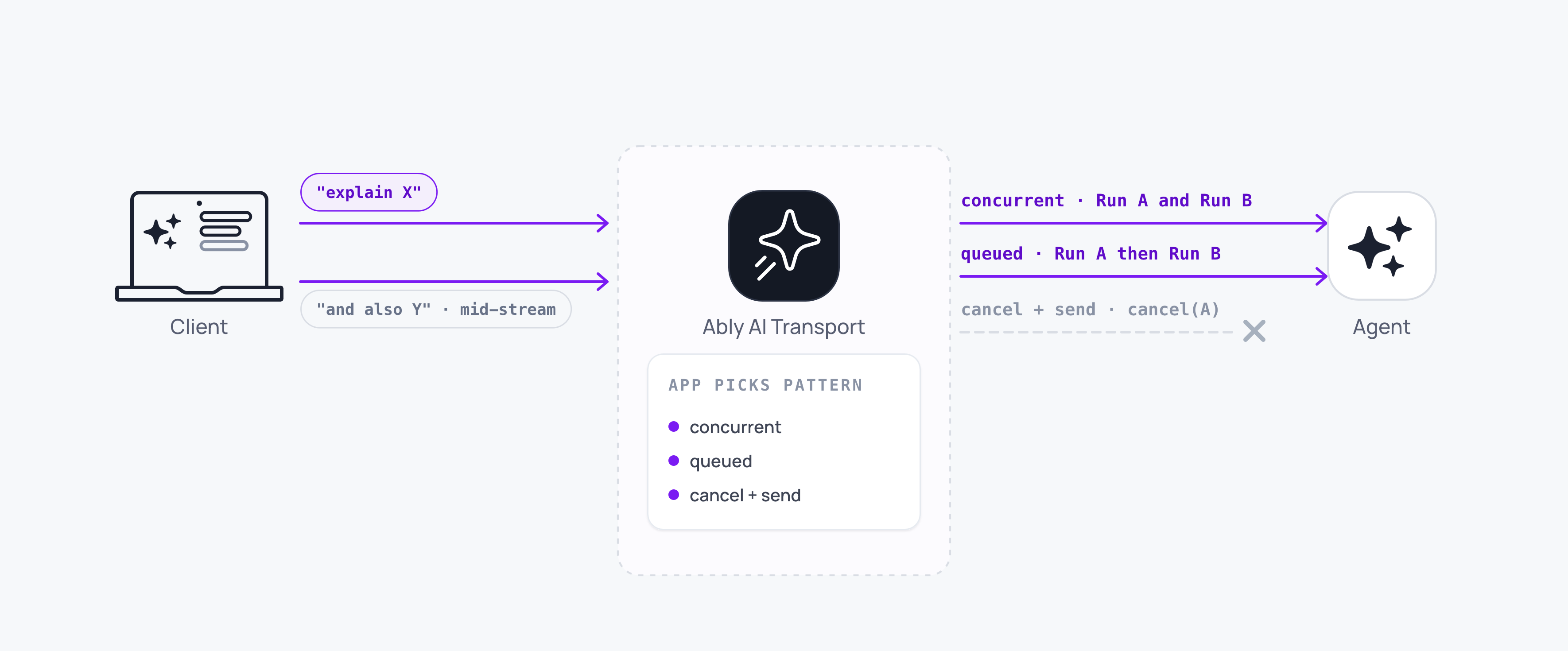
Each turn becomes a [run](https://ably.com/docs/ai-transport/streaming/runs-and-steps.md) on the channel. While a run is active, the client has four options:
| Pattern | What happens | When to use it |
| --- | --- | --- |
| Steer the active run | A new user message is published to the active run; the agent picks it up on the next loop iteration. | Quick correction or scope clarification while the agent is still working. |
| Cancel and re-prompt | The active run aborts; a new run starts. | The previous direction is wrong; the user wants to start over. |
| Send alongside | A second run starts; both runs stream in parallel. | A follow-up on a separate topic that does not replace the in-flight reply. |
| Queue the follow-up | The client holds the message and sends it once the current run reaches a terminal status. | A chat interface where two answers arriving at once would read as confusing. |
Your application sends alongside by default, because the SDK publishes a second input without checking whether a run is open. Steering leaves the run running and the stream intact.
## Steer the active run
Call `transport.steer(runId, input)` to send a steering message into an open run. The agent picks it up on the next loop iteration, and the message starts no run of its own.
`steer` returns synchronously with two promises:
### Javascript

```
// Client-side.
const { published, outcome } = transport.steer(runId, {
  kind: 'message',
  payload: { id: crypto.randomUUID(), role: 'user', parts: [{ type: 'text', text: 'Also include vegan options.' }] },
});

const { serial } = await published;
const { consumed, runTerminalReason } = await outcome;
```
- `published` resolves once the transport has seen the steering message's own channel echo, carrying the Ably-assigned `serial`.
- `outcome` resolves to `{ consumed, runTerminalReason? }` at the run's next lifecycle event:
- `consumed: true` means the message's codec-message-id appeared in a `steer-codec-message-ids` header on the run's output, so the agent had it in view when it produced that response. It resolves at a run end or a run suspend alike, so a steering message consumed before a suspend does not stay pending.
- `consumed: false` resolves only at `ai-run-end`. A suspend leaves it pending, because a later resume can still consume it.
- `runTerminalReason` is how the run ended, one of `'complete'`, `'cancelled'`, or `'error'`. It is absent when a suspend settled the outcome.
The first argument accepts a run id or a promise of one. Passing `publishInput`'s `runId` promise directly is how a client normally calls it: the message publishes as soon as the agent's run start arrives, and `published` and `outcome` both reject if the `runId` promise rejects.
On the agent, `run.hasInput()` decides whether the loop runs again. It returns `true` while there is input the agent has not answered, which is the triggering input on the first iteration and a steering message on any later one:
### Javascript

```
// Agent-side.
const trigger = await transport.locateInput(eventId);
const run = transport.openRun({ inputCodecMessageId: trigger?.meta.codecMessageId });

let context = [...conversationFromYourDatabase, ...(trigger?.inputs ?? [])];
const pending = [];

transport.subscribe((event) => {
  if (event.kind === 'message' && event.meta.runId === run.runId) pending.push(...event.inputs);
});

do {
  // hasInput() DRAINS pending steering messages, so call it once per
  // iteration, immediately before assembling this iteration's context.
  context = [...context, ...pending.splice(0)];
  const result = streamText({
    model: anthropic('claude-sonnet-4-20250514'),
    messages: await convertToModelMessages(context),
    abortSignal: run.abortSignal,
  });
  await run.pipe(result.toUIMessageStream());
} while (run.hasInput());

await run.end({ reason: 'complete' });
```
Reading `hasInput()` changes state. It drains the steering messages tracked so far into the set the next step attempt publishes as its `steer-codec-message-ids` header, so the client can resolve each message's outcome. Call it once per iteration, right before you assemble that iteration's context, and never twice for one iteration. It returns `false` once `abortSignal` has fired, so a cancelled run leaves the loop.
### Cancel the in-flight model call
The loop above only sees a steering message once the current model call finishes and `hasInput()` is checked again, so a steering message takes effect on the *next* response. To react sooner, pass the `onSteer` hook to `openRun`. It fires the moment a steering message is tracked for the run. The SDK does not interrupt your model call for you, so abort it from `onSteer` yourself; the loop then restarts with the steering message already in the context.
Give each model call its own `AbortController`, abort it from `onSteer`, and pass a signal that fires on either a run cancel or a steering message. The subtlety is that `onSteer` must abort only the model call, never the run, so the loop has to tell a steering interruption from a real cancel before it decides how to end:
#### Javascript

```
// Agent-side.
let callAbort = new AbortController();

const run = transport.openRun(
  { inputCodecMessageId: trigger?.meta.codecMessageId },
  // Abort only the current model call, never run.abortSignal, so a steering
  // message stops this response without cancelling the run.
  { onSteer: () => callAbort.abort() },
);

let context = [...conversationFromYourDatabase, ...(trigger?.inputs ?? [])];
const pending = [];
transport.subscribe((event) => {
  if (event.kind === 'message' && event.meta.runId === run.runId) pending.push(...event.inputs);
});

do {
  callAbort = new AbortController();
  context = [...context, ...pending.splice(0)];

  const result = streamText({
    model: anthropic('claude-sonnet-4-20250514'),
    messages: await convertToModelMessages(context),
    // Abort on a real cancel (run.abortSignal) or on a steering message (callAbort).
    abortSignal: AbortSignal.any([run.abortSignal, callAbort.signal]),
  });

  const piped = await run.pipe(result.toUIMessageStream());

  // run.pipe races only run.abortSignal, so a steering abort ends the stream
  // cleanly while a real cancel ends it 'cancelled'.
  const steerInterrupted =
    piped.reason === 'complete' && callAbort.signal.aborted && !run.abortSignal.aborted;

  // Swallow the aborted call's rejection so it is not unhandled, then loop:
  // hasInput() is now true and the next iteration re-runs with that message in context.
  if (steerInterrupted) result.finishReason.catch(() => {});
} while (run.hasInput());

await run.end({ reason: run.abortSignal.aborted ? 'cancelled' : 'complete' });
```
When `onSteer` aborts the model call, `run.pipe` returns with the partial output already published, `hasInput()` returns `true` because the steering message has been tracked, and the next iteration produces a fresh response that includes it. `onSteer` takes no arguments and returns nothing; keep it synchronous and cheap, because it runs on the message-handling path. A hook that throws rejects nothing: the error reaches the transport's `error` stream and the run carries on.
`onSteer` is a hint rather than the authority. `hasInput()` decides whether the loop runs again, so a design that reads `onSteer` alone can miss a steering message that arrived between iterations.
## Implement cancel and re-prompt
Cancel the live run, then publish the new input. Track live run ids off the lifecycle stream, because the transport keeps no registry of its own:
### Javascript

```
// Client-side.
const live = new Set();

transport.subscribe((event) => {
  if (event.kind !== 'run-lifecycle') return;
  const { type, runId } = event.event;
  if (type === 'start' || type === 'resume') live.add(runId);
  if (type === 'end') live.delete(runId);
});

const cancelThenSend = async (text) => {
  // A suspended run stays in `live`: nothing ended it, and a continuation can
  // re-activate it, so it survives the new turn unless it is cancelled here.
  await Promise.all([...live].map((runId) => transport.cancel(runId)));

  const sent = await transport.publishInput({
    kind: 'message',
    payload: { id: crypto.randomUUID(), role: 'user', parts: [{ type: 'text', text }] },
  });
  await wakeAgent(sent.eventId);
};
```
`transport.cancel(runId)` publishes the cancel. The agent's `run.abortSignal` fires, the model stream stops, and the agent ends the run with reason `'cancelled'`. The new input starts a clean run.
A suspend does not remove a run from the live set, which is what you want here: cancel-before-send has to reach a suspended run, or it survives the new turn. A Stop button is different, because a suspended run has nothing to stop, so gate that on runs you last saw start or resume without a suspend.
## Implement send-alongside
Publish without cancelling. Both runs stream concurrently, each with its own run id and its own cancel:
### Javascript

```
// Client-side.
const followUp = await transport.publishInput({
  kind: 'message',
  payload: { id: crypto.randomUUID(), role: 'user', parts: [{ type: 'text', text: 'Also include vegan options.' }] },
});
await wakeAgent(followUp.eventId);

// Cancel just this one, once the agent has opened it.
await transport.cancel(await followUp.runId);
```
Every `message` event carries `meta.runId`, so your UI can group the two streams by that field.
## Queue the follow-up
Nothing in the SDK holds a second publish back, so queueing is a gate your application puts in front of `publishInput`. Hold the text while a run is streaming and release it when the run ends:
### Javascript

```
// Client-side.
const queue = [];
let streaming = false;

transport.subscribe((event) => {
  if (event.kind !== 'run-lifecycle') return;
  if (event.event.type === 'start') streaming = true;
  if (event.event.type === 'end') {
    streaming = false;
    const next = queue.shift();
    if (next !== undefined) void submit(next);
  }
});

const handleSend = (text) => (streaming ? queue.push(text) : submit(text));
```
Show the queued message in your UI as soon as the user sends it. A message that vanishes for the length of a long response reads as a message that was dropped.
## Switch the Stop / Send toggle
Hold the current run id in your own state, set on the run start and cleared on the end:
### Javascript

```
// Client-side.
const [activeRunId, setActiveRunId] = useState(undefined);

transport.subscribe((event) => {
  if (event.kind !== 'run-lifecycle') return;
  if (event.event.type === 'start') setActiveRunId(event.event.runId);
  if (event.event.type === 'end') setActiveRunId(undefined);
});

return activeRunId
  ?  transport.cancel(activeRunId)} />
  : ;
```
Run status never arrives as a `message` event, so a toggle watching only `message` never flips back. `run-lifecycle` is the stream that carries it.
## Edge cases and unhappy paths
- If a steering message arrives just as the agent finishes its last `pipe()`, `outcome` resolves to `consumed: false`. This is normal under load. Show the user that the message didn't reach the agent rather than dropping it silently.
- Steering a run whose `ai-run-end` this transport has already received rejects both promises immediately and publishes nothing. Gate the steering control on a run you have seen start and not end.
- If a run is `'suspended'` (waiting on a tool approval, for example), a steering message the agent has not yet consumed keeps its `outcome` pending until the run resumes and consumes it or ends. A message the agent already consumed has resolved as `consumed: true`. Don't block UI updates on a pending outcome.
- `consumed: true` means the agent saw the steering message before it sent its response, which is no guarantee the LLM acted on it; that depends on the model, the system prompt, and what the agent passed in.
- Cancel is asynchronous. A small tail of tokens arrives after `transport.cancel(runId)` resolves and before the agent's `abortSignal` fires. They carry the cancelled run's `meta.runId`; keep them on that run rather than the new one.
- A run cancelled while awaiting a tool result ends with `'cancelled'` only when your agent calls `run.end({ reason: 'cancelled' })`; the cancel fires the `abortSignal` in whichever process still holds that run. Tool calls triggered before the cancel may still run on your server unless your handler honours the same `AbortSignal`.
- A network drop on the client cancels nothing. The agent keeps streaming into the channel, and the response is still there on reconnect. Read `history` on reconnect to work out whether a run is still open before you offer Stop.
- Send-alongside is rate-limited by your channel and any server-side [concurrency](https://ably.com/docs/ai-transport/streaming/concurrent-runs.md) you enforce. Parallel runs share the connection's message rate, so widen the [append rollup window](https://ably.com/docs/ai-transport/streaming/token-streaming.md#rollup) if several streams run at once.
- `'cancelled'` is reported on the run-lifecycle end event. Don't infer cancellation from the absence of further tokens; read the reason off that event.
- `transport.cancel(runId)` targets one run, so cancelling one of several parallel runs leaves the others streaming. Take the id from the run-lifecycle start event for the run you mean.
- Cancel is a signal on the shared channel, so a device other than the one that started the run can cancel it. Scope that with the [cancel authorisation pattern](https://ably.com/docs/ai-transport/streaming/cancellation.md#authorization) if a user should only cancel their own turns.
- A queue with no upper bound grows for the length of a slow run and then floods the channel when it drains. Cap it, and decide the pattern once at the application layer rather than per device, so two tabs on one session do not disagree about what a second send does.
## FAQ
### Which of the four patterns should I pick?
Steer when the existing direction is still useful and the user wants to refine it ("make it 5 days", "also include vegan options"). The agent keeps its tokens, its tool results, and its reasoning so far, and the new input joins the conversation. Cancel and re-prompt when the direction is wrong. Send alongside when the follow-up is a separate question that deserves its own answer. Queue when two answers arriving together would be hard to read, which is most single-thread chat interfaces.
### What does `consumed: false` mean for the user?
The run ended before the agent saw the steering message. Two common causes: the message arrived after the agent's final `pipe()`, or the run was cancelled or errored first. It is up to your application whether to re-submit the steering message as a new user prompt for a new run, or to drop it. `consumed: true` confirms only that the agent saw the message. Whether the model heeds new mid-flight input depends on the model, the system prompt, and what the agent passed in.
### Do steering messages persist in the conversation?
Yes. A steering message is an ordinary publish carrying the run's id, so every subscribed client sees it live and it stays in channel history. It arrives on `subscribe` as a `message` event with `meta.runId` set, so merging it beside the original prompt and the agent's output is one more branch in the same handler.
### What happens if I send several steering messages at once?
The next `run.hasInput()` call drains all of them together, and the following step attempt carries every one of their codec-message-ids, so each `outcome` resolves as `consumed`. The agent merges them into one model call rather than answering each separately.
### What if the agent endpoint is down when I send the follow-up?
The follow-up is published to the channel before your endpoint is called, so it survives whatever state the endpoint is in. For a steering message that is enough: the already-running agent picks it up on its next `hasInput()` check. A new run also needs the wake POST, and if that fails the input still sits on the channel, so retry it once the endpoint recovers and `locateInput` finds the trigger.
## Related features
- [Cancellation](https://ably.com/docs/ai-transport/streaming/cancellation.md): cancel signals and agent-side authorisation.
- [Concurrent runs](https://ably.com/docs/ai-transport/streaming/concurrent-runs.md): several runs in flight on one conversation.
- [Runs and steps](https://ably.com/docs/ai-transport/streaming/runs-and-steps.md): how steering fits the run model.
## Related Topics
- [Overview](https://ably.com/docs/ai-transport/streaming.md): Stream an agent's output to every connected client over one Ably channel, with run and step lifecycle, cancellation and steering on top, while the conversation stays in your own database.
- [Runs and steps](https://ably.com/docs/ai-transport/streaming/runs-and-steps.md): Understand runs in AI Transport: the unit of agent work for one prompt-response cycle, with explicit identity, lifecycle, and an end reason, triggered by an invocation and published as steps.
- [Token streaming](https://ably.com/docs/ai-transport/streaming/token-streaming.md): Stream AI-generated tokens to clients in realtime using AI Transport. Tokens are appended to a single durable message, and the full response is served to clients that join later.
- [Cancellation](https://ably.com/docs/ai-transport/streaming/cancellation.md): Cancel AI responses mid-stream with Ably AI Transport. A cancel is a signal on the channel, scoped to one run, authorised on the agent, and idempotent.
- [Reconnection and recovery](https://ably.com/docs/ai-transport/streaming/reconnection-and-recovery.md): AI Transport streams survive connection drops automatically. Clients reconnect and resume from where they left off with the whole response intact.
- [Multi-device and fan-out](https://ably.com/docs/ai-transport/streaming/multi-device.md): One agent run reaches every client attached to the conversation with Ably AI Transport. Fan-out comes from the channel, so a user can start on a laptop and carry on from a phone.
- [History and replay](https://ably.com/docs/ai-transport/streaming/history.md): Page conversation history backwards from the Ably channel with AI Transport. Chronological batches, a resumable cursor, and joining the channel to your own store.
- [Concurrent runs](https://ably.com/docs/ai-transport/streaming/concurrent-runs.md): Run multiple AI turns simultaneously with Ably AI Transport. Independent streams, scoped cancellation, and multi-agent support.
## Documentation Index
To discover additional Ably documentation:
1. Fetch [llms.txt](https://ably.com/llms.txt) for the canonical list of available pages.
2. Identify relevant URLs from that index.
3. Fetch target pages as needed.
Avoid using assumed or outdated documentation paths.