# History and replay
Your users see the conversation when they come back to it. The channel holds it, and `history` pages backwards through it a batch at a time.
Every message on a conversation persists on the [Ably channel](https://ably.com/docs/channels.md) that carries it: user inputs, agent output, and the run and step lifecycle around them. `history` walks the channel backwards from the point your transport attached, so a client can rebuild what it missed and an agent can assemble the context for a model call.
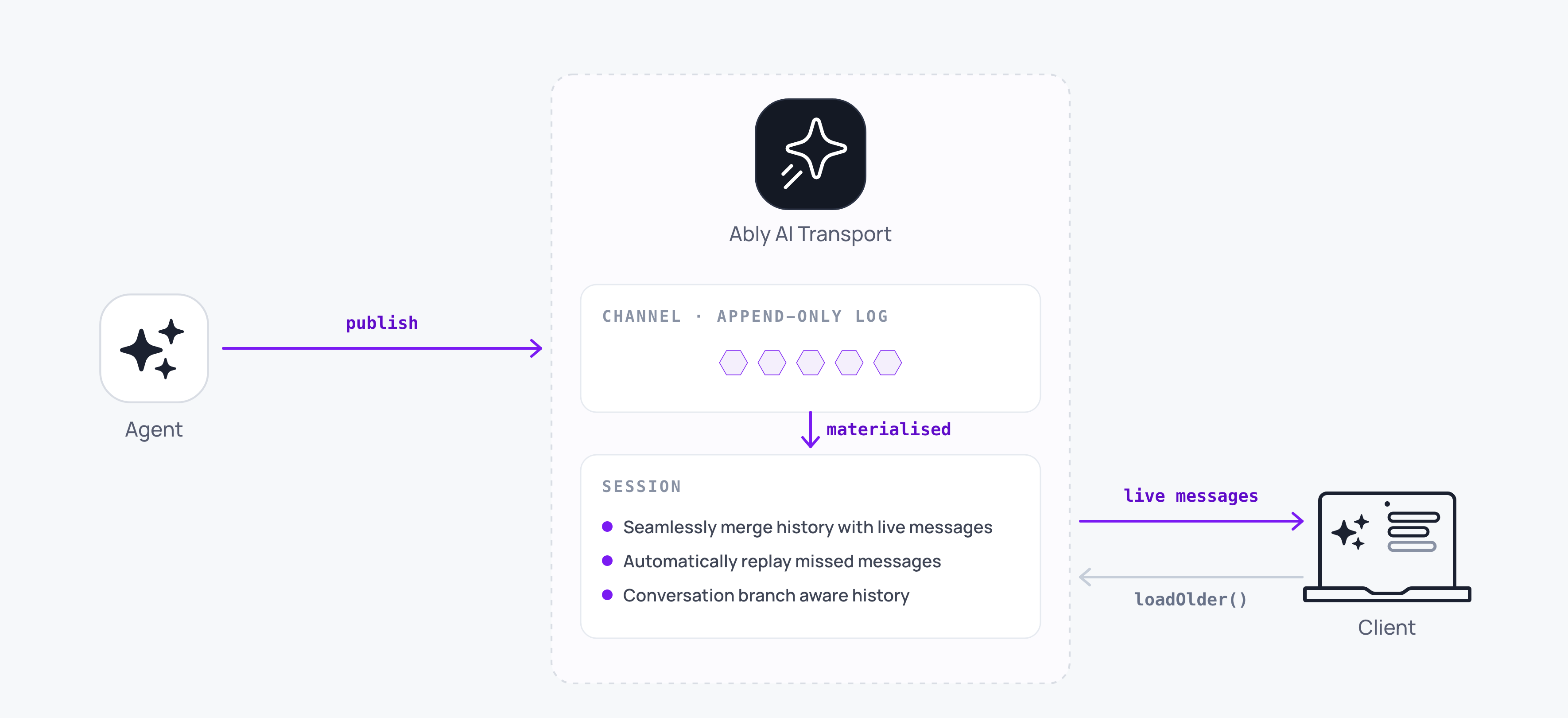
One call returns one batch:
#### Javascript

```
const { events, exhausted } = await transport.history({ limit: 50 });
```
## How it works
The cursor starts at the attach point and moves backwards. Each call returns the next older slice and leaves the cursor where it stopped, so repeated calls walk toward the start of the channel.
Five properties shape how you use it:
| Property | What it means for your code |
| --- | --- |
| Chronological within a batch | `events` is oldest-first, and each batch is older than the last, so a consumer prepends: `all = [...batch.events, ...all]`. |
| Page granular | `limit` stops the walk once it is reached, after finishing the page it is on, so a batch may come back larger than the limit you asked for. |
| `exhausted` | True once the cursor reaches the channel's start. Further calls resolve empty. |
| Single-flight | Concurrent calls serialise rather than interleaving, so a double-fired scroll handler cannot duplicate a page. |
| Shared decoder | Paging uses the live stream's decoder, so a stream that spans the attach boundary is decoded once rather than twice. |
History events are returned from this call only. They never reach your `subscribe` handlers, so a merge that runs on both has to be driven from both.
## Page backwards on the client
Scroll-back is a loop over batches, prepending each one:
### Javascript

```
// Client-side.
let exhausted = false;
let loading = false;

async function loadOlder() {
  if (exhausted || loading) return;
  loading = true;
  try {
    const batch = await transport.history({ limit: 30 });
    for (const event of batch.events) fold.apply(event);
    exhausted = batch.exhausted;
  } finally {
    loading = false;
  }
}
```
Guard on your own `loading` flag for the interface's sake. The call is single-flight underneath, so a second call while one is in flight waits rather than duplicating, but a spinner needs the flag anyway.
Pass a `signal` to abandon a walk when the user navigates away. The call rejects with `OperationCancelled` and the cursor stays where it was, so a later call carries on from the same place.
## Assemble context on the agent
An agent that has no store of its own can page the channel for the conversation to feed the model:
### Javascript

```
// Agent-side.
const events = [];
let exhausted = false;
while (!exhausted && events.length < 500) {
  const batch = await transport.history({ limit: 100 });
  events.unshift(...batch.events);
  exhausted = batch.exhausted;
}
```
`locateInput(eventId)` finds the one input that woke this invocation directly, which is a different job from paging the conversation. It scans on a throwaway decoder so it never disturbs the live stream's state, and it reads roughly one page whatever the conversation's length, because the trigger is the newest message in that history.
## Join your own store to the channel
Most applications that keep their own conversation store want both: the store for everything older than the channel's retention window, and the channel for what is live. You are responsible for making that join correct.
Your store ends somewhere, the channel's retained window starts somewhere, and the two overlap by an amount neither side knows. Walk too far and you render a message twice; stop too early and you leave a hole. Ordering the two halves is the same problem again, because your store's own ids are not the channel's serials.
What works today is to record, alongside each message you persist, the `meta.serial` of the wire message it came from. That gives you one comparable value on both sides: page the channel back until you reach a serial you already hold, drop that overlap, and prepend the rest.
## With a durable session
A durable session does the walk and the join for you. It pages the channel behind a view, materialises the results into the conversation tree, and reveals them a window at a time:
### Javascript

```
// Client-side, with a durable session.
const { messages, hasOlder, loading, loadOlder } = useView({ limit: 30 });
```
`loadOlder` expands the window and resolves with the page it revealed, oldest-first, and the `messages` array updates in step. The `untilAttach` walk underneath accounts for every message between the historical window and the live stream, so the two meet without a gap. Branch structure comes back too: the tree reads the `parent` and `fork-of` headers off each message and rebuilds the forks rather than a flat list.
Seeding that view from a store you already have is [database hydration](https://ably.com/docs/ai-transport/durable-sessions/database-hydration.md), which reconciles the two at a join point you choose.
## Edge cases and unhappy paths
- Channel history is bounded by your retention window. A client attaching after messages have aged out of the retention window sees only what is left, and `exhausted` reports the start of the retained window rather than the start of the conversation.
- A page fetch that keeps failing rejects the call with `SessionHistoryFetchFailed` after retries. The cursor is unmoved, so a retry resumes rather than restarting.
- A single undecodable message is skipped and emitted on the transport's `error` stream. The rest of the batch is returned, so a decode failure loses one message rather than the page.
- A client without `history` capability cannot page at all. Capability scoping is part of [authentication](https://ably.com/docs/ai-transport/setup/authentication.md).
- A late joiner that arrives mid-stream reads the accumulated content of the in-flight message rather than a replay of every token, then receives the remaining appends live.
- `history` requires `connect` first. Calling it on a transport that has not connected, or one that has closed, rejects.
## FAQ
### Do I need a database for chat history?
Not for AI Transport's own behaviour. The channel stores the conversation for the period configured by your retention window. Add a database when you need conversations to live longer than that window, or for search, analytics, and reporting.
### Why did I get more events than my `limit`?
The walk stops once the limit is reached, but it finishes the page it is on first, so `limit` is a floor for when to stop rather than a cap on the batch. Size your rendering for a batch a little larger than you asked for.
### Can I page forward?
No. `history` is backward-only, because the live subscription already delivers everything newer than the attach point. New messages arrive on `subscribe` with no fetch.
### Does history include cancelled runs?
Yes. A cancelled message keeps the content it had, with a `cancelled` status, and its run's end event carries the reason.
### Does paging disturb the live stream?
No. Paging shares the live decoder so a stream spanning the attach boundary decodes once, and history events are returned from the call rather than pushed to `subscribe`. `locateInput` goes further and uses a throwaway decoder, so it touches nothing.
## Related features
- [Token streaming](https://ably.com/docs/ai-transport/streaming/token-streaming.md): how a streamed response is persisted and read back.
- [Reconnection and recovery](https://ably.com/docs/ai-transport/streaming/reconnection-and-recovery.md): what the channel replays on its own, before you reach for history.
- [Runs and steps](https://ably.com/docs/ai-transport/streaming/runs-and-steps.md): the lifecycle events a history batch carries alongside messages.
- [Database hydration](https://ably.com/docs/ai-transport/durable-sessions/database-hydration.md): the join point between your store and the channel, solved for you once the session holds the conversation.
## Related Topics
- [Overview](https://ably.com/docs/ai-transport/streaming.md): Stream an agent's output to every connected client over one Ably channel, with run and step lifecycle, cancellation and steering on top, while the conversation stays in your own database.
- [Runs and steps](https://ably.com/docs/ai-transport/streaming/runs-and-steps.md): Understand runs in AI Transport: the unit of agent work for one prompt-response cycle, with explicit identity, lifecycle, and an end reason, triggered by an invocation and published as steps.
- [Token streaming](https://ably.com/docs/ai-transport/streaming/token-streaming.md): Stream AI-generated tokens to clients in realtime using AI Transport. Tokens are appended to a single durable message, and the full response is served to clients that join later.
- [Cancellation](https://ably.com/docs/ai-transport/streaming/cancellation.md): Cancel AI responses mid-stream with Ably AI Transport. A cancel is a signal on the channel, scoped to one run, authorised on the agent, and idempotent.
- [Interruption and steering](https://ably.com/docs/ai-transport/streaming/interruption-and-steering.md): Let users change direction mid-response in Ably AI Transport. Steer the active run with a follow-up prompt, cancel and re-prompt, send alongside as a concurrent run, or queue the follow-up.
- [Reconnection and recovery](https://ably.com/docs/ai-transport/streaming/reconnection-and-recovery.md): AI Transport streams survive connection drops automatically. Clients reconnect and resume from where they left off with the whole response intact.
- [Multi-device and fan-out](https://ably.com/docs/ai-transport/streaming/multi-device.md): One agent run reaches every client attached to the conversation with Ably AI Transport. Fan-out comes from the channel, so a user can start on a laptop and carry on from a phone.
- [Concurrent runs](https://ably.com/docs/ai-transport/streaming/concurrent-runs.md): Run multiple AI turns simultaneously with Ably AI Transport. Independent streams, scoped cancellation, and multi-agent support.
## Documentation Index
To discover additional Ably documentation:
1. Fetch [llms.txt](https://ably.com/llms.txt) for the canonical list of available pages.
2. Identify relevant URLs from that index.
3. Fetch target pages as needed.
Avoid using assumed or outdated documentation paths.