# Vercel Workflow Development Kit
Vercel WDK makes your agent's execution durable without leaving your Next.js app. AI Transport makes the conversation durable for every device watching it. Each owns its half of the job.
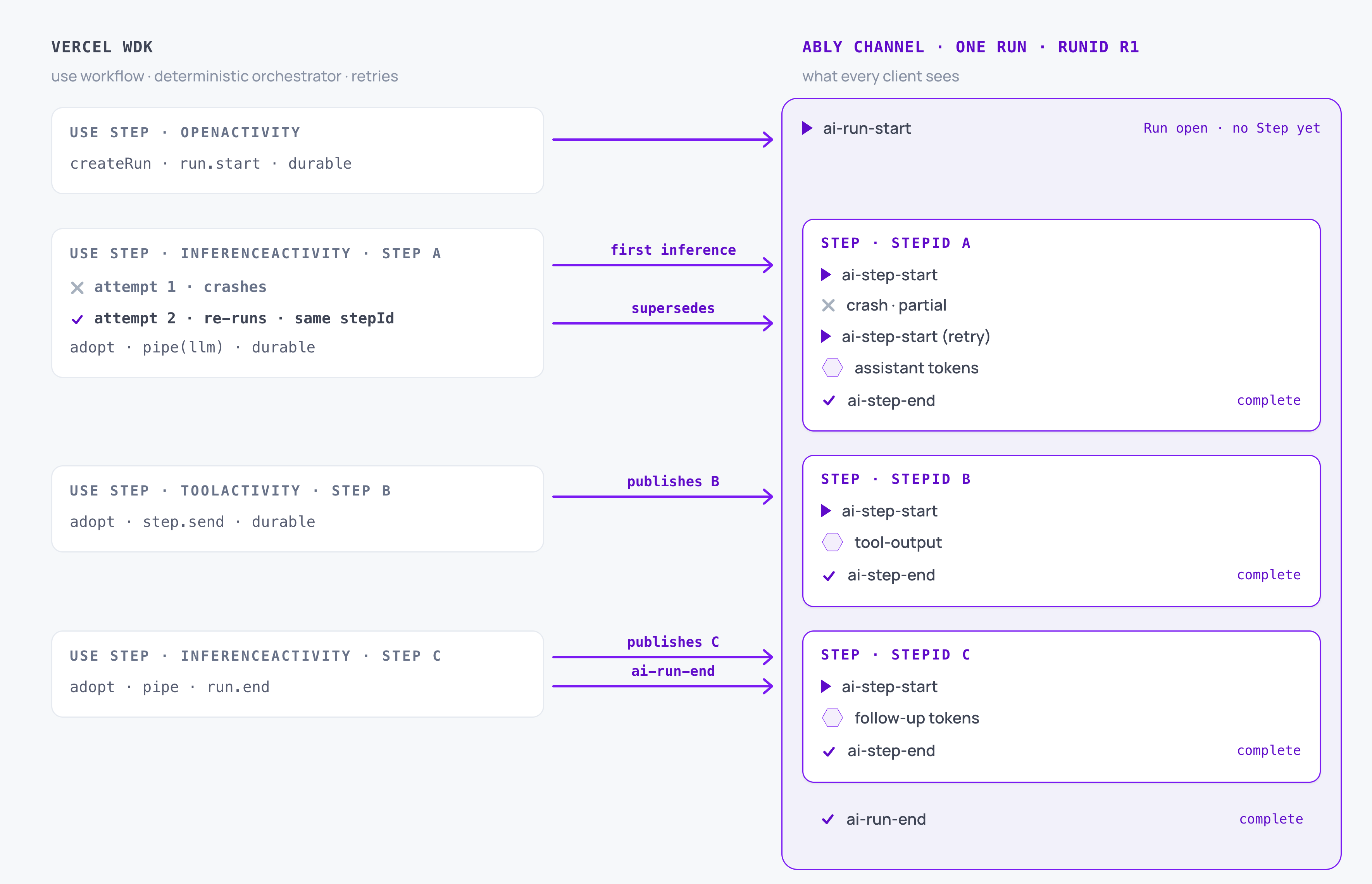
[Vercel Workflow Development Kit](https://useworkflow.dev/) (WDK) runs your agent's loop as a workflow compiled into the same app that serves your agent route. Every interaction with the session is its own `'use step'` function, a WDK step that WDK runs as its own process and re-runs on failure. AI Transport publishes each model call and each tool result as a [Step](https://ably.com/docs/ai-transport/concepts/steps.md) inside a [Run](https://ably.com/docs/ai-transport/concepts/runs.md). When WDK retries a step, the retry lands on the channel under the same `stepId` and supersedes the failed attempt.
## What Vercel WDK brings
Vercel WDK handles execution: it persists a workflow's progress, retries a failed WDK step, and runs it all inside your Next.js app.
| Capability | Description |
| --- | --- |
| Workflow durability | The workflow's progress persists as a journal of completed WDK steps. A crash or redeploy resumes the workflow with every finished step's result replayed, not re-executed. |
| Step retries | A failed WDK step re-runs as a fresh process, up to three retries by default. Tune the count per step with `maxRetries`, control backoff by throwing `RetryableError` with a `retryAfter`, or fail immediately with `FatalError`. The retry keeps the same WDK step id, so Ably can supersede its predecessor. |
| In-app runtime | Workflows compile into your Next.js app through the `'use workflow'` and `'use step'` directives. No separate cluster or worker fleet; `next dev` runs workflows locally with zero configuration. |
| Observability | `npx workflow web` opens an inspector showing runs, steps, attempts, and errors. Pair it with the channel to see the whole turn. |
## What AI Transport adds
AI Transport layers a durable session over that execution:
| Capability | Description |
| --- | --- |
| Durable sessions | Tokens flow through an Ably channel that outlives any single connection. A client reconnects and resumes from where it left off. |
| Multi-device sync | Every device subscribed to the session sees the same conversation in realtime. |
| Bidirectional control | Cancel, steer, and interrupt the agent from any client. No separate control channel. |
| Retry supersede | When WDK retries a step, [`AgentRun.createStep({ stepId })`](https://ably.com/docs/ai-transport/api/javascript/core/agent-session.md#create-step) causes the retry's channel output to supersede the failed attempt's rather than append beside it. |
| Cancel routing on the channel | Cancels published to the Ably channel reach every step's session directly, so a stop button in the browser aborts the LLM call inside the in-flight WDK step. |
| History and replay | Load the full conversation on reconnect, page refresh, or new device join. |
## Where they connect
A WDK step that produces agent output publishes it as a single Step, using the WDK step id as that Step's `stepId`. That is the join between the two systems: WDK's retryable unit and AI Transport's supersedable unit share one identifier.
Read the id with [`getStepMetadata()`](https://useworkflow.dev/docs/api-reference/workflow/get-step-metadata) from the `workflow` package, inside the step. WDK step ids are stable across retries of the same step and unique across workflow runs, so they pass straight into `createStep` with no prefixing.
An inference step:
### Javascript

```
import * as Ably from 'ably';
import { getStepMetadata } from 'workflow';
import { streamText, convertToModelMessages, stepCountIs } from 'ai';
import { anthropic } from '@ai-sdk/anthropic';
import { createAgentSession, vercelRunOutcome } from '@ably/ai-transport/vercel';

export async function runInference(invocation, ids) {
  'use step';
  const ably = new Ably.Realtime({ key: process.env.ABLY_API_KEY });
  const session = createAgentSession({ client: ably, channelName: invocation.sessionName });
  await session.connect();

  const run = session.adoptRun({
    runId: ids.runId,
    invocationId: ids.invocationId,
    triggerEventId: ids.triggerEventId,
  });
  await run.load();
  while (run.view.hasOlder()) await run.view.loadOlder();

  const step = run.createStep({ stepId: getStepMetadata().stepId });
  await step.start();

  const result = streamText({
    model: anthropic('claude-sonnet-4-20250514'),
    messages: await convertToModelMessages(run.view.getMessages().map((m) => m.message)),
    abortSignal: run.abortSignal,
    stopWhen: stepCountIs(1),
  });

  const pipeResult = await step.pipe(result.toUIMessageStream());
  const outcome = await vercelRunOutcome(pipeResult, result.finishReason);
  await step.end();

  await session.detach();
  ably.close();
  return outcome;
}
```
Open the Step before reading the view. A retry re-enters this WDK step with the same `stepId`, so its `step.start()` re-emits `ai-step-start` under a higher channel serial that supersedes the failed attempt. `step.start()` folds that superseding start into the read model behind `run.view` before it resolves, so once you have awaited it the view already reflects the supersede and you build the prompt from the winning attempt alone. Read `run.view` before opening the Step and the half-streamed response the retry is replacing trails the prompt as an assistant prefill, which real providers reject. The [getting-started guide](https://ably.com/docs/ai-transport/getting-started/vercel-wdk.md#define-steps) opens the Step before reading the view for this reason.
`stopWhen: stepCountIs(1)` prevents the Vercel AI SDK from running its own multi-step tool loop inside the WDK step. The workflow drives the loop instead: a step that opens the Run, a step for the first inference, then one step per server tool call and one per follow-up inference. This is what makes each unit retryable in isolation, and it shapes how tool calls route.
## Open the Run in its own step
Opening the Run is its own WDK step, separate from the first inference. `openRun` calls `createRun` and `run.start()`, publishing `ai-run-start` for a fresh turn or `ai-run-resume` for a continuation, and returns the Run's ids without running the model. Every model call, the first and each follow-up alike, is a separate `runInference` step that adopts that open Run.
The split follows the [durable execution](https://ably.com/docs/ai-transport/features/durable-execution.md) rule that each interaction with the session channel is its own retryable unit, and it earns two properties:
- An inference failure retries the inference alone. It never re-opens the Run, because opening happened in a different step that already succeeded.
- The Run's ids reach the workflow before any inference runs. If the first inference later exhausts its retries, your failure path still has the ids to end the Run rather than leaving it stranded open.
Pin the Run id to the workflow's replay-stable id (for example `run:${workflowRunId}` from `getWorkflowMetadata()`) so a retry of `openRun` re-enters the same Run. Its republished `ai-run-start` folds idempotently onto the existing Run, first start wins, so the retry never opens a parallel Run. A continuation ignores the override and resumes the Run its trigger names.
## Handle tool calls
The workflow owns the tool loop, not the Vercel AI SDK's internal one. Every model call runs with server `execute`s removed by `stripToolExecutes`, so `streamText` emits its tool-call parts and stops rather than running tools inline. Each inference then reads the calls the model left pending with `pendingToolCalls` and routes them by how each one resolves:
| Tool kind | How the model call sees it | How the driver resolves it |
| --- | --- | --- |
| Server tool | An `execute` in your registry, stripped for the model call | The workflow schedules one tool step (`runTool`) per call. The step runs `execute`, publishes the result as a `tool-output-available` message under its own Step, then a follow-up inference feeds it back to the model. |
| Client tool | No `execute`; the browser owns the work | The inference finds no server call to dispatch, so the Run suspends. The client runs the tool and posts the result, which starts a continuation. |
| Approval-gated tool | A `needsApproval` predicate that `stripToolExecutes` preserves, with its `execute` stripped for the model call like any server tool | The model emits a `tool-approval-request` part and the Run suspends for the user's decision. Once approved, the call runs as a server tool in its own tool step. |
`pendingToolCalls` reports the fresh calls the model just emitted, the parts in `input-available` state. It does not classify them; your registry does, by whether the named tool has an `execute`. A call with one is the workflow's to run as a tool step; a call without one belongs to the client, so the Run [suspends](#suspend-resume) and the continuation carries the answer back. A tool step throws if its tool has no `execute`, so the classification and the dispatch stay in agreement.
Approvals resolve on a separate helper. A continuation triggered by a `tool-approval-response` dispatches the approved call directly with `approvedPendingToolCalls`, rather than replaying the approval through the model. Feeding an approved-then-answered tool pair back through `streamText` is unreliable on real providers, so the driver runs the approved call itself and lets the next inference summarize the result. `approvedPendingToolCalls` excludes a denied approval, so a denied call never reaches the tool path.
Each inference ends with [`vercelRunOutcome`](https://ably.com/docs/ai-transport/api/javascript/vercel/run-outcome.md), which maps the stream's `finishReason` to a terminal or to a pause when the model stopped on tool calls. The step publishes `ai-run-end` or `ai-run-suspend` inline for a terminal outcome, but for a server-tool outcome it publishes nothing and leaves the Run open for the next tool step to adopt.
## Route cancels through the channel
Cancels do not travel through a workflow-level signal. Mid-flight control between a client and a running step is the transport's job, so a `clientRun.cancel()` in the browser publishes `ai-cancel` on the Ably channel. The in-flight WDK step's own `AgentSession` subscribes to that channel and routes the cancel to [`run.abortSignal`](https://ably.com/docs/ai-transport/api/javascript/core/agent-session.md#run) via the SDK's built-in cancel routing:
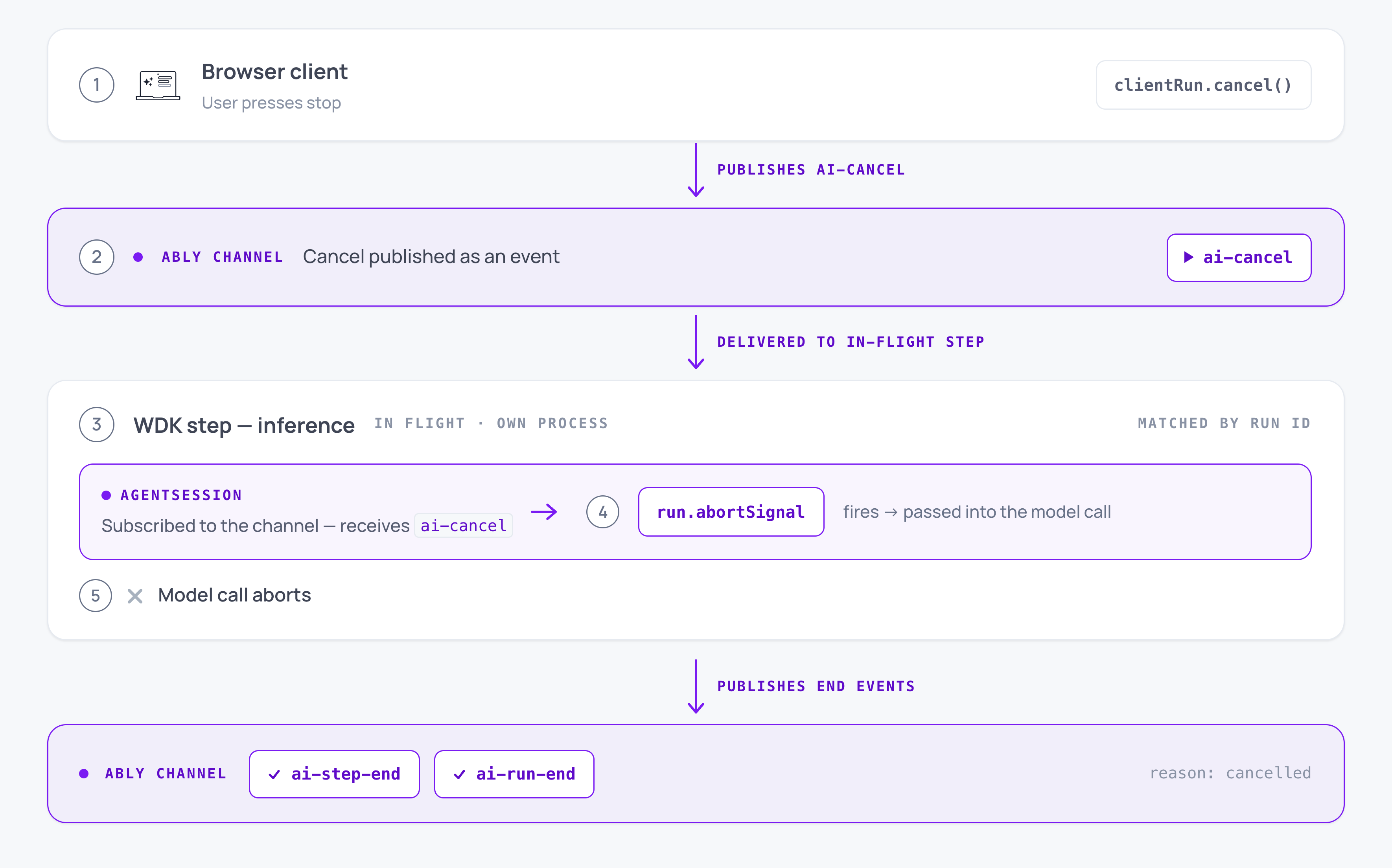
Because each WDK step constructs its own session and routes its own cancels, `run.abortSignal` fires in whichever step is subscribed when the cancel lands. An inference step passes that signal into its model call, aborts, and publishes the `cancelled` terminal inline, and the workflow stops scheduling further steps. A cancel that lands while a tool step is in flight fires that step's `run.abortSignal` too; wire it into any long-running tool work so the tool stops rather than running to completion.
## Suspend and resume across workflows
The WDK step holding the Run calls `run.suspend()`, publishes `ai-run-suspend`, and returns; the workflow completes. When the client posts a continuation invocation (a tool result or an approval response), the agent route starts a fresh workflow. That workflow's `openRun` step calls `createRun` as usual; the SDK reads the existing `runId` the continuation's trigger names and publishes `ai-run-resume` rather than `ai-run-start`.
The invocation is a poke and a pointer. Its HTTP body carries no session content, only the id of the channel event the client just published; the agent reads that event from the channel to learn what to do. One workflow run per HTTP POST, so continuations are new workflow runs on the same AI Transport `runId`, not resumes of the original workflow.
WDK's own hooks can hold a workflow open while it waits for external input. The design in the [getting-started walkthrough](https://ably.com/docs/ai-transport/getting-started/vercel-wdk.md) ends the workflow instead, because the continuation arrives as a fresh POST from the AI Transport client and its trigger already points at the channel event that resumes the Run. The client stays identical to the [Vercel AI SDK integration](https://ably.com/docs/ai-transport/frameworks/vercel-ai-sdk-ui.md), with no workflow-aware code on the browser side.
## Scope and trade-offs
Vercel WDK is intentionally focused on execution durability. By design, it does not model conversation state or route signals between clients and a running step. AI Transport adds both without changing how you write workflows. The workflow decides what runs and when; AI Transport decides what appears in the conversation and to whom.
Boundaries to keep in mind:
- The workflow function is a deterministic orchestrator. WDK re-executes it on every wake-up, replaying recorded step results, and rejects I/O inside it. All channel work happens inside steps.
- Only serializable values cross the workflow-to-step boundary. An `Ably.Realtime` client or an `AgentSession` cannot be passed between steps. Each step constructs its own and reconstructs Run state from the channel with `adoptRun` and `load`.
- Durability applies at the step boundary, not mid-chunk of an LLM stream. WDK re-runs the whole step; its Step opens fresh under the same `stepId` and the retry's output supersedes the failed attempt.
- Publish `run.end({ reason: 'error' })` from the workflow's catch when a step exhausts its retries, and give that cleanup step `maxRetries = 0` so its own failure cannot cascade. The catch holds the Run's ids only once `openRun` has returned them, so a turn whose `openRun` fails every attempt strands no Run: nothing was opened. Alert on persistent `openRun` failure so a turn that never starts does not pass silently.
## Read next
- [Get started with Vercel WDK](https://ably.com/docs/ai-transport/getting-started/vercel-wdk.md): the full walkthrough.
- [Durable execution](https://ably.com/docs/ai-transport/features/durable-execution.md): the framework-agnostic pattern.
- [Steps](https://ably.com/docs/ai-transport/concepts/steps.md): the unit a WDK step publishes.
- [AgentSession API reference](https://ably.com/docs/ai-transport/api/javascript/core/agent-session.md): `adoptRun`, `createStep`, `detach`, and `end`.
## Related Topics
- [Vercel AI SDK UI](https://ably.com/docs/ai-transport/frameworks/vercel-ai-sdk-ui.md): How Ably AI Transport integrates with Vercel AI SDK UI (@ai-sdk/react) to add durable sessions and multi-device sync to useChat.
- [Vercel AI SDK Core](https://ably.com/docs/ai-transport/frameworks/vercel-ai-sdk-core.md): How Ably AI Transport integrates with Vercel AI SDK Core (the `ai` library) on the server. Codec, streamText, and the UI message stream.
- [Temporal](https://ably.com/docs/ai-transport/frameworks/temporal.md): How Ably AI Transport composes with Temporal. One activity per Step, activity ids as stepIds, retry supersedes on the channel, cancels routed through Ably rather than Temporal signals.
## Documentation Index
To discover additional Ably documentation:
1. Fetch [llms.txt](https://ably.com/llms.txt) for the canonical list of available pages.
2. Identify relevant URLs from that index.
3. Fetch target pages as needed.
Avoid using assumed or outdated documentation paths.