# Token streaming
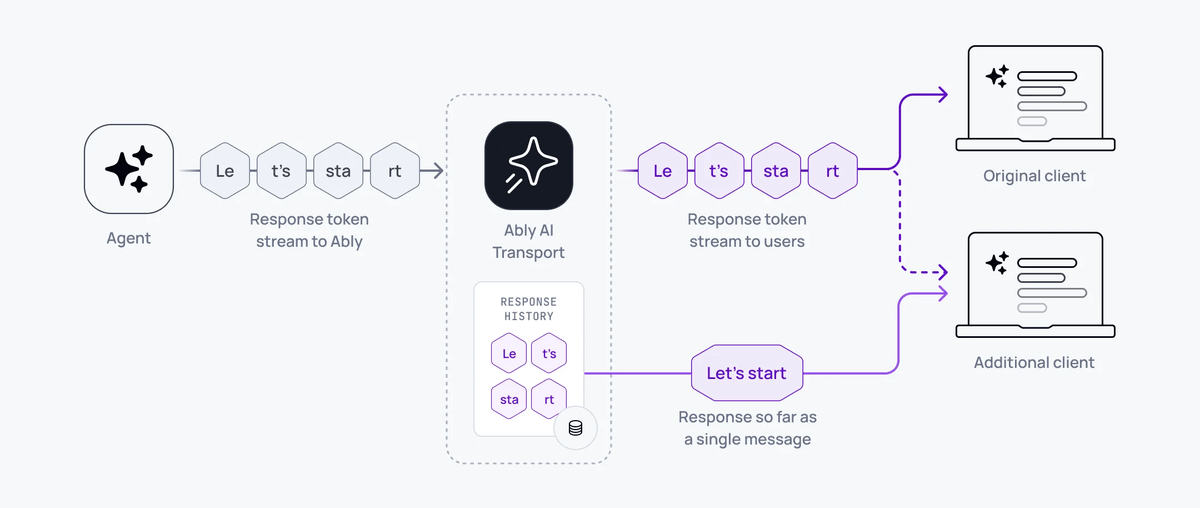
Tokens are streamed to subscribing clients in realtime, as the model generates them. The same response is available as a single aggregated message to clients connecting later. AI Transport streams tokens by appending to a durable channel message.
Tokens stream from the model to every connected client as the LLM generates them. The same response is also available as a single coherent message to any client that reconnects, refreshes, or loads history.
A minimal server-side stream uses one call:
#### Javascript

```
const { reason } = await turn.streamResponse(result.toUIMessageStream());
```
That single line reads the LLM stream, encodes tokens through the codec, publishes messages to the Ably channel, handles abort signals, and returns when the stream completes or is cancelled.
## How it works
The transport layer treats a streamed response as one logical message built incrementally by appending each token to a single Ably channel message. A real-time subscriber receives each appended token as it arrives. A client that joins later, refreshes, or reconnects sees the accumulated content of that message up to the latest append; it does not need to replay each token to rebuild the response.
A streamed message moves through three states:
| State | Meaning |
| --- | --- |
| `streaming` | Tokens are being appended. The message grows as tokens arrive. |
| `finished` | The stream completed normally. The message is final. |
| `aborted` | The stream was cancelled or failed. The partial message is preserved. |
The stream status is carried in the message header (`x-ably-status`). Clients check this to detect whether a message is still streaming.
## Implement token streaming
### Server
The server creates a turn, invokes the LLM, and streams the response:
#### Javascript

```
import { createServerTransport } from '@ably/ai-transport/vercel';

const transport = createServerTransport({ channel });
const turn = transport.newTurn({ turnId, clientId });

await turn.start();
await turn.addMessages(messages, { clientId });

const result = streamText({
  model: anthropic('claude-sonnet-4-20250514'),
  messages: conversationHistory,
  abortSignal: turn.abortSignal,
});

const { reason } = await turn.streamResponse(result.toUIMessageStream());
await turn.end(reason);
```
`streamResponse` accepts any `ReadableStream`. For Vercel AI SDK, `result.toUIMessageStream()` provides the right format. For other frameworks, produce a `ReadableStream` of your codec's event type.
### Client
With Vercel's `useChat`:
#### Javascript

```
const { chatTransport } = useChatTransport();
const { messages } = useChat({ transport: chatTransport });
```
With the generic hooks:
#### Javascript

```
const { nodes } = useView();
// Each node.message contains the streamed content, updating in real time.
```
## Under the hood
The codec converts domain events to Ably operations:
- Start: create a new Ably message on the channel.
- Append: append content to the existing message (Ably message append operation).
- Close: update the message with a terminal status (`finished` or `aborted`).
If an append fails, for example due to a transient network issue, the encoder falls back to a full message update operation to recover. The accumulated response is never lost.
## Append rollup
LLM token streaming produces high-rate traffic. Some models emit over 150 distinct token events per second. AI Transport rolls up multiple appends into a single published message, so a single response does not hit the [message rate limit](https://ably.com/docs/platform/pricing/limits.md?source=llms.txt#connection) on a connection.
1. Your agent streams tokens to the channel at the model's output rate.
2. Ably publishes the first token immediately, then rolls up subsequent tokens within the rollup window.
3. Clients receive the same content, delivered in fewer discrete messages.
By default, Ably delivers a single response stream at 25 messages per second, or the model output rate, whichever is lower. Ably charges for the number of published messages, not the number of streamed tokens.
### Configure rollup behaviour
Set the rollup window for a connection using the `appendRollupWindow` [transport parameter](https://ably.com/docs/api/realtime-sdk.md?source=llms.txt#client-options):
| `appendRollupWindow` | Maximum message rate for a single response |
|---|---|
| 0ms | Model output rate |
| 20ms | 50 messages/s |
| 40ms (default) | 25 messages/s |
| 100ms | 10 messages/s |
| 500ms (maximum) | 2 messages/s |
#### Javascript

```
const ably = new Ably.Realtime({
  authUrl: '/auth',
  transportParams: { appendRollupWindow: 100 },
});
```
## Edge cases and unhappy paths
- A network drop during streaming pauses delivery to the affected client. The server keeps publishing. On reconnect, the client receives the accumulated content of the message up to the latest append, not a replay of every token. This allows the client to efficiently catchup to the latest response state without replaying the response token-by-token.
- An aborted stream leaves the partial message on the channel with status `aborted`. Render it the same as a complete message; treat the absence of further tokens as the signal to stop animating.
- If `appendRollupWindow` is set to `0ms` to maximise model output rate, you become responsible for keeping the publish rate under your connection limit.
- An append fallback (full message update) is invisible to subscribers; the message content is consistent. If you log channel operations, you see periodic updates instead of appends.
- A turn that times out on the server before the stream finishes ends with reason `'error'`. The partial message has status `aborted`.
## FAQ
### What happens to the stream when the client tab closes?
The agent keeps streaming. The session and message persist on the channel. When the user returns, the client loads the accumulated content of the message and receives any further tokens in real time.
### Does Ably charge per token?
No. Ably charges per published message, not per token. The append rollup reduces the publish rate; multiple tokens become one published message. See [pricing](https://ably.com/docs/platform/pricing.md?source=llms.txt) for the current rates.
### How do I stream more than one message per turn?
Use `turn.addMessages()` for discrete messages and `turn.streamResponse()` for streamed ones. Each call creates a separate Ably message; the turn is the unit that groups them.
### Why does my client see fewer tokens than the model emits?
The append rollup compacts multiple tokens into single published messages within the rollup window. The content is identical; the delivery is fewer, larger updates. Set `appendRollupWindow` to `0ms` to disable rollup and deliver every model token as its own message, subject to the connection rate limit.
### What status do I see on a cancelled response?
The message keeps the content it had at the time of the cancel and its `x-ably-status` header transitions to `aborted`. Use this to distinguish a partial response from a complete one.
## Related features
- [Cancellation](https://ably.com/docs/ai-transport/features/cancellation.md?source=llms.txt): stop a stream mid-response.
- [Reconnection and recovery](https://ably.com/docs/ai-transport/features/reconnection-and-recovery.md?source=llms.txt): resume streams after disconnection.
- [History and replay](https://ably.com/docs/ai-transport/features/history.md?source=llms.txt): load past streamed responses from channel history.
## Related Topics
- [Cancellation](https://ably.com/docs/ai-transport/features/cancellation.md?source=llms.txt): Cancel AI responses mid-stream with Ably AI Transport. Scoped cancel signals, server-side authorization, and graceful abort handling.
- [Reconnection and recovery](https://ably.com/docs/ai-transport/features/reconnection-and-recovery.md?source=llms.txt): AI Transport streams survive connection drops automatically. Clients reconnect and resume from where they left off with no lost tokens.
- [Multi-device sessions](https://ably.com/docs/ai-transport/features/multi-device.md?source=llms.txt): Share AI conversations across tabs, phones, and laptops with Ably AI Transport. All devices see the same session in real time.
- [History and replay](https://ably.com/docs/ai-transport/features/history.md?source=llms.txt): Load conversation history from Ably channels with AI Transport. Paginated history, gapless continuity, and scroll-back patterns.
- [Conversation branching](https://ably.com/docs/ai-transport/features/branching.md?source=llms.txt): Edit user messages, regenerate AI responses, and navigate branches with Ably AI Transport. The full history is preserved as a tree.
- [Interruption](https://ably.com/docs/ai-transport/features/interruption.md?source=llms.txt): Let users interrupt AI agents mid-stream with Ably AI Transport. Cancel-then-send and send-alongside patterns for responsive AI interactions.
- [Concurrent turns](https://ably.com/docs/ai-transport/features/concurrent-turns.md?source=llms.txt): Run multiple AI turns simultaneously with Ably AI Transport. Independent streams, scoped cancellation, and multi-agent support.
- [Tool calling](https://ably.com/docs/ai-transport/features/tool-calling.md?source=llms.txt): Stream tool invocations and results through Ably AI Transport. Server-executed and client-executed tools with persistent state.
- [Human-in-the-loop](https://ably.com/docs/ai-transport/features/human-in-the-loop.md?source=llms.txt): Add human approval gates to AI agent workflows with Ably AI Transport. Approve tool executions and provide input across devices.
- [Optimistic updates](https://ably.com/docs/ai-transport/features/optimistic-updates.md?source=llms.txt): User messages appear instantly in Ably AI Transport. Optimistic insertion with automatic reconciliation when the server confirms.
- [Agent presence](https://ably.com/docs/ai-transport/features/agent-presence.md?source=llms.txt): Show agent status in your AI application with Ably Presence. Display streaming, thinking, idle, and offline states in real time.
- [Push notifications](https://ably.com/docs/ai-transport/features/push-notifications.md?source=llms.txt): Notify users when AI agents complete background tasks with Ably Push Notifications. Reach users even when they're offline.
- [Chain of thought](https://ably.com/docs/ai-transport/features/chain-of-thought.md?source=llms.txt): Stream reasoning and thinking content alongside responses with Ably AI Transport. Display chain-of-thought in real time.
- [Double texting](https://ably.com/docs/ai-transport/features/double-texting.md?source=llms.txt): Handle users sending multiple messages while the AI is streaming with Ably AI Transport. Queue or run messages concurrently.
## Documentation Index
To discover additional Ably documentation:
1. Fetch [llms.txt](https://ably.com/llms.txt?source=llms.txt) for the canonical list of available pages.
2. Identify relevant URLs from that index.
3. Fetch target pages as needed.
Avoid using assumed or outdated documentation paths.