# Multi-device sessions
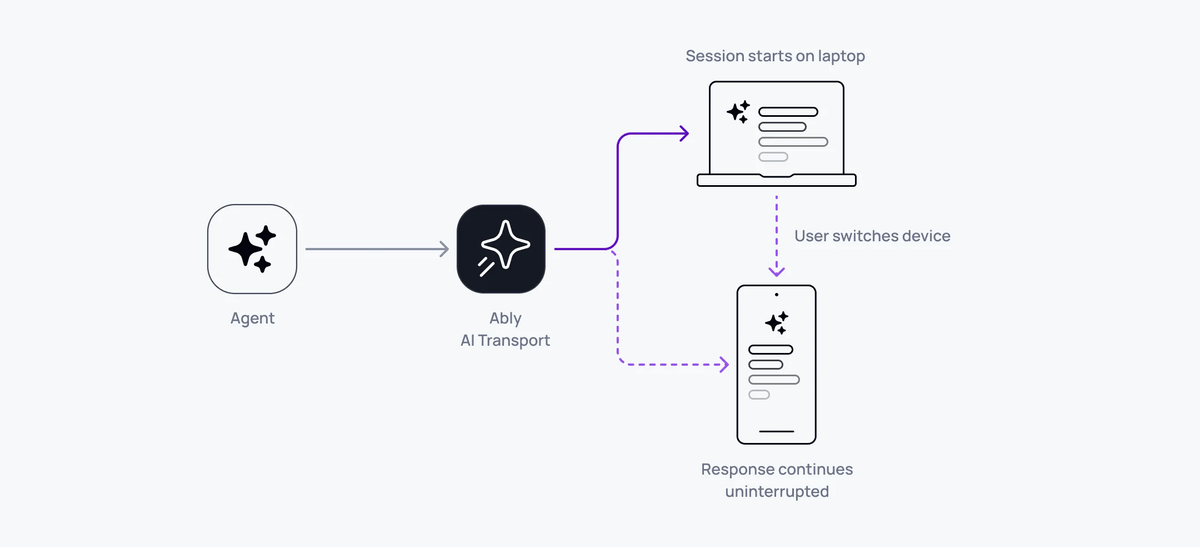
Multi-device sessions in AI Transport work because the session is a shared Ably channel, not a private connection. Any device that subscribes to the channel sees every message - user prompts, agent responses, and control signals - in real time. Open a second tab, switch to your phone, or share a session with a colleague.
## How it works
All clients connected to the same Ably channel share the same durable session. When any participant publishes (a user message, an agent response, a cancel signal), every other participant receives it through their channel subscription.
The client transport distinguishes between "own" turns (started by this client) and "observer" turns (started by someone else). Both types are tracked, decoded, and added to the conversation tree. The UI updates for all clients, regardless of who initiated the action.
Minimal code - no special configuration needed:
### Javascript

```
// Client A (laptop)
const transport = useClientTransport({
  channel: ably.channels.get('shared-session'),
  codec: UIMessageCodec,
  clientId: 'user-laptop',
})

// Client B (phone) - same channel name, different device
const transport = useClientTransport({
  channel: ably.channels.get('shared-session'),
  codec: UIMessageCodec,
  clientId: 'user-phone',
})
```
Both clients see the same conversation. When Client A sends a message, Client B sees it immediately.
## Own turns vs observer turns
The transport distinguishes between turns initiated by the current client and turns from other participants:
- Own turns - the client sent the HTTP POST that created this turn. It receives an `ActiveTurn` with a `stream` and `cancel()` method.
- Observer turns - another client or agent created this turn. The observer sees the turn lifecycle events and streamed messages, but doesn't have a direct stream handle.
Both types appear in the conversation tree and UI. The difference is in how they're routed internally - own turns have a dedicated stream, observer turns are accumulated from channel messages.
## Active turn tracking
Track which clients have active turns using `useActiveTurns`:
### Javascript

```
const activeTurns = useActiveTurns(transport)
// Map>

// Check if any client is streaming
const isAnyoneStreaming = activeTurns.size > 0

// Check if a specific client is streaming
const isAgentWorking = activeTurns.has('agent-1')
```
This works across all connected clients. If Client A starts a turn, Client B's `useActiveTurns` updates immediately.
## Sync with useChat
When using Vercel's `useChat`, the `useMessageSync` hook pushes messages from other clients into `useChat`'s state:
### Javascript

```
const { messages, setMessages } = useChat({ transport: chatTransport })
useMessageSync(transport, setMessages)
```
Without `useMessageSync`, `useChat` only sees messages from its own sends. The sync hook bridges the gap by feeding observer messages into the state.
## Late joiners
A client that connects after the conversation has started loads the full history from the channel:
### Javascript

```
const { nodes, hasOlder, loadOlder } = useView(transport, { limit: 30 })
```
`useView` loads history on mount. If a response is currently streaming, the late joiner sees it in progress - the lifecycle tracker synthesizes missing events so the stream renders correctly.
## Client identity
Each client has a `clientId` that identifies it across the session. Set the client ID through Ably token authentication to ensure it's verified and can't be spoofed:
### Javascript

```
// In your token endpoint
const token = jwt.sign({
  'x-ably-clientId': 'user-123',
  // ...
}, keySecret)
```
The `clientId` is used throughout: turn ownership, cancel scoping (`{ own: true }` filters by the sender's client ID), and active turn tracking.
## Related features
- [Reconnection and recovery](https://ably.com/docs/ai-transport/features/reconnection-and-recovery.md) - each device reconnects independently
- [Cancellation](https://ably.com/docs/ai-transport/features/cancellation.md) - cancel from any device
- [History and replay](https://ably.com/docs/ai-transport/features/history.md) - late joiners load full conversation
- [Concurrent turns](https://ably.com/docs/ai-transport/features/concurrent-turns.md) - multiple clients sending simultaneously
- [React hooks](https://ably.com/docs/ai-transport/api-reference/react-hooks.md) - reference for `useActiveTurns`, `useMessageSync`, and other hooks.
- [Sessions and turns](https://ably.com/docs/ai-transport/how-it-works/sessions-and-turns.md) - how shared sessions enable multi-device access.
- [Get started](https://ably.com/docs/ai-transport/getting-started/vercel-ai-sdk.md) - build your first AI Transport application.
## Related Topics
- [Token streaming](https://ably.com/docs/ai-transport/features/token-streaming.md): Stream AI-generated tokens to clients in realtime using AI Transport, with support for message-per-response and message-per-token patterns.
- [Cancellation](https://ably.com/docs/ai-transport/features/cancellation.md): Cancel AI responses mid-stream with Ably AI Transport. Scoped cancel signals, server-side authorization, and graceful abort handling.
- [Reconnection and recovery](https://ably.com/docs/ai-transport/features/reconnection-and-recovery.md): AI Transport streams survive connection drops automatically. Clients reconnect and resume from where they left off with no lost tokens.
- [History and replay](https://ably.com/docs/ai-transport/features/history.md): Load conversation history from Ably channels with AI Transport. Paginated history, gapless continuity, and scroll-back patterns.
- [Conversation branching](https://ably.com/docs/ai-transport/features/branching.md): Branch conversations with edit and regenerate in Ably AI Transport. Navigate sibling branches and maintain full conversation history.
- [Interruption and barge-in](https://ably.com/docs/ai-transport/features/interruption.md): Let users interrupt AI agents mid-stream with Ably AI Transport. Cancel-then-send and send-alongside patterns for responsive AI interactions.
- [Concurrent turns](https://ably.com/docs/ai-transport/features/concurrent-turns.md): Run multiple AI turns simultaneously with Ably AI Transport. Independent streams, scoped cancellation, and multi-agent support.
- [Edit and regenerate](https://ably.com/docs/ai-transport/features/edit-and-regenerate.md): Edit user messages and regenerate AI responses with Ably AI Transport. Fork conversations and navigate between branches.
- [Tool calling](https://ably.com/docs/ai-transport/features/tool-calling.md): Stream tool invocations and results through Ably AI Transport. Server-executed and client-executed tools with persistent state.
- [Human-in-the-loop](https://ably.com/docs/ai-transport/features/human-in-the-loop.md): Add human approval gates to AI agent workflows with Ably AI Transport. Approve tool executions and provide input across devices.
- [Optimistic updates](https://ably.com/docs/ai-transport/features/optimistic-updates.md): User messages appear instantly in Ably AI Transport. Optimistic insertion with automatic reconciliation when the server confirms.
- [Agent presence](https://ably.com/docs/ai-transport/features/agent-presence.md): Show agent status in your AI application with Ably Presence. Display streaming, thinking, idle, and offline states in real time.
- [Push notifications](https://ably.com/docs/ai-transport/features/push-notifications.md): Notify users when AI agents complete background tasks with Ably Push Notifications. Reach users even when they're offline.
- [Chain of thought](https://ably.com/docs/ai-transport/features/chain-of-thought.md): Stream reasoning and thinking content alongside responses with Ably AI Transport. Display chain-of-thought in real time.
- [Double texting](https://ably.com/docs/ai-transport/features/double-texting.md): Handle users sending multiple messages while the AI is streaming with Ably AI Transport. Queue or run messages concurrently.
## Documentation Index
To discover additional Ably documentation:
1. Fetch [llms.txt](https://ably.com/llms.txt) for the canonical list of available pages.
2. Identify relevant URLs from that index.
3. Fetch target pages as needed.
Avoid using assumed or outdated documentation paths.