# Interruption
Your users can change direction mid-response. AI Transport's session layer lets a client cancel the in-progress turn and start a new one without breaking the stream.
Interruption lets a user send a new message while the agent is still streaming a response. The new message creates a new [turn](https://ably.com/docs/ai-transport/concepts/turns.md?source=llms.txt) on the [session](https://ably.com/docs/ai-transport/concepts/sessions.md?source=llms.txt); whether the existing turn is cancelled first or runs in parallel is up to the application. In voice contexts this pattern is also known as barge-in.
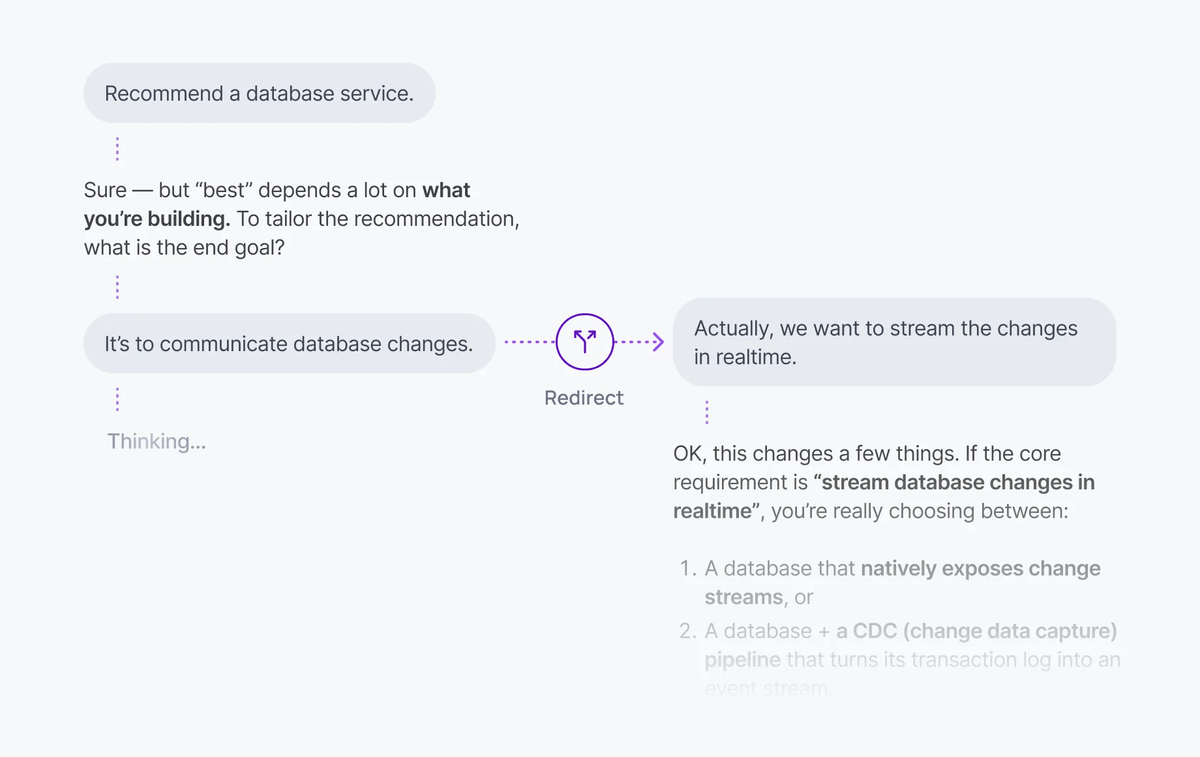
A minimal interruption call cancels the active turn and sends a new message:
#### Javascript

```
await transport.cancel();
await transport.view.send([{ id: crypto.randomUUID(), role: 'user', parts: [{ type: 'text', text: 'Wait, focus on the budget instead' }] }]);
```
## How it works
Turns are independent units of agent work on a session. The session is bidirectional, so the client publishes a cancel signal on the channel at any time, regardless of whether the response is still in flight. A new turn does not have to wait for the previous one to finish.
There are two patterns for handling interruption:
| Pattern | Behaviour | Use case |
| --- | --- | --- |
| Cancel-then-send | Cancel the active turn, then send a new message. | Stop button followed by a new prompt. |
| Send-alongside | Send a new message while the active turn continues. | Follow-up without waiting. |
With cancel-then-send, the active turn is aborted before the new message dispatches. The agent stops generating, cleans up, and starts a fresh turn. With send-alongside, both turns run concurrently, each with its own stream and cancel handle.
## Implement cancel-then-send
Detect whether a turn is active, cancel it, then send a new message. This pattern mimics a stop button followed by a re-prompt.
### Javascript

```
import { useActiveTurns, useClientTransport, useView } from '@ably/ai-transport/react';

function Chat({ chatId }) {
  const { transport } = useClientTransport({ channelName: chatId });
  const { send } = useView();
  const activeTurns = useActiveTurns();

  const handleSend = async (text) => {
    if (activeTurns.size > 0) {
      await transport.cancel();
    }

    await send([{ id: crypto.randomUUID(), role: 'user', parts: [{ type: 'text', text }] }]);
  };
}
```
`transport.cancel()` publishes a cancel signal on the channel. The server's `abortSignal` fires, the LLM stream stops, and the turn ends with reason `'cancelled'`. The new message is then sent on a clean turn.
## Implement send-alongside
Send a new message without cancelling the active turn. Both turns run concurrently. The agent continues streaming the first response while processing the new input.
### Javascript

```
const handleSend = async (text) => {
  await send([{ id: crypto.randomUUID(), role: 'user', parts: [{ type: 'text', text }] }]);
};
```
Each concurrent turn has its own stream and its own cancel handle. Cancel them independently:
### Javascript

```
await transport.cancel({ turnId: specificTurnId });
```
## Detect active turns
The `useActiveTurns` hook returns a `Map>` of currently streaming turns. Use it to check whether the agent is mid-response:
### Javascript

```
const activeTurns = useActiveTurns({ transport });

const isStreaming = activeTurns.size > 0;

const agentTurns = activeTurns.get('agent-client-id');
const agentIsStreaming = agentTurns !== undefined && agentTurns.size > 0;
```
This is what drives the toggle between a send button and a stop button, or disables input while a cancellation is in progress.
## Edge cases and unhappy paths
- The cancel signal is asynchronous. A few more tokens arrive after `transport.cancel()` returns and before the agent's `abortSignal` fires. The view emits them; treat tokens after a cancel as part of the cancelled turn, not the new one.
- A turn that cancels while waiting for a tool result ends with reason `'cancelled'`. Tool invocations triggered before the cancel still run on the server unless your handler honours the same `abortSignal`.
- A network drop on the client cancels nothing. The server keeps streaming into the session. When the client reconnects, the response is still there. Use `useActiveTurns` to decide whether to show a stop button on reconnect.
- Sending alongside an existing turn is rate-limited by your channel and any server-side concurrency you enforce. See [concurrent turns](https://ably.com/docs/ai-transport/features/concurrent-turns.md?source=llms.txt) for the multiplexing model.
- The `'cancelled'` reason is reported through the view's turn events. Do not rely on the absence of further tokens to detect a cancel.
## FAQ
### What happens to tokens already in flight when I cancel?
The agent keeps publishing until its `abortSignal` fires. A small tail of tokens arrives after `cancel()` returns. The view reflects them on the cancelled turn; the new turn is unaffected.
### Can I cancel one of several concurrent turns without touching the others?
Yes. Pass a `turnId` to `transport.cancel({ turnId })`. Only the matching turn is cancelled.
### Does `transport.cancel()` work from a different device?
Yes. Any client connected to the same session publishes a cancel signal. The server receives it through its channel subscription, regardless of which client started the turn. See [cancellation](https://ably.com/docs/ai-transport/features/cancellation.md?source=llms.txt) for the authorisation model.
### What if the server is down when I send a new message after a cancel?
The cancel signal is delivered when the server reconnects to the channel. The new message creates a new turn as soon as the server's poke endpoint is reachable. The session and existing messages are unaffected.
### How is interruption different from concurrent turns?
Interruption is the user-facing pattern: stop and re-prompt, or send a follow-up. [Concurrent turns](https://ably.com/docs/ai-transport/features/concurrent-turns.md?source=llms.txt) is the underlying mechanism that makes both patterns possible. Multiple turns coexist on the same session.
## Related features
- [Cancellation](https://ably.com/docs/ai-transport/features/cancellation.md?source=llms.txt): cancel signals, filters, and server-side abort handling.
- [Concurrent turns](https://ably.com/docs/ai-transport/features/concurrent-turns.md?source=llms.txt): multiple turns running in parallel.
- [Double texting](https://ably.com/docs/ai-transport/features/double-texting.md?source=llms.txt): handling multiple user messages in quick succession.
## Related Topics
- [Token streaming](https://ably.com/docs/ai-transport/features/token-streaming.md?source=llms.txt): Stream AI-generated tokens to clients in realtime using AI Transport, with support for message-per-response and message-per-token patterns.
- [Cancellation](https://ably.com/docs/ai-transport/features/cancellation.md?source=llms.txt): Cancel AI responses mid-stream with Ably AI Transport. Scoped cancel signals, server-side authorization, and graceful abort handling.
- [Reconnection and recovery](https://ably.com/docs/ai-transport/features/reconnection-and-recovery.md?source=llms.txt): AI Transport streams survive connection drops automatically. Clients reconnect and resume from where they left off with no lost tokens.
- [Multi-device sessions](https://ably.com/docs/ai-transport/features/multi-device.md?source=llms.txt): Share AI conversations across tabs, phones, and laptops with Ably AI Transport. All devices see the same session in real time.
- [History and replay](https://ably.com/docs/ai-transport/features/history.md?source=llms.txt): Load conversation history from Ably channels with AI Transport. Paginated history, gapless continuity, and scroll-back patterns.
- [Conversation branching](https://ably.com/docs/ai-transport/features/branching.md?source=llms.txt): Edit user messages, regenerate AI responses, and navigate branches with Ably AI Transport. The full history is preserved as a tree.
- [Concurrent turns](https://ably.com/docs/ai-transport/features/concurrent-turns.md?source=llms.txt): Run multiple AI turns simultaneously with Ably AI Transport. Independent streams, scoped cancellation, and multi-agent support.
- [Tool calling](https://ably.com/docs/ai-transport/features/tool-calling.md?source=llms.txt): Stream tool invocations and results through Ably AI Transport. Server-executed and client-executed tools with persistent state.
- [Human-in-the-loop](https://ably.com/docs/ai-transport/features/human-in-the-loop.md?source=llms.txt): Add human approval gates to AI agent workflows with Ably AI Transport. Approve tool executions and provide input across devices.
- [Optimistic updates](https://ably.com/docs/ai-transport/features/optimistic-updates.md?source=llms.txt): User messages appear instantly in Ably AI Transport. Optimistic insertion with automatic reconciliation when the server confirms.
- [Agent presence](https://ably.com/docs/ai-transport/features/agent-presence.md?source=llms.txt): Show agent status in your AI application with Ably Presence. Display streaming, thinking, idle, and offline states in real time.
- [Push notifications](https://ably.com/docs/ai-transport/features/push-notifications.md?source=llms.txt): Notify users when AI agents complete background tasks with Ably Push Notifications. Reach users even when they're offline.
- [Chain of thought](https://ably.com/docs/ai-transport/features/chain-of-thought.md?source=llms.txt): Stream reasoning and thinking content alongside responses with Ably AI Transport. Display chain-of-thought in real time.
- [Double texting](https://ably.com/docs/ai-transport/features/double-texting.md?source=llms.txt): Handle users sending multiple messages while the AI is streaming with Ably AI Transport. Queue or run messages concurrently.
## Documentation Index
To discover additional Ably documentation:
1. Fetch [llms.txt](https://ably.com/llms.txt?source=llms.txt) for the canonical list of available pages.
2. Identify relevant URLs from that index.
3. Fetch target pages as needed.
Avoid using assumed or outdated documentation paths.