# Durable execution
Your agent turn survives a mid-flight process crash. AI Transport's Runs and Steps let a fresh process adopt the in-flight Run, retry the failed Step under the same stepId, and supersede the dead attempt's channel output cleanly.
An agent turn is often more than one HTTP request's worth of work. An LLM call, a tool execution, a follow-up call, sometimes a suspend and a later resume. Each stage is a candidate for failure: a serverless cold start, a container redeploy, a spot instance eviction. Durable execution keeps the whole turn safe by pushing each stage into a workflow engine's activity and using AI Transport's [Steps](https://ably.com/docs/ai-transport/concepts/steps.md) to keep the channel clean.
AI Transport is not itself a durable execution engine. It works with any engine that gives each retryable activity a stable identifier, including [Temporal](https://ably.com/docs/ai-transport/frameworks/temporal.md), [Vercel WDK](https://ably.com/docs/ai-transport/frameworks/vercel-wdk.md), Inngest, and trigger.dev.
## How it works
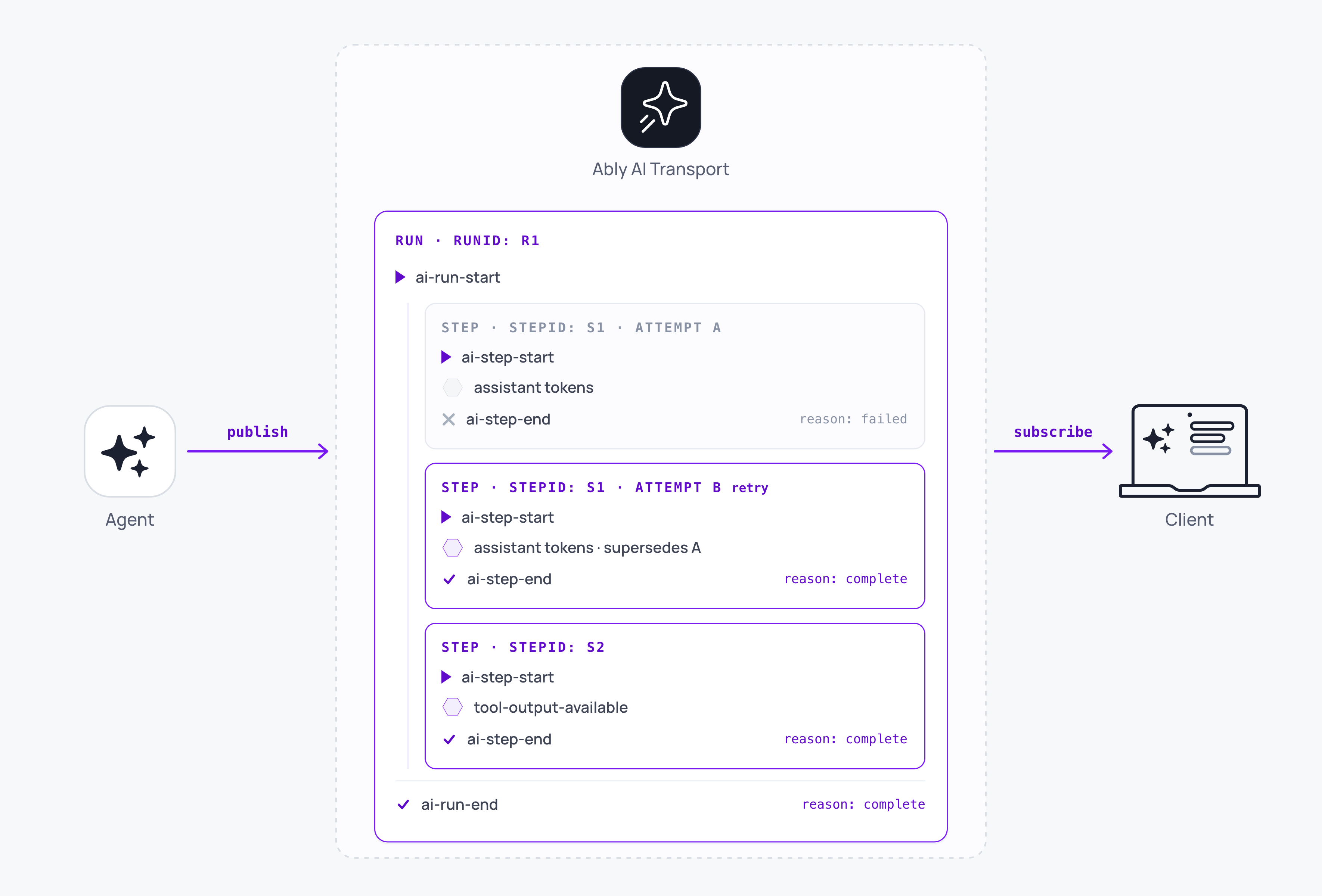
Each retryable step or activity in the workflow engine maps to an SDK [Step](https://ably.com/docs/ai-transport/concepts/steps.md) with a `stepId`. When the workflow engine retries a failed activity, by re-using the `stepId` the SDK automatically supersedes the previous failed activity's partial output, leaving the conversation history clean.
To create a Step inside a Run, the SDK needs three identifiers: `runId`, `invocationId`, and `triggerEventId`. These identifiers allow different retryable activities, scheduled across different durable-execution workers, to contribute Steps to an existing Run, even if that Run was started in a different activity:
### Javascript

```
import * as Ably from 'ably';
import { createAgentSession } from '@ably/ai-transport';
import { UIMessageCodec } from '@ably/ai-transport/vercel';

async function runToolStep({ runId, invocationId, triggerEventId, activityId, toolCall }) {
  const ably = new Ably.Realtime({ key: process.env.ABLY_API_KEY });
  const session = createAgentSession({
    client: ably,
    channelName: 'conversation-42',
    codec: UIMessageCodec,
  });
  await session.connect();

  const run = session.adoptRun({ runId, invocationId, triggerEventId });
  await run.load();

  const output = await runYourTool(toolCall);

  const step = run.createStep({ stepId: activityId });
  await step.start();
  await step.send({ type: 'tool-output-available', toolCallId: toolCall.id, output });
  await step.end();

  await session.detach();
  ably.close();
}
```
`load` completes the adoption. It confirms the Run is still open on the channel and routes any cancels for this Run to the handle's abort signal. It rejects if the Run has already been suspended or ended, because a Run in either state can no longer accept new Steps.
## Retry a Step under a stable stepId
For a retry to supersede the failed attempt, both attempts must publish under the same `stepId`. Pass the workflow engine's own per-activity id as the `stepId` option to [`run.createStep()`](https://ably.com/docs/ai-transport/api/javascript/core/agent-session.md#create-step). Any id that the engine keeps stable across retries of the same activity is a valid source. In Temporal, that is the activity id. In [Vercel WDK](https://ably.com/docs/ai-transport/frameworks/vercel-wdk.md), it is `getStepMetadata().stepId`.
Inside a single process, leave `stepId` out. The SDK picks one for you and reuses it if the previous Step ended `failed`, so an in-process retry supersedes without any extra bookkeeping.
## Close the Run only once
Every activity ends by releasing the channel with [`session.detach()`](https://ably.com/docs/ai-transport/api/javascript/core/agent-session.md#detach). Detach unsubscribes and drops the channel without publishing anything, so the Run stays open on the channel for the next activity to adopt.
Exactly one process publishes the Run's terminal event. On the happy path that is the activity holding the final Step: it calls `run.end(...)` (or `run.suspend()` if the Run is waiting on external input) before it detaches. Account for the failure path as well: if a turn exhausts its retries with the Run still open, nothing has ended it and every observer's UI stays stuck on `streaming`. Your failure path needs to adopt the Run and call `run.end({ reason: 'error' })` to unstick them.
Do not call [`session.end()`](https://ably.com/docs/ai-transport/api/javascript/core/agent-session.md#session-end) inside a still-running workflow. `session.end()` closes every open Run this session owns as `'cancelled'`, which is the wrong outcome for a Run whose next activity has not run yet. `session.end()` belongs to the final teardown of a turn that runs in a single process, not one driven across workflow-engine activities.
## Route cancels through the channel
Cancels arrive on the Ably channel, not through a workflow signal. Every `AgentSession` subscribes to the channel on connect, so a cancel published by the client fires [`run.abortSignal`](https://ably.com/docs/ai-transport/api/javascript/core/agent-session.md#run) inside the activity that currently holds the Run. Pass that signal into the LLM call as its `abortSignal` and the model call stops with the Step ending `'cancelled'`. No listener activity or workflow signal is required.
Each activity constructs its own `Ably.Realtime` client and its own `AgentSession`. Sharing session objects (instances) across activities is not supported; each activity should connect to the underlying Ably AI Transport session through its own session object. Sharing a Realtime client is only possible when activities run in the same process; workflow engines that isolate each activity in its own process, such as Temporal and Vercel WDK, give each activity a fresh client regardless. Where a client is shared, no activity may close a channel that another Run still uses.
## Edge cases
- Cross-process retry with a fresh `stepId` appends instead of superseding. Two attempts persist in the conversation. Always source `stepId` from the workflow engine's stable per-activity id.
- `adoptRun` on a suspended Run rejects with `InvalidArgument`. Resume via `createRun().start()` with the continuation input event; adoption is for still-active Runs only.
- `adoptRun` on a terminal Run rejects as read-only. There is nothing to publish; the Run is already closed on the wire.
- `load` times out if the Run's `ai-run-start` is not observed within 30 seconds (`options.timeoutMs`). This is a workflow-ordering error: the adopting activity ran before the opener published. Retry with backoff, or raise the timeout when history pages back a long way.
- A cancel arriving before `load()` returns fires `run.abortSignal` synchronously once load resolves. The cancel is not lost.
- A turn that exhausts its retries with the Run still open leaves every observer's UI on `streaming`. Your failure path must adopt the Run and publish `run.end({ reason: 'error' })` so the client unsticks.
- A retry supersedes the previous attempt as soon as it calls `step.start()`, because supersede keys on the fresh, higher-serial `ai-step-start` published under the same `stepId`, not on any output the retry goes on to produce. A retry that starts and then emits nothing still replaces the earlier attempt's output with an empty Step.
- `session.end()` on a still-active Run publishes `ai-run-end` with reason `'cancelled'`. Reserve it for teardown, not mid-workflow handoff.
## FAQ
### Does Ably retry Steps automatically?
No. The workflow engine retries. AI Transport's role is to keep the channel clean when the retry lands: the stable `stepId` causes the retry's `ai-step-start` to supersede the failed attempt.
### Which durable execution engines can I use?
Any engine that gives each retryable unit of work an id it keeps stable across retries of that unit and unique across different units. AI Transport passes that id to [`createStep({ stepId })`](https://ably.com/docs/ai-transport/api/javascript/core/agent-session.md#create-step), so a retry lands under the same `stepId` and supersedes the failed attempt. What differs per engine is where that id comes from:
- Temporal: the activity id. The [`stepIdFor`](https://ably.com/docs/ai-transport/api/javascript/temporal.md) helper reads it from `Context.current().info.activityId` and prefixes it with the Run's invocation id. Temporal is the reference integration, with a [framework page](https://ably.com/docs/ai-transport/frameworks/temporal.md).
- Vercel WDK: `getStepMetadata().stepId`, already stable across retries and unique across workflow runs, so it passes straight to `createStep` with no helper. Integration documented on a [framework page](https://ably.com/docs/ai-transport/frameworks/vercel-wdk.md).
- Inngest and trigger.dev: the stable id each exposes for a step or task. Dedicated helpers are [on the roadmap](https://ably.com/docs/ai-transport/roadmap.md); until then, read that id and pass it to `createStep({ stepId })` yourself.
An engine that does not expose a retry-stable id cannot supersede: derive one that is stable, or the retry double-publishes.
### What happens if a Step throws before `step.start()`?
Nothing is published on the channel. `createStep` mints an id but does no I/O. `start()` is what emits `ai-step-start`. A throw before `start()` leaves the Run unchanged; the retry starts clean.
### Can two Steps run in parallel on one Run?
No. Exactly one Step at a time on a given Run; `step.start()` rejects if another Step is still open. Parallel work runs as [concurrent Runs](https://ably.com/docs/ai-transport/features/concurrent-turns.md) on the same session instead.
### How is `createStep` different from `run.pipe`?
[`AgentRun.pipe`](https://ably.com/docs/ai-transport/api/javascript/core/agent-session.md#pipe) opens an implicit Step lazily at the first output, streams, and closes on stream end. Each `pipe` call is a fresh Step with a fresh id; retries never supersede. Use `pipe` when a turn runs in a single process. Use `createStep({ stepId })` when it runs across workflow-engine activities, or for any case where a re-attempt must replace the failed attempt's output.
## Related features
- [Reconnection and recovery](https://ably.com/docs/ai-transport/features/reconnection-and-recovery.md): what the client side does when a connection drops. Durable execution is the agent-side counterpart.
- [Tool calling](https://ably.com/docs/ai-transport/features/tool-calling.md): each tool becomes its own Step under a workflow engine.
- [Concurrent turns](https://ably.com/docs/ai-transport/features/concurrent-turns.md): parallel Runs on the same session.
## Related Topics
- [Token streaming](https://ably.com/docs/ai-transport/features/token-streaming.md): Stream AI-generated tokens to clients in realtime using AI Transport, with support for message-per-response and message-per-token patterns.
- [Cancellation](https://ably.com/docs/ai-transport/features/cancellation.md): Cancel AI responses mid-stream with Ably AI Transport. Scoped cancel signals, server-side authorization, and graceful abort handling.
- [Reconnection and recovery](https://ably.com/docs/ai-transport/features/reconnection-and-recovery.md): AI Transport streams survive connection drops automatically. Clients reconnect and resume from where they left off with no lost tokens.
- [Multi-device sessions](https://ably.com/docs/ai-transport/features/multi-device.md): Share AI conversations across tabs, phones, and laptops with Ably AI Transport. All devices see the same session in real time.
- [History and replay](https://ably.com/docs/ai-transport/features/history.md): Load conversation history from Ably channels with AI Transport. Paginated history, gapless continuity, and scroll-back patterns.
- [Database hydration](https://ably.com/docs/ai-transport/features/database-hydration.md): Hydrate an AI conversation from your own database with AI Transport and reconcile it with the live Ably channel, with no gap and no duplicate.
- [Branching, edit, and regenerate](https://ably.com/docs/ai-transport/features/branching.md): Edit user messages, regenerate AI responses, and navigate branches with Ably AI Transport. The full history is preserved in the conversation tree.
- [Interruption](https://ably.com/docs/ai-transport/features/interruption.md): Let users interrupt AI agents mid-stream with Ably AI Transport. Cancel-then-send and send-alongside patterns for responsive AI interactions.
- [Concurrent turns](https://ably.com/docs/ai-transport/features/concurrent-turns.md): Run multiple AI turns simultaneously with Ably AI Transport. Independent streams, scoped cancellation, and multi-agent support.
- [Tool calling](https://ably.com/docs/ai-transport/features/tool-calling.md): Stream tool invocations and results through Ably AI Transport. Server-executed and client-executed tools with persistent state.
- [Human-in-the-loop](https://ably.com/docs/ai-transport/features/human-in-the-loop.md): Add human approval gates to AI agent workflows with Ably AI Transport. Approve tool executions and provide input across devices.
- [Optimistic updates](https://ably.com/docs/ai-transport/features/optimistic-updates.md): User messages appear instantly in Ably AI Transport. Optimistic insertion with automatic reconciliation when the server confirms.
- [Agent presence](https://ably.com/docs/ai-transport/features/agent-presence.md): Show agent status in your AI application with Ably Presence. Display streaming, thinking, idle, and offline states in real time.
- [LiveObjects State](https://ably.com/docs/ai-transport/features/liveobjects.md): Give an AI agent live awareness of what the user is doing, and the user live awareness of what the agent is doing, with shared state on the AI Transport session channel via Ably LiveObjects.
- [Push notifications](https://ably.com/docs/ai-transport/features/push-notifications.md): Notify users when AI agents complete background tasks with Ably Push Notifications. Reach users even when they're offline.
- [Chain of thought](https://ably.com/docs/ai-transport/features/chain-of-thought.md): Stream reasoning and thinking content alongside responses with Ably AI Transport. Display chain-of-thought in real time.
- [Double texting](https://ably.com/docs/ai-transport/features/double-texting.md): Handle users sending multiple messages while the AI is streaming with Ably AI Transport. Queue or run messages concurrently.
## Documentation Index
To discover additional Ably documentation:
1. Fetch [llms.txt](https://ably.com/llms.txt) for the canonical list of available pages.
2. Identify relevant URLs from that index.
3. Fetch target pages as needed.
Avoid using assumed or outdated documentation paths.