# Tool calling
Your agents call tools and every client sees the invocation, the result, and the follow-up in realtime. Tool state persists in the session so a user picks up the workflow on any device.
Tool calling in AI Transport supports both server-executed and client-executed tools. Tool invocations and results are published to the session, so every client sees tool activity in realtime and tool state persists in history.
> Tool calling needs a durable session, because the conversation tree holds tool state, and any client can read it back.
## How it works
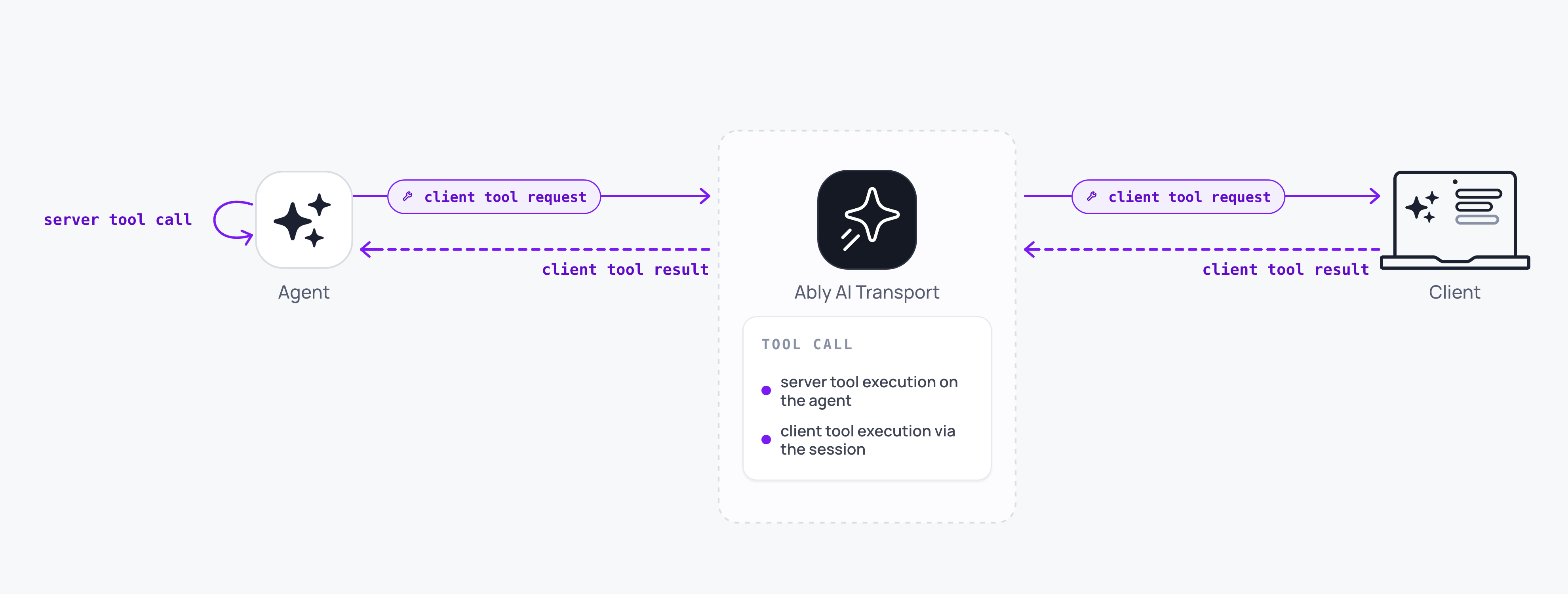
The model does not run a tool. It emits a tool call, and the call's name and arguments stream to the session as the model generates them, so every client watches the call take shape. For a tool that runs on the server, the agent publishes the result to the session as one event on the same run. A tool that runs on the client needs your agent to call `run.suspend()`, so the run stays live while the client does the work. What the client's answer does next depends on the codec: the OpenAI codec re-enters the same run as a continuation, and the Vercel codec opens a fresh reply run beside the suspended one, whose run id the agent assigns.
How that answer reaches the agent depends on the codec. The Vercel codec forks: the client publishes its result as a fresh reply run carrying a copy of the suspended run's messages, and the agent assigns the fork's run id. The OpenAI Responses codec addresses the result to the suspended run and resumes it.
Tool state (invocations, arguments, results) is part of the session's history. Late joiners and reconnecting clients see the full tool activity as well as the final text.
## Server-executed tools
Server-executed tools are the default path. On the agent, the AI SDK handles tool execution during the LLM stream. Tool invocations and results are encoded by the codec and published to the session as part of the turn.
### Javascript

```
const result = streamText({
  model: anthropic('claude-sonnet-4-20250514'),
  messages: conversationHistory,
  tools: {
    getWeather: {
      description: 'Get current weather for a location',
      inputSchema: z.object({ city: z.string() }),
      execute: async ({ city }) => {
        const data = await fetchWeather(city);
        return { temperature: data.temp, conditions: data.conditions };
      },
    },
  },
  abortSignal: run.abortSignal,
});

const { reason } = await run.pipe(result.toUIMessageStream());
await run.end({ reason });
```
Clients see the tool invocation as it streams, then the result, then the LLM's follow-up text, all within a single turn.
## Client-executed tools
Client-executed tools require a round trip between the server and the client. The LLM requests a tool call, the agent suspends the run, and the client executes the tool locally and submits the result as a fresh reply run.
On the server, define the tool without an `execute` function. When the model requests it, the stream ends with a tool call that the client must fulfil:
### Javascript

```
const result = streamText({
  model: anthropic('claude-sonnet-4-20250514'),
  messages: conversationHistory,
  tools: {
    getUserLocation: {
      description: "Get the user's current location",
      inputSchema: z.object({}),
      // No execute function: the client handles this.
    },
  },
  abortSignal: run.abortSignal,
});

const pipeResult = await run.pipe(result.toUIMessageStream());
const outcome = await vercelRunOutcome(pipeResult, result.finishReason);

if (outcome.reason === 'suspend') {
  await run.suspend();
} else {
  await run.end(outcome);
}
```
[`vercelRunOutcome`](https://ably.com/docs/ai-transport/api/javascript/vercel/run-outcome.md) returns `'suspend'` when `streamText` finishes with `finishReason: 'tool-calls'`, so the agent suspends instead of ending. The pending tool call stays on the session for any connected client to fulfil.
On the client, find the assistant message holding the pending tool call, run the tool, and publish the result with [`createToolResultFork`](https://ably.com/docs/ai-transport/api/javascript/vercel/tool-result-fork.md) from `@ably/ai-transport/vercel`. It builds the input and the send options for you, so the answer becomes its own reply run rather than re-entering the suspended one.
A tool part arrives in one of two representations: a statically-declared tool (one defined in the `tools` object, like `getUserLocation` above) as `tool-${name}`, and a dynamic tool as `dynamic-tool`. Match both so the lookup works regardless of how the tool was declared:
### Javascript

```
// Client-side.
import { useTree, useView } from '@ably/ai-transport/react';
import { createToolResultFork, createUIMessageSessionCodec } from '@ably/ai-transport/vercel';

const codec = createUIMessageSessionCodec();

function ToolResolver() {
  const { messages, runOf, send } = useView();
  const { getRunNode } = useTree();

  const isToolPart = (p) => p.type === 'dynamic-tool' || p.type.startsWith('tool-');

  const resolvePending = async () => {
    const pending = messages.find(({ message }) =>
      message.parts?.some((p) => isToolPart(p) && p.state === 'input-available'),
    );
    if (!pending) return;

    const toolCall = pending.message.parts.find(
      (p) => isToolPart(p) && p.state === 'input-available',
    );

    const location = await new Promise((resolve, reject) => {
      navigator.geolocation.getCurrentPosition(resolve, reject);
    });

    const node = getRunNode(runOf(pending.codecMessageId).runId);
    const { input, sendOptions } = createToolResultFork({
      // The whole suspended run is copied into the fork, so the fork
      // reconstructs full context across sequential client tool calls.
      runMessages: codec.getMessages(node.projection),
      parentCodecMessageId: node.parentCodecMessageId,
      toolCallId: toolCall.toolCallId,
      result: { output: { lat: location.coords.latitude, lng: location.coords.longitude } },
      supersedesRunId: node.runId,
    });

    const run = await send([input], sendOptions);

    // Wake the agent so it picks up the result and opens the fork's run.
    await fetch('/api/chat', {
      method: 'POST',
      body: JSON.stringify(run.toInvocation().toJSON()),
    });
  };
}
```
The fork is published without a run id. Its send options carry the suspended run's own input node as the `parent`, `role: 'assistant'` to mark it as a reconstructed reply run, and `supersedes` set to the run it resolves. The agent assigns the fork's run id when it publishes `ai-run-start`, and the tree reconciles this client's optimistic reply run onto it.
`supersedes` keeps a single answer rendering as one linear reply: the suspended run is dead once it has been resolved, so the tree hides it from branch selection. Two clients answering the same tool call each supersede the same run, which leaves them as segregated sibling branches, and the tree keeps the two answers apart on its own.
If you use Vercel's `useChat` rather than the core hooks, the chat transport does all of this internally when you call `addToolOutput`.
## OpenAI codec
The OpenAI Responses codec supports the same tools: server-executed function calls, client-executed tools, tool failures, and human approvals. It resolves a client tool differently from the Vercel codec. There is no fork helper on this path, so a resolution addresses the assistant message holding the call and reuses the suspended run's id, which resumes that run rather than opening a reply run beside it.
The codec expresses tool state against the Responses types, so a tool call is a `function_call` item and its result is a `function_call_output` item. The client factories take snake_case payloads keyed by `call_id`:
### Javascript

```
import { ResponsesSessionCodec } from '@ably/ai-transport/openai';

// A client-run tool succeeded.
await view.send(ResponsesSessionCodec.createToolResult(codecMessageId, { call_id, output }), { runId });

// A client-run tool failed. The message becomes the output the model sees next turn.
await view.send(ResponsesSessionCodec.createToolResultError(codecMessageId, { call_id, message }), { runId });

// A user approved or denied a gated tool. A denial resolves entirely on the client.
await view.send(ResponsesSessionCodec.createToolApprovalResponse(codecMessageId, { call_id, approved, reason }), { runId });
```
The Responses `function_call_output` item has no field for an approval decision or an error, so the codec holds that render-only state on `OpenAIMessage.toolCallStates`, a map keyed by `call_id`. `toResponsesInput` never reads it, so it cannot reach the model. See [OpenAI Responses](https://ably.com/docs/ai-transport/frameworks/openai.md) for the agentic loop and the approval-request output.
## History persistence
Tool invocations and results are part of the session's history. When a client reconnects or a late joiner loads the conversation, tool activity is replayed along with text messages. The view reconstructs tool state so the UI shows the correct status: pending, complete, or failed.
A user who starts a tool-assisted workflow on a laptop continues it on a phone without losing context.
## Durable tool execution
When the agent runs inside a workflow engine such as [Temporal](https://ably.com/docs/ai-transport/durable-execution/temporal.md) or [Vercel WDK](https://ably.com/docs/ai-transport/durable-execution/vercel-wdk.md), each tool execution can be its own [retryable activity](https://ably.com/docs/ai-transport/durable-execution.md). Wrap the tool call in [`AgentRun.createStep({ stepId })`](https://ably.com/docs/ai-transport/api/javascript/core/agent-session.md#create-step) and publish the result via [`RunStep.send`](https://ably.com/docs/ai-transport/api/javascript/core/agent-session.md#step-send). A retry of the same tool activity re-enters `createStep` with the same `stepId`, so the retry's tool result supersedes the failed attempt on the session rather than appending beside it.
## Edge cases and unhappy paths
- A client-executed tool that the user denies (for example a geolocation permission prompt) leaves the tool call pending. Submit a failure with `codec.createToolResultError(codecMessageId, { toolCallId, message })` (or the literal `{ kind: 'tool-result-error', ... }`) to unblock the LLM, or end the turn explicitly.
- A tool that takes longer than the agent's runtime budget should suspend the run rather than end it, and the client publishes the answer on a continuation when it is ready. Publishing a bare new run just to carry a late result loses the tie back to the call it answers.
- A server-executed tool that does not honour `run.abortSignal` keeps running after a cancel. Wire the signal into your tool implementation.
- Two clients answering one client-executed tool call at the same time land on segregated sibling branches under the Vercel codec, because each fork supersedes the same suspended run. On the OpenAI codec both resolutions address the same run, so guard against a double submit at the application layer there.
- `createToolResultFork` throws `InvalidArgument` when no message in `runMessages` carries the `toolCallId` you passed, which means the run does not own that call. Take the messages from the run node the call belongs to rather than from the view's current path.
- A failed tool call is delivered with an error result. The view exposes the failure; render it in place rather than silently retrying.
## FAQ
### Do server-executed and client-executed tools mix in one turn?
Yes. The model may request any tool the agent defines. Server-executed tools complete inline; a client-executed tool suspends the run until the client submits its result.
### How do I cancel a tool call?
Cancel the turn. The agent's `abortSignal` fires; if your tool implementation checks it, the tool stops. Stopping a pending client-executed tool is your client's job, because nothing in the SDK prevents it running or publishing its result after a cancel. Cancelling aborts the signal and publishes no terminal, so your agent must call `run.end()` itself, and a run suspended for a client tool stays suspended and resumable until it does. A tool result published as a fork carries no run id, so the agent opens a fresh run for it either way.
### What if my client cannot perform the tool?
Submit a tool result with an error payload. The agent receives it on the continuation turn and decides how to respond.
### Are tool inputs and outputs visible to every participant?
Yes. Tool calls are messages on the session, so every subscriber sees them. Scope channel capabilities if you need to restrict visibility.
### How big can a tool result be?
Subject to Ably's [message size limit](https://ably.com/docs/platform/pricing/limits.md). Stream large results across multiple events or persist them externally and reference the URL.
## Related features
- [Human-in-the-loop](https://ably.com/docs/ai-transport/durable-sessions/human-in-the-loop.md): approval gates built on tool calling.
- [Token streaming](https://ably.com/docs/ai-transport/streaming/token-streaming.md): how tool events are streamed.
- [History and replay](https://ably.com/docs/ai-transport/streaming/history.md): loading past tool activity from history.
- [Durable execution](https://ably.com/docs/ai-transport/durable-execution.md): run each tool as its own retryable step under a workflow engine.
## Related Topics
- [Overview](https://ably.com/docs/ai-transport/durable-sessions.md): A drop-in durable session layer for AI applications. AI Transport holds the conversation and the message state your UI renders, including branching, and you render from its React hooks.
- [Sessions](https://ably.com/docs/ai-transport/durable-sessions/sessions.md): Understand sessions in AI Transport: persistent, shared conversation state that exists independently of any connection, and the ClientSession and AgentSession objects that attach to it.
- [Conversation tree](https://ably.com/docs/ai-transport/durable-sessions/conversation-tree.md): Understand how AI Transport organises messages into a branching conversation tree, and how views give each client its own linear path through it.
- [Optimistic updates](https://ably.com/docs/ai-transport/durable-sessions/optimistic-updates.md): User messages appear instantly in Ably AI Transport. Optimistic insertion with automatic reconciliation when the server confirms.
- [Branching, edit, and regenerate](https://ably.com/docs/ai-transport/durable-sessions/branching.md): Edit user messages, regenerate AI responses, and navigate branches with Ably AI Transport. The full history is preserved in the conversation tree.
- [Human-in-the-loop](https://ably.com/docs/ai-transport/durable-sessions/human-in-the-loop.md): Add human approval gates to AI agent workflows with Ably AI Transport. Approve tool executions and provide input across devices.
- [Database hydration](https://ably.com/docs/ai-transport/durable-sessions/database-hydration.md): Hydrate an AI conversation from your own database with AI Transport and reconcile it with the live Ably channel, with no gaps and no duplicate messages.
- [Migrate from Streaming](https://ably.com/docs/ai-transport/durable-sessions/move-up-from-streaming.md): What changes in an application already streaming with Ably AI Transport when it moves the conversation into a durable session, and what stays exactly as it is.
## Documentation Index
To discover additional Ably documentation:
1. Fetch [llms.txt](https://ably.com/llms.txt) for the canonical list of available pages.
2. Identify relevant URLs from that index.
3. Fetch target pages as needed.
Avoid using assumed or outdated documentation paths.