# Durable sessions
A drop-in durable session layer for AI applications. AI Transport holds the conversation and the message state your UI renders, including branching, and your components render from its React hooks.
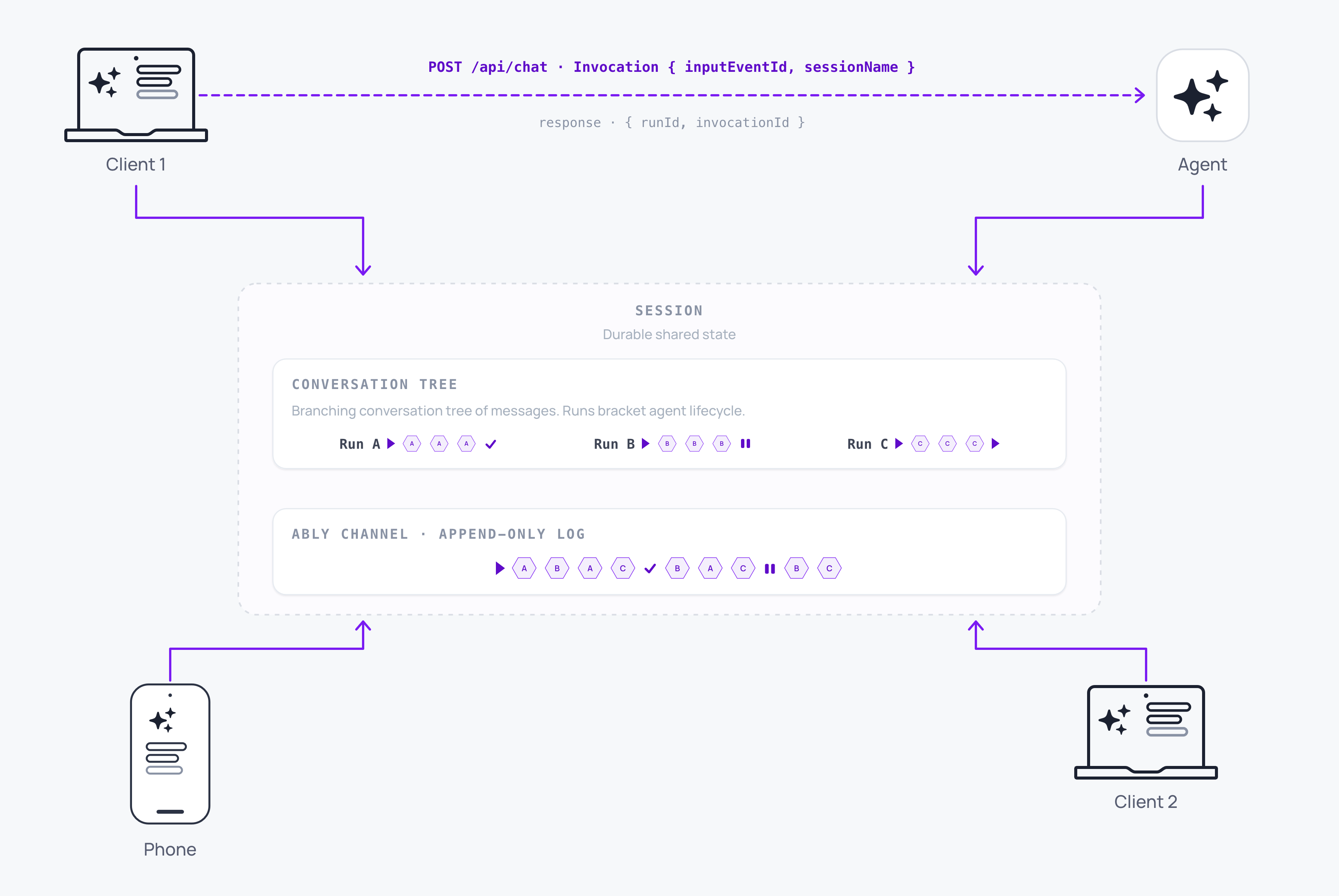
A durable session provides the complete, persistent state of a conversation, and it exists independently of anything that connects to it. The conversation history can be fully hydrated from the [Ably channel](https://ably.com/docs/channels.md), including the messages, their order, the branches a user creates by editing or regenerating, and the state your components render. Your UI can read all of it through a hook that re-renders your components when the conversation changes. Choose a durable session when you want the SDK to hold the conversation state, the branches a user creates by editing or regenerating, and the React hooks that render them. Choose [streaming](https://ably.com/docs/ai-transport/streaming.md) when your application owns the message format and its own store.
## Understand the model
Streaming delivers an agent's messages and responses to every subscribed client. A durable session goes further, so edits, regenerating, branching, and tool calls come with the session rather than being things you model yourself.
A new client can reconstruct the whole conversation from the channel. A phone picking up a conversation that started on a laptop can read it back from the session.
The [conversation tree](https://ably.com/docs/ai-transport/durable-sessions/conversation-tree.md) holds one node per user prompt and one per agent reply, each with a parent and siblings. Editing or regenerating adds a sibling and leaves the original where it is, so the whole history stays addressable. A [view](https://ably.com/docs/ai-transport/durable-sessions/conversation-tree.md#views) reads that tree and selects one path through its branches, exposing it as an ordered list your UI can render, so switching branch is a change of selection rather than a refetch. The [React hooks](https://ably.com/docs/ai-transport/api/react/core/use-view.md) bind a view to your UI: `useView` returns the messages, the run statuses, and the write operations, and re-renders your component when the tree changes underneath it.
## Client and agent example
The agent publishes the stream into a run on the session, and the client subscribes to the channel to read the conversation.
### Javascript

```
// Agent-side, in place of `return result.toUIMessageStreamResponse()`:
import { after } from 'next/server';
import * as Ably from 'ably';
import { streamText, convertToModelMessages } from 'ai';
import { anthropic } from '@ai-sdk/anthropic';
import { Invocation } from '@ably/ai-transport';
import { createAgentSession, vercelRunOutcome } from '@ably/ai-transport/vercel';

const ably = new Ably.Realtime({ key: process.env.ABLY_API_KEY });

export async function POST(req) {
  const invocation = Invocation.fromJSON(await req.json());
  const session = createAgentSession({ client: ably, channelName: invocation.sessionName });
  await session.connect();

  const run = session.createRun(invocation, {}, { signal: req.signal });

  after(async () => {
    try {
      // Drain the view's history pages before run.start(), which otherwise waits
      // for this run's triggering input to arrive live.
      while (run.view.hasOlder()) await run.view.loadOlder();
      const conversation = run.view.getMessages().map(({ message }) => message);

      await run.start();
      const result = streamText({
        model: anthropic('claude-sonnet-4-20250514'),
        messages: await convertToModelMessages(conversation),
        abortSignal: run.abortSignal,
      });
      const pipeResult = await run.pipe(result.toUIMessageStream());
      await run.end(await vercelRunOutcome(pipeResult, result.finishReason));
    } finally {
      session.end();
    }
  });

  return Response.json({ runId: run.runId, invocationId: run.invocationId });
}
```
The route returns the run's identifiers and the client reads the response from the channel.
In the browser, a client attaches to that same channel by name:
### Javascript

```
// Client-side.
import * as Ably from 'ably';
import { createClientSession } from '@ably/ai-transport/vercel';

const ably = new Ably.Realtime({ authUrl: '/api/auth/token' });
const session = createClientSession({ client: ably, channelName: 'conversations:42' });

await session.connect();
```
The SDK is JavaScript and TypeScript, with React hooks for the client. The [roadmap](https://ably.com/docs/ai-transport/roadmap.md) covers other languages.
## Know who implements what
A durable session leaves one row for your application to write. Everything else comes from the SDK or from the channel underneath it:
| Part of the system | Who implements it |
| --- | --- |
| Token streaming to the client | SDK |
| Messages from the client to the agent | SDK |
| Cancelling a run in flight | SDK |
| Run and step lifecycle | SDK |
| Steering a run while it streams | SDK |
| Finding the message that woke a restarted agent | SDK |
| Reading message history back from the channel | SDK |
| Hydrating the client's view of the conversation | SDK |
| Assembling context for the agent's model call | SDK |
| Merging decoded codec events into the conversation's messages | SDK |
| Branching, editing, and regenerating | SDK |
| The message state your UI renders | SDK |
| Where the conversation lives | Ably channel |
| Fan-out to several clients | Ably channel |
| Ordering, storage, and replay of messages | Ably channel |
| Resume after a disconnect | Ably channel |
| Presence and a shared state store | Ably channel |
| Waking the agent | Your application |
## What you still own
You are responsible for waking an agent, typically using an HTTP request that carries an [invocation](https://ably.com/docs/ai-transport/streaming/runs-and-steps.md#invocations). The client publishes the input to the session, then calls your own endpoint to run the agent.
The channel holds the conversation for as long as your retention window covers it. For history beyond that window, keep your own store of completed runs and let [database hydration](https://ably.com/docs/ai-transport/durable-sessions/database-hydration.md) join it to the live conversation.
## How to get started
To get started, see one of the quickstarts with [the React hooks](https://ably.com/docs/ai-transport/durable-sessions/quickstart-react-hooks.md) or [Vercel `useChat`](https://ably.com/docs/ai-transport/durable-sessions/quickstart-use-chat.md).
Both quickstarts build the same application. The React hooks read the conversation tree directly, with branch navigation and pagination, and `useChat` keeps Vercel as the message manager, reading its messages from the session.
## Read next
- [Get started with the React hooks](https://ably.com/docs/ai-transport/durable-sessions/quickstart-react-hooks.md): direct access to the tree, with branch navigation and pagination.
- [Get started with Vercel useChat](https://ably.com/docs/ai-transport/durable-sessions/quickstart-use-chat.md): Vercel's `useChat` as the message manager, backed by the session.
- [Conversation tree](https://ably.com/docs/ai-transport/durable-sessions/conversation-tree.md): nodes, branches, and how a view selects one path through them.
- [Migrate from the streaming APIs](https://ably.com/docs/ai-transport/durable-sessions/move-up-from-streaming.md): what changes in an application that already streams.
- [Database hydration](https://ably.com/docs/ai-transport/durable-sessions/database-hydration.md): seeding the session from a store you already have.
## Related Topics
- [Sessions](https://ably.com/docs/ai-transport/durable-sessions/sessions.md): Understand sessions in AI Transport: persistent, shared conversation state that exists independently of any connection, and the ClientSession and AgentSession objects that attach to it.
- [Conversation tree](https://ably.com/docs/ai-transport/durable-sessions/conversation-tree.md): Understand how AI Transport organises messages into a branching conversation tree, and how views give each client its own linear path through it.
- [Optimistic updates](https://ably.com/docs/ai-transport/durable-sessions/optimistic-updates.md): User messages appear instantly in Ably AI Transport. Optimistic insertion with automatic reconciliation when the server confirms.
- [Branching, edit, and regenerate](https://ably.com/docs/ai-transport/durable-sessions/branching.md): Edit user messages, regenerate AI responses, and navigate branches with Ably AI Transport. The full history is preserved in the conversation tree.
- [Tool calling](https://ably.com/docs/ai-transport/durable-sessions/tool-calling.md): Stream tool invocations and results through Ably AI Transport. Server-executed and client-executed tools with persistent state.
- [Human-in-the-loop](https://ably.com/docs/ai-transport/durable-sessions/human-in-the-loop.md): Add human approval gates to AI agent workflows with Ably AI Transport. Approve tool executions and provide input across devices.
- [Database hydration](https://ably.com/docs/ai-transport/durable-sessions/database-hydration.md): Hydrate an AI conversation from your own database with AI Transport and reconcile it with the live Ably channel, with no gaps and no duplicate messages.
- [Migrate from Streaming](https://ably.com/docs/ai-transport/durable-sessions/move-up-from-streaming.md): What changes in an application already streaming with Ably AI Transport when it moves the conversation into a durable session, and what stays exactly as it is.
## Documentation Index
To discover additional Ably documentation:
1. Fetch [llms.txt](https://ably.com/llms.txt) for the canonical list of available pages.
2. Identify relevant URLs from that index.
3. Fetch target pages as needed.
Avoid using assumed or outdated documentation paths.