# Temporal
Run the agent side of a conversation inside a Temporal workflow. Each activity publishes one step, a retried activity supersedes the failed attempt's output, and the user's stream never breaks.
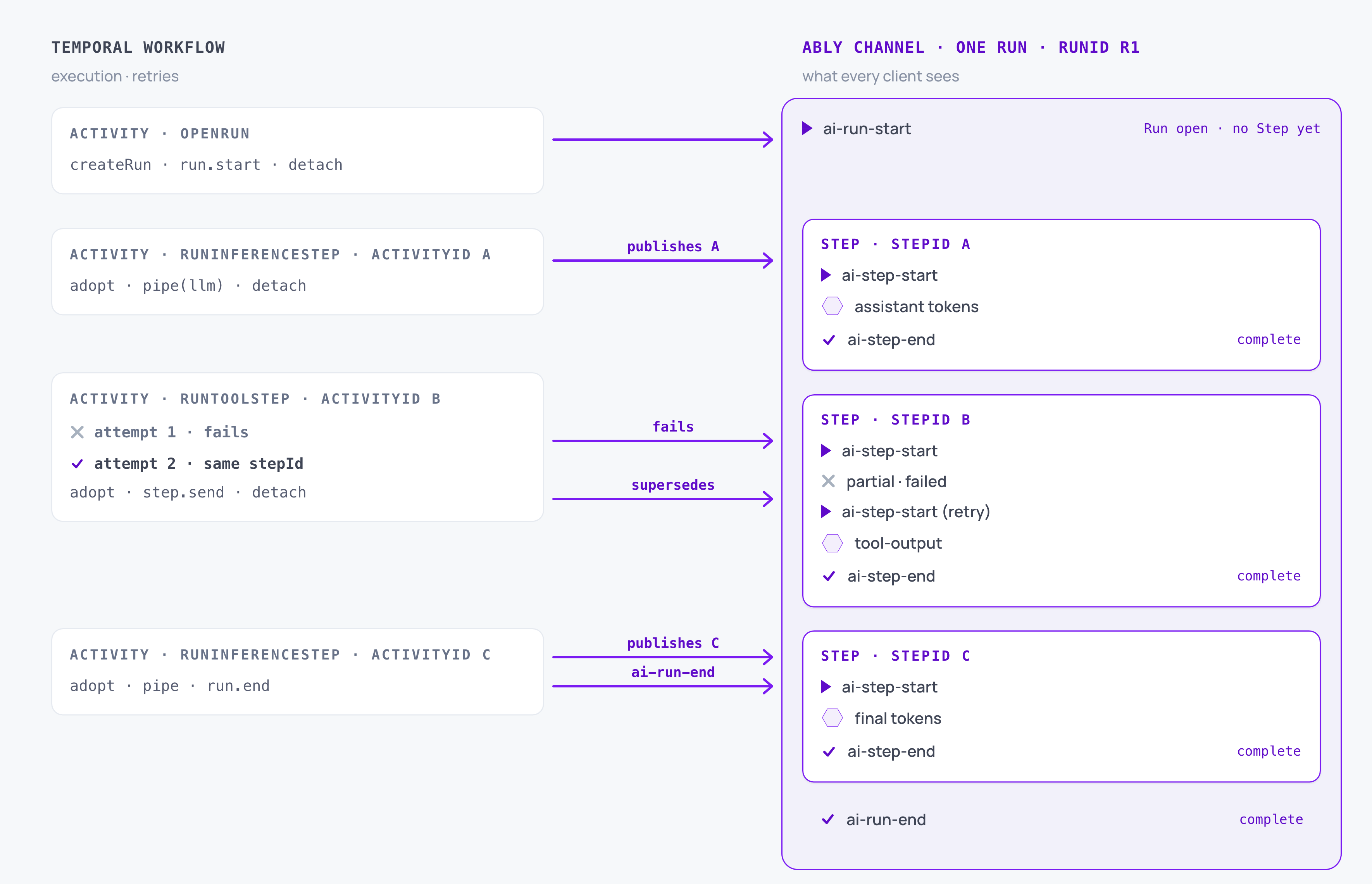
Temporal runs the agent loop as a workflow, so a crashed worker resumes where it left off and a failed model call retries without losing the turn. AI Transport publishes that work to the conversation as it happens, so the browser reads the agent's output straight off an Ably channel rather than waiting on the HTTP request that started the workflow.
## What Temporal brings
Temporal owns execution durability. A workflow survives a worker restart, an activity retries under a policy you set, and the whole history is inspectable in the Web UI.
| Temporal | What it owns |
| --- | --- |
| Workflow | The agent loop, replayed deterministically from its own history. |
| Activity | One unit of I/O: a model call, a tool execution, a publish. Retried under its own policy. |
| Activity id | Stable across retries of the same activity within one workflow. |
| Cancellation scope | Cancels a workflow and the activities it holds. |
## What AI Transport adds
AI Transport owns conversation state. What appears in the conversation, how a retry reconciles with the attempt it replaces, and how every connected device observes it.
| AI Transport concept | What it is | Temporal counterpart |
| --- | --- | --- |
| Session | The conversation clients attach to and detach from independently. | None. Several workflows publish to and read from one session. |
| Run | One turn, from the user's prompt to the agent's final answer. | One or more workflow executions. |
| Step | One unit of a run's output: a model response, or a tool result. | One activity. The step's retry boundary is the activity's. |
| Invocation | One request to start an agent. | One workflow execution, whose workflow id becomes the run's invocation id by default. |
Steps within a run are deduplicated on `stepId`. When an activity fails and Temporal retries it, the retry carries the same activity id, so its output supersedes the failed attempt's on the session. The user sees the failed attempt's output until the retry publishes its `ai-step-start`, and the retried step's output alone from then on.
Cancel and steering messages travel on the channel rather than through a Temporal signal. A client can cancel a run mid-stream, and the cancel fires `run.abortSignal` inside whichever activity is holding the run at the time.
## Prerequisites
- Node.js 22 or later.
- Working knowledge of Temporal workflows and activities. If Temporal is new to you, start with [Understanding Temporal](https://docs.temporal.io/evaluate/understanding-temporal).
- The [Temporal CLI](https://learn.temporal.io/getting_started/typescript/dev_environment/) installed locally (`brew install temporal` on macOS).
- An [Ably account](https://ably.com/sign-up) with an API key.
- An Anthropic API key, or any other model provider the Vercel AI SDK supports.
## Install the packages
Install the SDK, the Ably client, and the Temporal packages:
### Shell

```
npm install @ably/ai-transport@^0.9.0 ably ai@^6 \
  @ai-sdk/react@^3 @ai-sdk/anthropic@^3 \
  @temporalio/client @temporalio/worker @temporalio/workflow @temporalio/activity \
  next react react-dom zod jsonwebtoken dotenv
npm install -D tsx typescript @types/node @types/react @types/react-dom @types/jsonwebtoken
```
`@temporalio/activity` and `@temporalio/worker` are optional peer dependencies of `@ably/ai-transport`, required only when you import from the `/temporal` subpath.
The integration ships in two halves, split by where the code runs:
| Import | Runs on | Contains |
| --- | --- | --- |
| `@ably/ai-transport/temporal` | the worker | `createAblyTransportPlugin`, `stepIdFor`, the activity types |
| `@ably/ai-transport/temporal/workflow` | the workflow sandbox | `withRun`, `openRun`, `RunHandle` |
Workflow code must import the `/workflow` subpath. The worker half reaches for `ably` and `@temporalio/activity`, and neither exists inside Temporal's workflow sandbox.
This is a standard Next.js app with one addition: the Temporal worker runs as a separate Node process. Add a script for it in `package.json`:
### Json

```
{
  "scripts": {
    "dev": "next dev",
    "worker": "tsx workflow/worker.ts"
  }
}
```
Keep the Temporal client out of the browser bundle. In `next.config.mjs`:
### Javascript

```
/** @type {import('next').NextConfig} */
export default {
  serverExternalPackages: ['@temporalio/client'],
};
```
Add your keys to `.env.local`. `next dev` generates `tsconfig.json` on first run.
### Shell

```
# Ably API key in "keyName:keySecret" form, from your Ably dashboard.
ABLY_API_KEY=
# Anthropic API key used by the worker's inference activity.
ANTHROPIC_API_KEY=
```
## Set up authentication and the channel rule
Create an auth endpoint at `/api/auth/token` that returns an Ably JWT to the browser, signed with the user's client id and the channel capabilities they need. [Set up authentication](https://ably.com/docs/ai-transport/setup/authentication.md) covers the endpoint. The client below fetches from it with `authUrl: '/api/auth/token'`, and the worker uses the API key directly because it runs on your own infrastructure.
AI Transport streams each response by appending tokens to one channel message, which needs the **Message annotations, updates, deletes, and appends** rule (`mutableMessages`) on the namespace your conversations live on. Enable it once per Ably app through the [dashboard, Control API, or CLI](https://ably.com/docs/ai-transport/setup/channel-rules.md).
## Decide the agent layout
A Temporal workflow has to be deterministic and free of I/O, so the workflow never calls the model, runs a tool, or touches the channel. Every interaction with AI Transport happens inside an activity, and the ids that tie them together travel through the workflow as plain data.
A durable agent has two halves. Inference is yours: the model, the system prompt, the tool registry, when to stop. The run lifecycle around it is identical in every integration, so the plugin registers the run lifecycle activities and none of them appear in your code:
| Run lifecycle activity | Publishes | What it does |
| --- | --- | --- |
| `openRun` | `ai-run-start` or `ai-run-resume` | Creates the run, finds its trigger in channel history, opens it |
| `endRun` | `ai-run-end` | Publishes a terminal |
| `suspendRun` | `ai-run-suspend` | Parks the run awaiting client input |
| `cleanupRun` | `ai-run-end` with an error | Closes a run whose turn failed, so a waiting client sees the run end |
Two of those carry subtleties. `openRun` pins the run id to the invocation id, so a retry re-enters the same run rather than opening a second one alongside it. `cleanupRun` checks the run's status before publishing, so it does nothing when the run has already finished or is parked suspended.
| AI Transport | Where it runs | Why |
| --- | --- | --- |
| The run's identity, and the invocation itself | Workflow | Plain data. `withRun` gives you `run.ids` to pass into every activity you schedule. |
| Connecting, publishing through steps, running the model | Activity | Reads and writes the channel. |
| Cancellation and steering | Neither | Cancel messages arrive on the channel and fire `run.abortSignal` inside whichever activity holds the run. |
## Build the worker
The worker is the agent side of the app. It lives in a `workflow/` package: shared types, the workflow definition, one server tool, the activities that publish your output, and the entrypoint that hosts them.
### Share the types between the halves
Create `workflow/shared.ts`. These types travel between the API route, the workflow, and the activities. Keep them plain data with no runtime side effects, because Temporal loads workflow bundles in a sandbox with no access to Ably, the `ai` SDK, or `crypto` at import time.
#### Javascript

```
import type { InvocationData, RunIdentity } from '@ably/ai-transport';

export interface ChatWorkflowInput {
  invocation: InvocationData;
}

export interface StepInput {
  ids: RunIdentity;
  invocation: InvocationData;
}

export interface ToolCallInfo {
  toolCallId: string;
  toolName: string;
  input: unknown;
}

// The inference step either finishes the turn or asks to run a server tool.
export type InferenceOutcome =
  | { kind: 'done' }
  | { kind: 'server-tools'; toolCalls: ToolCallInfo[] };

export const TASK_QUEUE = 'ai-transport-demo';
```
### Define the workflow
Create `workflow/workflows.ts`. `withRun` opens the run, runs your body against it, and closes the run if the body throws. What you write inside is the agent loop and nothing else:
#### Javascript

```
import { proxyActivities } from '@temporalio/workflow';
import { withRun } from '@ably/ai-transport/temporal/workflow';
import type { ChatWorkflowInput } from './shared.js';
import type * as activities from './activities.js';

const { runInferenceStep } = proxyActivities({
  startToCloseTimeout: '5 minutes',
  retry: { maximumAttempts: 3 },
});

// getStockPrice throws on odd prices (~half the time), so give the tool
// activity enough attempts to show Temporal retrying it.
const { runToolStep } = proxyActivities({
  startToCloseTimeout: '5 minutes',
  retry: { maximumAttempts: 5 },
});

export async function chatWorkflow(input: ChatWorkflowInput): Promise {
  await withRun(input.invocation, async (run) => {
    let outcome = await runInferenceStep({ ids: run.ids, invocation: input.invocation });

    while (outcome.kind === 'server-tools') {
      for (const toolCall of outcome.toolCalls) {
        await runToolStep({ ids: run.ids, invocation: input.invocation, toolCall });
      }
      outcome = await runInferenceStep({ ids: run.ids, invocation: input.invocation });
    }
  });
}
```
`withRun` makes a best-effort attempt to close the run when the body throws, and that attempt is the reason to use it. An unclosed run leaves the browser waiting on a stream that never ends, and remembering to clean up by hand is the easiest part of a durable agent to forget. The attempt runs in a non-cancellable scope, so it still fires when the workflow itself is cancelled or terminated.
Best-effort is literal, and deliberate:
- Cleanup gets one attempt with a short timeout, because retrying would let a stalled cleanup delay a workflow termination.
- It no-ops when the run is already terminal or parked suspended.
- Its own failure is swallowed, so the body's error reaches Temporal unmasked.
- It only fires on a throw. A body that returns without publishing a terminal leaves the run open.
`openRun` covers two cases. A fresh turn creates a run and publishes `ai-run-start`; a continuation resumes the run identified in its trigger and publishes `ai-run-resume`. On success `withRun` publishes nothing at all, because the activity that did the work already published the terminal.
Timeouts and retry policies for the run lifecycle activities come from workflow code rather than plugin options, because the sandbox cannot read worker-process state and stay deterministic:
#### Javascript

```
await withRun(
  input.invocation,
  {
    activityOptions: {
      default: { startToCloseTimeout: '2 minutes' },
      openRun: { retry: { maximumAttempts: 5 } },
    },
  },
  body,
);
```
`cleanupRun` defaults to one attempt with a thirty-second timeout, so a stalled cleanup cannot delay a workflow termination.
### Add a server tool
Create `workflow/tools.ts` with one tool. It generates a whole-dollar price and throws when the price is odd, about half the time, so you can watch Temporal retry the activity in the Web UI and see the retry's re-rolled output supersede the failed attempt on the channel.
#### Javascript

```
import { z } from 'zod';
import type { Tool } from 'ai';

export const tools: Record = {
  getStockPrice: {
    description: 'Get the current stock price for a ticker symbol.',
    inputSchema: z.object({
      symbol: z.string().describe('The ticker symbol, for example "AAPL"'),
    }),
    execute: async ({ symbol }: { symbol: string }) => {
      // Intentionally flaky: throws on an odd price (~half the time) and
      // succeeds on an even one. The retry re-rolls the price.
      const priceUSD = Math.round(50 + Math.random() * 500);
      if (priceUSD % 2 !== 0) {
        throw new Error(`stock price service returned an odd price (${priceUSD}), retry me`);
      }
      return { symbol, priceUSD };
    },
  },
};
```
### Write your own activities
Create `workflow/activities.ts`. Only the inference and tool activities are yours: the run lifecycle ones come from the plugin. Each adopts the run the workflow opened and publishes a step whose `stepId` comes from the Temporal activity id.
#### Javascript

```
// Agent-side activities. They run on the worker, so they hold the API key.
import { Context } from '@temporalio/activity';
import Ably from 'ably';
import { streamText, convertToModelMessages, stepCountIs, type UIMessage } from 'ai';
import { anthropic } from '@ai-sdk/anthropic';
import { Invocation, type AgentRun } from '@ably/ai-transport';
import {
  createAgentSession,
  pendingToolCalls,
  stripToolExecutes,
  vercelRunOutcome,
} from '@ably/ai-transport/vercel';
import type { VercelOutput, VercelProjection } from '@ably/ai-transport/vercel';
import { stepIdFor } from '@ably/ai-transport/temporal';
import type { InferenceOutcome, StepInput, ToolCallInfo } from './shared.js';
import { tools } from './tools.js';

type VercelAgentRun = AgentRun;

// One client per activity: `client.channels.get(name)` caches per name, and
// detaching a session detaches that channel, so a shared client would let two
// sessions break each other. The plugin follows the same rule for its own.
const makeAbly = () => new Ably.Realtime({ key: process.env.ABLY_API_KEY! });

export async function runInferenceStep(input: StepInput): Promise {
  const ably = makeAbly();
  const session = createAgentSession({ client: ably, channelName: input.invocation.sessionName });
  try {
    await session.connect();
    const run = session.adoptRun(Invocation.fromJSON(input.invocation), input.ids, {
      signal: Context.current().cancellationSignal,
    });
    await run.load();
    while (run.view.hasOlder()) await run.view.loadOlder();

    const outcome = await runInference(run, stepIdFor(input.ids.invocationId));
    await session.detach();
    return outcome;
  } finally {
    ably.close();
  }
}

export async function runToolStep(input: StepInput & { toolCall: ToolCallInfo }): Promise {
  const ably = makeAbly();
  const session = createAgentSession({ client: ably, channelName: input.invocation.sessionName });
  try {
    await session.connect();
    const run = session.adoptRun(Invocation.fromJSON(input.invocation), input.ids, {
      signal: Context.current().cancellationSignal,
    });
    await run.load();

    const step = run.createStep({ stepId: stepIdFor(input.ids.invocationId) });
    await step.start();
    const tool = tools[input.toolCall.toolName] as { execute: (input: unknown) => Promise };
    const output = await tool.execute(input.toolCall.input);
    await step.send({
      type: 'tool-output-available',
      toolCallId: input.toolCall.toolCallId,
      output,
    });
    await step.end();
    await session.detach();
  } finally {
    ably.close();
  }
}

async function runInference(run: VercelAgentRun, stepId: string): Promise {
  const step = run.createStep({ stepId });
  await step.start();

  const conversation = run.view.getMessages().map((m) => m.message);
  const result = streamText({
    model: anthropic('claude-sonnet-4-20250514'),
    messages: await convertToModelMessages(conversation),
    tools: stripToolExecutes(tools),
    abortSignal: run.abortSignal,
    // The workflow drives the loop; this call runs one step only.
    stopWhen: stepCountIs(1),
  });

  const pipeResult = await step.pipe(result.toUIMessageStream());
  const outcome = await vercelRunOutcome(pipeResult, result.finishReason);
  await step.end();

  // Publishing the terminal here is the cheaper of the two styles: this
  // activity already has the run loaded, so it costs nothing extra.
  if (outcome.reason !== 'suspend') {
    await run.end(outcome);
    return { kind: 'done' };
  }

  // The model asked for a server tool: leave the run open for runToolStep.
  const toolCalls = pendingToolCalls(run.messages)
    .filter((call) => typeof tools[call.toolName]?.execute === 'function')
    .map((call) => ({ toolCallId: call.toolCallId, toolName: call.toolName, input: call.input }));
  return { kind: 'server-tools', toolCalls };
}
```
`stopWhen: stepCountIs(1)` stops the Vercel AI SDK running its own multi-step tool loop inside a single activity. The workflow runs the loop instead, one activity at a time, so each unit retries in isolation.
`stepIdFor(invocationId)` reads `Context.current().info.activityId`, so it only works inside an activity. It prefixes the activity id with the invocation id because Temporal's activity ids are unique within one workflow rather than across workflows, and a suspended run continued by a second workflow would otherwise collide on `step-id: "1"` and supersede the first workflow's output.
### Host the worker
Create `workflow/worker.ts`. The worker hosts your activities and registers the plugin, which supplies the run lifecycle ones:
#### Javascript

```
import path from 'node:path';
import { config as loadDotenv } from 'dotenv';
import { NativeConnection, Worker } from '@temporalio/worker';
import Ably from 'ably';
import { createAblyTransportPlugin } from '@ably/ai-transport/temporal';
import { createUIMessageSessionCodec } from '@ably/ai-transport/vercel';
import * as activities from './activities.js';
import { TASK_QUEUE } from './shared.js';

// tsx does not auto-load .env.local the way `next dev` does.
loadDotenv({ path: path.resolve(__dirname, '../.env.local') });

async function main() {
  const connection = await NativeConnection.connect({ address: 'localhost:7233' });
  const worker = await Worker.create({
    connection,
    namespace: 'default',
    taskQueue: TASK_QUEUE,
    workflowsPath: require.resolve('./workflows'),
    activities,
    plugins: [
      createAblyTransportPlugin({
        codec: createUIMessageSessionCodec(),
        // Required: the SDK never reads your environment or builds clients for
        // you. Called once per run lifecycle activity, and closed before it returns.
        createClient: () => new Ably.Realtime({ key: process.env.ABLY_API_KEY! }),
      }),
    ],
  });
  console.log(`worker listening on ${TASK_QUEUE}`);
  await worker.run();
}

main().catch((err) => {
  console.error(err);
  process.exit(1);
});
```
`createAblyTransportPlugin` also takes `logger`, `maxHistoryPages`, and `historyPageSize`. `heartbeat` is off by default; turn it on when conversations are long enough that Temporal could read the paging as a stalled activity.
## Start a workflow per turn
On the agent, create `app/api/chat/route.ts`. The route starts a workflow and returns immediately, because the client reads the rest of the turn off the session rather than off this response.
### Javascript

```
// Agent-side route handler.
import { Client, Connection } from '@temporalio/client';
import type { InvocationData } from '@ably/ai-transport';
import type { ChatWorkflowInput } from '../../../workflow/shared';
import { TASK_QUEUE } from '../../../workflow/shared';

let cachedTemporal: Client | undefined;
async function temporalClient() {
  if (cachedTemporal) return cachedTemporal;
  const connection = await Connection.connect({ address: 'localhost:7233' });
  cachedTemporal = new Client({ connection, namespace: 'default' });
  return cachedTemporal;
}

export async function POST(req: Request) {
  const invocation = (await req.json()) as InvocationData;
  const workflowId = crypto.randomUUID();

  const client = await temporalClient();
  const args: [ChatWorkflowInput] = [{ invocation }];
  await client.workflow.start('chatWorkflow', {
    workflowId,
    taskQueue: TASK_QUEUE,
    args,
  });

  return Response.json({ ok: true });
}
```
Because you start one workflow per POST, `withRun` defaults the invocation id to the workflow id, so nothing here has to generate or pass one. A continuation POST, whether a tool result, a regenerate, or a resume after a suspend, starts a fresh workflow against the same run: `openRun` reads the existing run id off the resuming event's headers rather than pinning a new one. So one run spans several workflow executions, and only the first supplies its id.
## Connect the browser
Nothing on the client is workflow-aware, so the same client code works whether the agent side is a single `streamText` call or a Temporal workflow. Use the [Vercel AI SDK quickstart](https://ably.com/docs/ai-transport/durable-sessions/quickstart-use-chat.md#create-the-chat-component) for the chat component and the page wrapper unchanged.
A cancel is keyed on the id of the message the client published, which the client knows the moment it publishes. That matters here, because the run id does not exist until the workflow is scheduled and `openRun` has run, and a user who wants to stop the agent usually clicks during that gap.
## Run the app
Open three terminals. `--db-filename` persists Temporal state across restarts, so a workflow you inspect in the Web UI survives a reboot.
### Shell

```
# Terminal 1: Temporal dev server
temporal server start-dev --db-filename ai-transport-demo.db
```
### Shell

```
# Terminal 2: Temporal worker
npx tsx workflow/worker.ts
```
### Shell

```
# Terminal 3: Next.js
npm run dev
```
Open the app at `http://localhost:3000` and the Temporal Web UI at `http://localhost:8233`. Every user turn appears as a new workflow, and each activity is one step on the session.
## Close the run when retries are exhausted
There is nothing to write here. `withRun` schedules the plugin's `cleanupRun` when the body throws, which ends the run in error so every waiting browser sees the run end.
What it does not cover is a body that returns without publishing a terminal. Cleanup fires on a throw alone, so make sure every path through your loop either ends the run, suspends it, or throws.
The happy path above ends the run inside the final inference activity, which is why the workflow's success path publishes nothing.
## Troubleshoot the worker
**"activity type not registered" on the first turn.** The workflow imported the `/workflow` subpath but the worker never registered the plugin. Add `plugins: [createAblyTransportPlugin({ ... })]` to `Worker.create`.
**"Cannot read private member #cancelRequested".** You are consuming the SDK through a local link. The shim imports `@temporalio/workflow`, Node resolves that from the link's real path, and webpack bundles two copies. Temporal's runtime classes use private fields, so a `CancellationScope` built by one copy cannot be read by the other. Alias the package to a single copy in `bundlerOptions.webpackConfigHook`. Installing from npm never hits this, because the peer dependency resolves to one copy.
## Edge cases and unhappy paths
- A `withRun` body that returns without publishing a terminal leaves the run open. Cleanup fires on a throw alone, so end or suspend the run on every path the body can take.
- A cancel that arrives between the POST and `openRun` is keyed on the input message id rather than the run id, so it still lands. A cancel that arrives after the run ends is dropped.
- Temporal's cancellation signal and a client's cancel are separate. Passing `Context.current().cancellationSignal` into `adoptRun` joins them, so terminating the workflow aborts the model call too.
- An activity that shares an Ably client with another activity on the same channel detaches that channel out from under it. Build the client inside the activity and close it in a `finally`.
- Two workflows publishing under the same `stepId` supersede each other. `stepIdFor` prevents this by scoping the id to the invocation, so pass `run.ids.invocationId` rather than generating one per activity.
- One workflow serving several turns keeps one workflow id, so every turn reuses the first turn's run unless you pass a per-turn `invocationId` to `withRun`. Nothing validates it, so the value you pass must stay stable across retries of one turn and differ between turns. A workflow that serves several turns keeps one workflow id throughout, so passing that id makes every turn reuse the first turn's run.
- A conversation longer than your channel's retention window cannot be rebuilt from the channel alone. [Hydrate from your own database](https://ably.com/docs/ai-transport/durable-sessions/database-hydration.md) for those.
- `openRun` pages history to find its trigger, which on a long conversation Temporal can read as a stalled activity. Turn the plugin's `heartbeat` on when that is a risk.
## FAQ
### Do I need AI Transport to run an agent in Temporal?
Temporal runs the agent loop. AI Transport is how the output of each activity reaches a browser in realtime. Without it you need somewhere for the activity's output to go, and a way for the client to find it.
### Why not send the output out of the activity directly?
A workflow is started by an HTTP request, but its activities are scheduled onto a Temporal worker, which is usually a different process from the one that received the request. That process has no route back to the browser. Publishing to a channel gives every client a way to read the output no matter which process produced it.
### What happens if nobody is watching while the agent runs?
The run completes anyway. Each activity publishes as it goes, so a client attaching later loads the finished answer rather than needing to have been connected throughout.
### Does the browser talk to Temporal?
No. The browser attaches to the session and posts to your agent's HTTP endpoint, and the endpoint starts the workflow. You can move the agent into or out of Temporal without changing client code.
## Demo app
The [Temporal demo app](https://github.com/ably/ably-ai-transport-js/tree/main/demo/temporal/use-client-session-temporal) is a complete Next.js chat app with the worker built in, including the flaky tool above, so you can watch a Temporal retry supersede a failed attempt on the session.
## Read next
- [Durable execution](https://ably.com/docs/ai-transport/durable-execution.md): the same pattern, generalised to any workflow engine.
- [Runs and steps](https://ably.com/docs/ai-transport/streaming/runs-and-steps.md): the retry unit Temporal activities map to.
- [`stepIdFor` API reference](https://ably.com/docs/ai-transport/api/javascript/temporal.md): the helper that produces a Temporal-safe step id.
- [AgentSession API reference](https://ably.com/docs/ai-transport/api/javascript/core/agent-session.md): `adoptRun`, `createStep`, `detach`, and `end`.
- [Agent transport reference](https://ably.com/docs/ai-transport/api/javascript/transport/agent-transport.md): the tree-free API, for an agent that keeps its own conversation store.
- [Vercel WDK](https://ably.com/docs/ai-transport/durable-execution/vercel-wdk.md): the same job on Vercel's workflow runtime.
## Related Topics
- [Overview](https://ably.com/docs/ai-transport/durable-execution.md): Run AI Transport agents inside a durable workflow engine. Adopt an in-flight run from a fresh process, retry a failed step under a stable stepId, and let the retry supersede the failed attempt on the channel.
- [Vercel WDK](https://ably.com/docs/ai-transport/durable-execution/vercel-wdk.md): Run an AI Transport agent as a Vercel Workflow inside your Next.js app. Each model call and tool is its own retryable WDK step, a retry supersedes the failed attempt on the session, and cancel messages route over the channel.
## Documentation Index
To discover additional Ably documentation:
1. Fetch [llms.txt](https://ably.com/llms.txt) for the canonical list of available pages.
2. Identify relevant URLs from that index.
3. Fetch target pages as needed.
Avoid using assumed or outdated documentation paths.