# Token streaming
Token streaming delivers your agent's response to every subscribed client in realtime, as the model writes it.
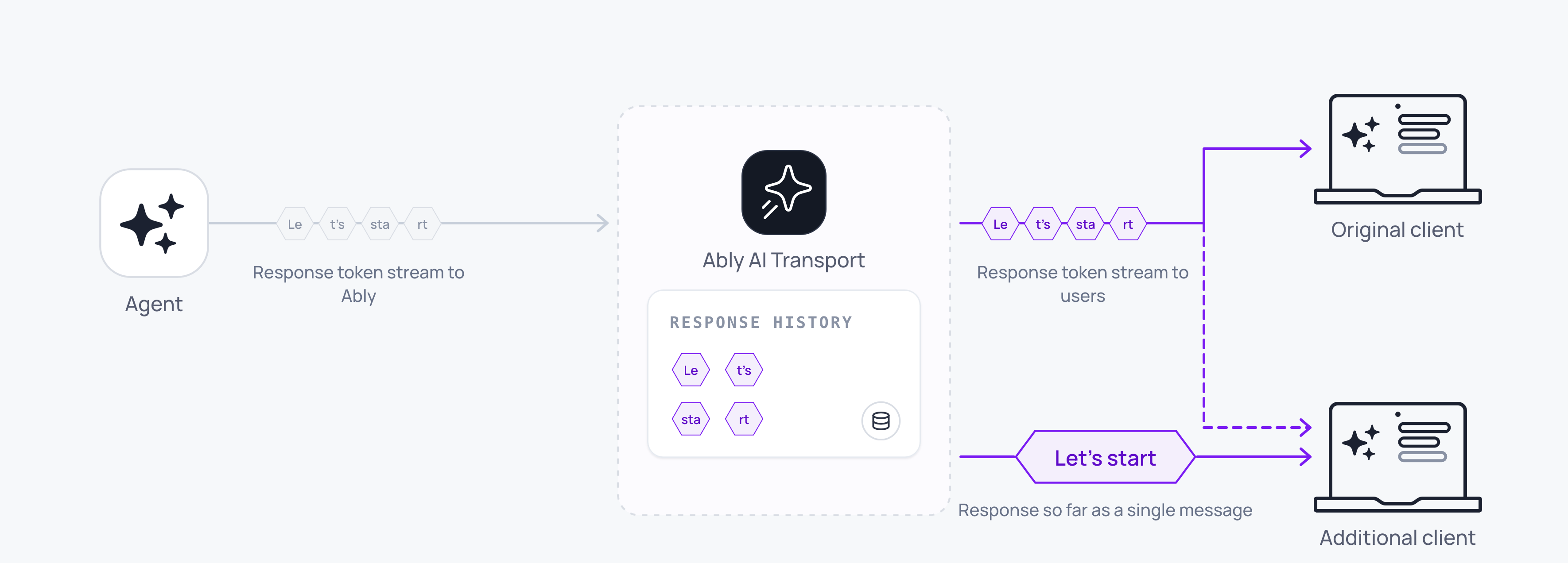
The AI Transport SDK publishes the events from your AI model's streaming response to every [subscribed](https://ably.com/docs/pub-sub.md#subscribe) client with `pipe`. The agent passes the model's stream to an [agent adaptor](https://ably.com/docs/ai-transport/api/javascript/agent-adaptor.md), and the adaptor turns each event into Ably messages on the conversation's [Ably channel](https://ably.com/docs/channels.md).
Each adaptor takes an LLM event stream:
- The [Vercel AI SDK](https://ably.com/docs/ai-transport/frameworks/vercel-ai-sdk-core.md) adaptor takes the events that `toUIMessageStream` produces.
- The [OpenAI](https://ably.com/docs/ai-transport/api/javascript/openai.md) adaptor takes the Responses API stream unchanged.
- The [AG-UI](https://ably.com/docs/ai-transport/api/javascript/ag-ui.md) adaptor takes an AG-UI event stream unchanged.
- For any other provider, you can build an agent adaptor from a [custom codec](https://ably.com/docs/ai-transport/frameworks/custom-codec.md), and your stream must yield that codec's events.
The adaptor publishes some events, such as the start and the end of a response, as single Ably messages. It joins delta events, such as the streamed text of a response, into one message with [message appends](https://ably.com/docs/messages/updates-deletes.md#append). A subscribed client receives the text as it streams, and channel history holds one message with the full text, so clients joining late have access to the full message without having to stream each individual delta.
## Stream from the agent
The agent gets the channel from a [realtime client](https://ably.com/docs/pub-sub/api/javascript/realtime/realtime-client.md) and wraps the channel in an adaptor.
Typically, the client POSTs the prompt to your agent's HTTP endpoint, and the agent publishes the [prompt](https://ably.com/docs/ai-transport/conversation.md#prompt) to the channel through the agent adaptor, with `send`. The client can also publish the prompt itself, but this is a less common pattern. The agent should publish the prompt to the channel to allow other devices, tabs, or users to see the content of the prompt and the response that follows.
The agent then calls the model and pipes the model's output to the channel. Each message on the channel has a [serial](https://ably.com/docs/messages.md#properties) that represents the message's position on the channel. `pipe` resolves with the serial of the last message it published. The agent should store that serial in your database, so a client that loads the conversation later can start its [rewind](https://ably.com/docs/ai-transport/conversation/history.md#joining) of the channel from that serial.
`pipe` also takes a `signal` option, an `AbortSignal` that cancels the pipe when it fires. In this example the agent passes `req.signal` to `pipe` and to the model call.
This agent code streams one response and stores its serial with `saveResponse`, your code that writes to your database:
### OpenAI Javascript

```
// This runs on your server, so it holds the API key.
import OpenAI from 'openai';
import { createRealtimeClient } from '@ably/pubsub-server';
import { openaiAdaptor } from '@ably/ai-transport/openai';

const client = createRealtimeClient({ key: process.env.ABLY_API_KEY });
const adaptor = openaiAdaptor(client.channels.get(channelName));
const headers = { requestId };
// input is the conversation so far, ending with the prompt's items.

try {
  await adaptor.send({ type: 'input', items }, { headers });
  const stream = await new OpenAI().responses.create({ model: 'gpt-5.5', input, stream: true }, { signal: req.signal });
  const { serial } = await adaptor.pipe(stream, { signal: req.signal, headers });
  await saveResponse(channelName, serial);
} finally {
  client.close();
}
```

### Vercel AI SDK Javascript

```
// This runs on your server, so it holds the API key.
import { createRealtimeClient } from '@ably/pubsub-server';
import { vercelAdaptor } from '@ably/ai-transport/vercel';
import { convertToModelMessages, streamText, toUIMessageStream } from 'ai';

const client = createRealtimeClient({ key: process.env.ABLY_API_KEY });
const adaptor = vercelAdaptor(client.channels.get(channelName));
const headers = { requestId: message.id };
// uiMessages is the conversation so far, ending with the prompt (message).

try {
  await adaptor.send({ type: 'user-message', message }, { headers });
  const result = streamText({ model, messages: await convertToModelMessages(uiMessages), abortSignal: req.signal });
  const stream = toUIMessageStream({ stream: result.fullStream, originalMessages: uiMessages, generateMessageId: () => crypto.randomUUID() });
  const { serial } = await adaptor.pipe(stream, { signal: req.signal, headers });
  await saveResponse(channelName, serial);
} finally {
  client.close();
}
```
`pipe` accepts a `ReadableStream` or any async iterable of the adaptor's events.
The agent can set headers on a response with the `headers` option of `pipe`. The pipe sets the headers on every message it writes, including each append, and a client can match each response to its prompt by these headers. This agent code sets a `requestId` header on every message of the response:
### Javascript

```
await adaptor.pipe(stream, { signal: req.signal, headers: { requestId } });
```
You can also set default headers on the adaptor with `vercelAdaptor(channel, { headers })` or `openaiAdaptor(channel, { headers })`. Where `pipe` and the adaptor's default headers both set a value, the value from `pipe` is used.
`pipe` rejects with `OperationCancelled` when the signal fires, and with `PipeFailed` when the LLM event stream throws, an event cannot be encoded or publishing a message fails. Any messages published to the channel before an error remain on the channel.
[`pipeEach`](https://ably.com/docs/ai-transport/api/javascript/agent-adaptor.md#pipe-each) is an alternative to `pipe`. `pipeEach` writes the same stream as `pipe`, but yields back to the agent after each event has been published to Ably, with the serial of the message that carries it. The agent can use `pipeEach` to act on each event, for example to save the response's serial when the response ends, update progress or check whether to stop.
This agent code saves the serial of the event that ends the response:
### OpenAI Javascript

```
for await (const { event, serial } of adaptor.pipeEach(stream, { signal: req.signal, headers })) {
  if (event.type === 'response.completed') await saveResponse(channelName, serial);
}
```

### Vercel AI SDK Javascript

```
for await (const { event, serial } of adaptor.pipeEach(stream, { signal: req.signal, headers })) {
  if (event.type === 'finish') await saveResponse(channelName, serial);
}
```
The adaptor reads the next event from the LLM event stream only when the loop body finishes, so slow work inside the loop slows the stream.
When the loop ends early, through `break`, `return`, or a throw, the adaptor waits for Ably to acknowledge the text it has sent, and repairs any [failed append](#under-the-hood). If the LLM event stream is a `ReadableStream`, such as the stream from `toUIMessageStream`, the model call keeps running after the loop ends, so you must abort it with the signal you pass to `pipeEach`.
## Subscribe on the client
On the client, the [decoder](https://ably.com/docs/ai-transport/api/javascript/decoder.md) reads each message from the channel and passes the decoded event to `onEvent`. Your application can merge the decoded events into the messages that your UI uses.
With the OpenAI decoder, this client code appends each `response.output_text.delta` to the text of the output item it belongs to, keyed by `item_id`:
With the Vercel decoder, this client code merges the chunks of each response with the AI SDK's `readUIMessageStream`, from the `start` chunk to the `finish` or `abort` chunk. It keys each stream by the `requestId` header, so two responses in flight at the same time stay separate:
### OpenAI Javascript

```
import { openaiDecoder } from '@ably/ai-transport/openai';

const decoder = openaiDecoder();
const text = new Map();
decoder.onEvent(({ event }) => {
  if (event?.type !== 'response.output_text.delta') return;
  text.set(event.item_id, (text.get(event.item_id) ?? '') + event.delta);
  render(event.item_id, text.get(event.item_id));
});
await channel.subscribe(decoder.receive);
```

### Vercel AI SDK Javascript

```
import { readUIMessageStream } from 'ai';
import { vercelDecoder } from '@ably/ai-transport/vercel';

const decoder = vercelDecoder();
const responses = new Map();
decoder.onEvent(({ event, message }) => {
  if (event === undefined || event.type === 'user-message') return;
  const requestId = message.extras?.headers?.requestId;
  if (event.type === 'start') {
    const stream = new ReadableStream({ start: (controller) => responses.set(requestId, controller) });
    (async () => {
      for await (const response of readUIMessageStream({ stream })) render(response);
    })();
  }
  responses.get(requestId)?.enqueue(event);
  if (event.type === 'finish' || event.type === 'abort') {
    responses.get(requestId)?.close();
    responses.delete(requestId);
  }
});
await channel.subscribe(decoder.receive);
```
Each output item has an `item_id`, so the deltas of several responses stay separate. Your merge can also place each response after its prompt, as the [merge in the Get started guide](https://ably.com/docs/ai-transport/get-started/openai.md#merge) does.
Your merge can also reserve each response's place in the list and handle a stream that `readUIMessageStream` rejects, as the [merge in the Get started guide](https://ably.com/docs/ai-transport/get-started/vercel-ai-sdk.md#merge) does.
## Join an existing conversation
A client that loads the page, opens a second tab or comes back later can join the conversation with a [rewind](https://ably.com/docs/ai-transport/conversation/history.md#joining) of the channel to the serial you stored in your database.
For a late joining client, a response that is still streaming arrives as one update that carries the text so far, and then each following message live.
## Stop a response
When the user presses Stop, the client should abort its POST to your agent's HTTP endpoint, so the request's signal fires on the agent. This client code aborts the request:
### Javascript

```
const controller = new AbortController();
fetch('/api/chat', { method: 'POST', body: JSON.stringify({ channelName, message }), signal: controller.signal });
stopButton.onclick = () => controller.abort();
```
`pipe` stops when its `signal` fires, and the agent decides where that signal comes from. Typically, the agent's HTTP endpoint passes the request's signal, `req.signal`, so the pipe stops when the client aborts its POST or the request's connection closes. A closed tab then stops the response too. The agent can also create an `AbortController`, for example to stop the response after a timeout.
If the LLM event stream is a `ReadableStream`, such as the stream from `toUIMessageStream`, stopping the pipe does not stop the model call, so you must abort the model call with the same signal: `abortSignal` on `streamText`, or the `signal` request option on `responses.create`. When the signal fires, the model call stops and the pipe rejects with `OperationCancelled`. The response stays on the channel with the messages published so far.
The pipe does not automatically publish a cancel event into the channel, so the agent needs to publish an end event itself to notify clients of a cancellation or error.
The Vercel AI SDK has an `abort` chunk that ends a UI message stream. A Vercel agent can send `{ type: 'abort' }` with `send` and the same headers as the pipe, and a client's merge can close the response on `abort` as it does on `finish`. For OpenAI and for a custom codec, the agent should publish an event that the client's merge treats as the end of the response.
This agent code handles a stopped response:
### OpenAI Javascript

```
try {
  const stream = await openai.responses.create({ model: 'gpt-5.5', input, stream: true }, { signal: req.signal });
  await adaptor.pipe(stream, { signal: req.signal, headers });
  return new Response(null, { status: 204 });
} catch (error) {
  if (req.signal.aborted) return new Response(null, { status: 204 });
  throw error;
}
```

### Vercel AI SDK Javascript

```
import { ErrorCode } from '@ably/ai-transport';
import { ErrorInfo } from '@ably/pubsub-server';

const result = streamText({ model, messages, abortSignal: req.signal });
try {
  await adaptor.pipe(
    toUIMessageStream({ stream: result.fullStream, originalMessages: uiMessages, generateMessageId: () => crypto.randomUUID() }),
    { signal: req.signal, headers },
  );
  return new Response(null, { status: 204 });
} catch (error) {
  // Best effort: publishing the abort chunk can fail for the same reason the pipe did.
  await adaptor.send({ type: 'abort' }, { headers }).catch((sendError) => console.error('abort publish failed', sendError));
  if (error instanceof ErrorInfo && error.code === ErrorCode.OperationCancelled) return new Response(null, { status: 204 });
  throw error;
}
```
When the signal fires, the model call can reject with the OpenAI SDK's abort error before the pipe rejects with `OperationCancelled`. This code checks `req.signal.aborted`, which is true for both errors.
## Repair a failed append
The pipe sends each append without waiting for Ably to acknowledge it, so a response streams at the speed of the connection. If an append fails, for example on a transient network issue, the pipe carries on. When a streamed part ends, the pipe replaces its message with an update that carries the full text, before it publishes the event that ends the part. Subscribed clients receive the missing text in that update, and history holds the whole message.
If the update fails too, the pipe rejects with `PipeFailed`, whose `cause` is a `StreamedMessageFinalizeFailed` error. The partial message stays on the channel.
## Append rollup
Append rollup joins the appends that the agent's realtime connection publishes within a short window into one message. A model can write many deltas every second, and the adaptor publishes each delta as an append. With rollup, subscribed clients receive the same text in fewer and larger messages.
Ably joins the appends before it counts messages or applies the rate limit. After a pause, Ably sends the first append without waiting. During a continuous stream, each append waits for the rollup window. By default, Ably delivers a single response at 25 messages per second, or the model's output rate, whichever is lower.
Before it publishes the event that ends a streamed part, such as the end of the text, the adaptor waits for Ably to acknowledge that part's appends, so the end event never reaches subscribers ahead of the part's text. Ably does not hold a new message in the window, so a message you publish with `channel.publish` can reach subscribers ahead of appends that the window still holds.
### Configure the rollup window
Rollup applies to the connection that publishes the appends, so you set the window on the agent's realtime client, with the `appendRollupWindow` entry in [`transportParams`](https://ably.com/docs/pub-sub/api/javascript/realtime/realtime-client.md#constructor-params):
| `appendRollupWindow` | Maximum message rate for a single response |
|---|---|
| 0ms | Model output rate |
| 20ms | 50 messages/s |
| 40ms (default) | 25 messages/s |
| 100ms | 10 messages/s |
| 500ms (maximum) | 2 messages/s |
This agent code sets a 100ms window:
#### Javascript

```
// This runs on your server, so it holds the API key.
import { createRealtimeClient } from '@ably/pubsub-server';

const client = createRealtimeClient({ key: process.env.ABLY_API_KEY, transportParams: { appendRollupWindow: 100 } });
```
> **Important**
>
> The agent's connection publishes up to one joined message per rollup window for each response, and the [connection inbound message rate](https://ably.com/docs/platform/pricing/limits.md#connection) applies to all the responses on that connection. If a short window, or several responses at the same time, take the agent past that rate, Ably enforces the [rate limit](https://ably.com/docs/platform/pricing/limits.md#hitting).
## Edge cases
- Without the [channel rule](https://ably.com/docs/ai-transport/setup/channel-rules.md), Ably rejects every append with error `93002`. Subscribed clients receive only the first delta of each stream, because the adaptor publishes the first delta as a new message. The repair at the end of the stream fails for the same reason, so the pipe rejects with `PipeFailed`.
- An agent whose API key lacks the `message-update-any` [capability](https://ably.com/docs/ai-transport/setup/authentication.md#capabilities) publishes the first delta of each stream, and then every append fails. The repair needs the same capability, so the pipe rejects with `PipeFailed`.
- A closed tab does not stop the response unless the agent's HTTP endpoint passes the request's `signal` to `pipe` and to the model call. Without the signal, the agent keeps publishing to the channel whether or not a client is subscribed.
- A network drop pauses delivery to the client that lost its connection, and the agent keeps publishing. If the connection resumes after a short drop, the client receives the text it missed. After a longer gap the client can recover the conversation from your database with the code in [Recover the conversation](https://ably.com/docs/ai-transport/conversation/reconnection-and-recovery.md#recover), and receive the response so far as a single message.
- A cancelled pipe does not send an end event, so the response stays open on every subscribed client until the agent sends one, such as `abort` for Vercel, or until the client stops waiting.
- Two prompts in flight on one channel interleave the messages of their responses. A new message can also reach subscribers ahead of appends that the rollup window still holds for another stream, so your merge should assign each message to its response by a header such as `requestId`, or by an id in the event such as `item_id`.
- An LLM event stream that throws rejects the pipe with `PipeFailed`. The text the pipe wrote before the failure stays on the channel.
- A header value other than a string, number, boolean, or null rejects the call with `InvalidArgument` before the adaptor publishes anything.
- If you log channel operations, a repaired append shows up as one update at the end of each stream that had a failed append.
- If you set `appendRollupWindow` to `0ms` for the model's full output rate, you are responsible for keeping the publish rate under your connection limit.
## FAQ
### What happens to the response when the client tab closes?
If the agent's HTTP endpoint passes the request's signal to the pipe and to the model call, the response stops with the messages published so far. Without the signal, the agent keeps streaming, and the channel keeps the response. When the user returns, the client can rewind the channel, receive the response so far, and then receive the rest of the response live.
### How is streaming billed?
Ably charges per [message](https://ably.com/docs/ai-transport/pricing.md), whatever the number of tokens the message carries. Append rollup reduces the number of messages for each response, because several appends become one message.
### How do I stream more than one message per response?
A single `pipe` call reads the whole stream. Text, reasoning, and tool calls within one stream all go through the same call, and the adaptor gives each streamed part a separate message. If your agent produces several separate streams for one prompt, the agent can call `pipe` once for each stream, with the same headers.
### Why does my client see fewer tokens than the model emits?
Append rollup joins the appends published within the rollup window into one message. Subscribed clients receive the same content in fewer and larger messages. You can set `appendRollupWindow` to `0ms` to deliver each append separately, subject to the connection rate limit.
### When do I use `pipeEach` instead of `pipe`?
`pipeEach` suits an agent that acts on each event as the adaptor writes it, for example to save a serial, update progress or stop on a condition the agent sets. An agent that only needs the result once the stream ends can use `pipe`.
## Read next
- [Reconnection and recovery](https://ably.com/docs/ai-transport/conversation/reconnection-and-recovery.md): detect when the channel loses continuity, and recover from it.
- [History and replay](https://ably.com/docs/ai-transport/conversation/history.md): store the serial, rewind the channel to it, and read older messages.
- [Agent adaptor](https://ably.com/docs/ai-transport/api/javascript/agent-adaptor.md): the API reference for `send`, `pipe`, and `pipeEach`.
## Related Topics
- [Overview](https://ably.com/docs/ai-transport/conversation.md): Stream an agent's responses to every device over one Ably channel. Subscribed clients can catch up after a reload or a dropped connection, and the conversation stays in your database.
- [Reconnection and recovery](https://ably.com/docs/ai-transport/conversation/reconnection-and-recovery.md): A client that disconnects does not stop the agent's response, and the Ably SDK attempts to reconnect the client automatically and deliver the messages the client missed. If it cannot, the client can load the conversation from your database and rewind the channel.
- [Multi-device and fan-out](https://ably.com/docs/ai-transport/conversation/multi-device.md): With Ably AI Transport, every client subscribed to a conversation's channel receives each prompt and response on the channel in realtime. A user can start a conversation on a laptop and continue it on a phone.
- [History and replay](https://ably.com/docs/ai-transport/conversation/history.md): Load a conversation from your database, catch up on the channel from the serial you stored and page back through older messages with channel history.
## Documentation Index
To discover additional Ably documentation:
1. Fetch [llms.txt](https://ably.com/llms.txt) for the canonical list of available pages.
2. Identify relevant URLs from that index.
3. Fetch target pages as needed.
Avoid using assumed or outdated documentation paths.