# Multi-device and fan-out
Every client subscribed to a conversation's channel receives each message on the channel in realtime, so one conversation can be open on several devices at the same time. For example, a user can start a conversation on a laptop and open it on a phone while a response is still streaming. The phone can receive the response so far, and then the rest as the model writes it.
Ably delivers every message on a conversation's [Ably channel](https://ably.com/docs/channels.md) to every [subscribed](https://ably.com/docs/pub-sub.md#subscribe) client, in the same order. Several users can participate in a single [conversation](https://ably.com/docs/ai-transport/conversation.md). If the agent publishes [awareness](https://ably.com/docs/ai-transport/awareness.md) or [artifact](https://ably.com/docs/ai-transport/artifacts.md) updates to the channel, such as the agent's status or a table the agent builds, every subscribed client receives them too.
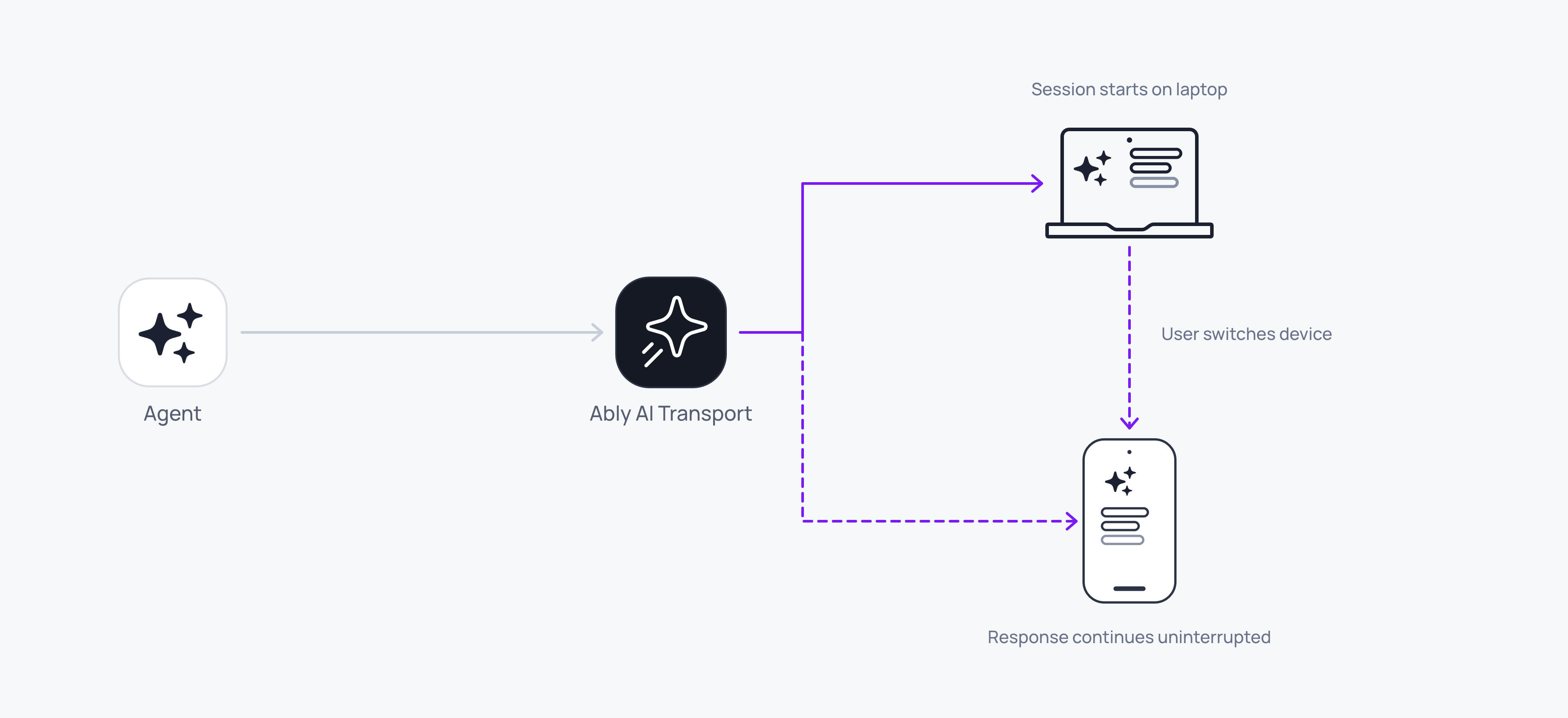
On each device, the client subscribes a [decoder](https://ably.com/docs/ai-transport/api/javascript/decoder.md) to the channel. The decoder reads each message from the channel and passes the decoded event to `onEvent`. This client code runs the same way on every device. `merge` is your code that merges each event into the messages that your UI uses:
#### Vercel AI SDK Javascript

```
import { createClient } from '@ably/pubsub-device';
import { vercelDecoder } from '@ably/ai-transport/vercel';

const client = createClient({ authUrl: '/auth' });
const channel = client.channels.get('conversations:42');
const decoder = vercelDecoder();
decoder.onEvent(({ event }) => {
  if (event !== undefined) merge(event);
});
await channel.subscribe(decoder.receive);
```

#### OpenAI Javascript

```
import { createClient } from '@ably/pubsub-device';
import { openaiDecoder } from '@ably/ai-transport/openai';

const client = createClient({ authUrl: '/auth' });
const channel = client.channels.get('conversations:42');
const decoder = openaiDecoder();
decoder.onEvent(({ event }) => {
  if (event !== undefined) merge(event);
});
await channel.subscribe(decoder.receive);
```
## How it works
Typically, the client POSTs the prompt to your agent's HTTP endpoint, and the agent publishes the prompt to the channel before it streams the response. Ably orders the messages on each channel, so every subscribed client receives the prompt and then the response.
The client can also publish the [prompt](https://ably.com/docs/ai-transport/conversation.md#prompt) directly to the channel, but this is a less common pattern. The client should set the `requestId` header when it publishes the prompt, so that it can match the responses to that prompt.
By default, Ably sends each message a client publishes back to that client. A client that shows the prompt as soon as the user sends it can set [`echoMessages: false`](https://ably.com/docs/pub-sub/advanced.md#echo) on `createClient`, so that it does not receive the prompt a second time. The user's other devices still receive the prompt from the channel.
## Publish the prompt from the agent
The agent should publish the prompt to the channel to allow other devices, tabs, or users to see the content of the prompt and the response that follows.
The agent can publish the prompt with the [adaptor](https://ably.com/docs/ai-transport/api/javascript/agent-adaptor.md)'s `send` before it pipes the response. The agent should pass the same `requestId` header to both calls, so that a client can match the response to its prompt. In this agent code, `agentClient` is the agent's [realtime client](https://ably.com/docs/pub-sub/api/javascript/realtime/realtime-client.md), `loadConversation` is your code that reads the conversation so far from your database, and in the Vercel sample `model` is your AI SDK model:
### Vercel AI SDK Javascript

```
import { after } from 'next/server';
import { vercelAdaptor } from '@ably/ai-transport/vercel';
import { convertToModelMessages, streamText, toUIMessageStream } from 'ai';

export async function POST(req) {
  const { channelName, message } = await req.json();
  const headers = { requestId: message.id };
  const adaptor = vercelAdaptor(agentClient.channels.get(channelName));
  await adaptor.send({ type: 'user-message', message }, { headers });

  after(async () => {
    try {
      const uiMessages = [...(await loadConversation(channelName)), message];
      const result = streamText({ model, messages: await convertToModelMessages(uiMessages) });
      await adaptor.pipe(
        toUIMessageStream({ stream: result.fullStream, originalMessages: uiMessages, generateMessageId: () => crypto.randomUUID() }),
        { headers },
      );
    } catch (error) {
      console.error('response failed', error);
    }
  });
  return new Response(null, { status: 202 });
}
```

### OpenAI Javascript

```
import OpenAI from 'openai';
import { after } from 'next/server';
import { openaiAdaptor } from '@ably/ai-transport/openai';

export async function POST(req) {
  const { channelName, requestId, items } = await req.json();
  const headers = { requestId };
  const adaptor = openaiAdaptor(agentClient.channels.get(channelName));
  await adaptor.send({ type: 'input', items }, { headers });

  after(async () => {
    try {
      const stream = await new OpenAI().responses.create({
        model: 'gpt-5.5',
        input: [...(await loadConversation(channelName)), ...items],
        stream: true,
      });
      await adaptor.pipe(stream, { headers });
    } catch (error) {
      console.error('response failed', error);
    }
  });
  return new Response(null, { status: 202 });
}
```
This agent streams the response in `after()` from `next/server`, which runs the function after the agent's HTTP endpoint has sent its HTTP response. This agent does not pass the request's [signal](https://ably.com/docs/ai-transport/conversation/token-streaming.md#stop) to the model call or to `pipe`. So if the device that sent the prompt closes, the response carries on and every other device keeps receiving it.
## Recognise your own prompts
The decoder passes each `onEvent` handler the event and the Ably message that the event was decoded from. Two fields of that message tell you where it came from:
| Field | What it tells you |
| --- | --- |
| `message.extras.headers` | The headers that the agent set on the `send` or `pipe` call, or as the adaptor's default headers, such as the `requestId` that ties a response to its prompt. |
| `message.clientId` | The client that published the message. Typically, the agent publishes the prompt, so the prompt has the agent's `clientId`, or no `clientId` if the agent's client does not set one. |
The client should create the `requestId` before it POSTs the prompt, and the agent should set it as a header with `send` and `pipe`. A client can then recognise the prompts it sent, and the responses to them, by that header.
This client code reads the `requestId` header from each prompt and each response. `isMine` is your code that checks a `requestId` against the ids this client sent, and `showPrompt` and `showResponse` update your UI:
### Vercel AI SDK Javascript

```
decoder.onEvent(({ event, message }) => {
  const requestId = message.extras?.headers?.requestId;
  if (event?.type === 'user-message') showPrompt(event.message, { mine: isMine(requestId) });
  if (event?.type === 'start') showResponse(requestId, { mine: isMine(requestId) });
});
```

### OpenAI Javascript

```
// A response can have several output items, so show each response once.
const shown = new Set();
decoder.onEvent(({ event, message }) => {
  const requestId = message.extras?.headers?.requestId;
  if (event?.type === 'input') showPrompt(event.items, { mine: isMine(requestId) });
  if (event?.type === 'response.output_item.added' && !shown.has(requestId)) {
    shown.add(requestId);
    showResponse(requestId, { mine: isMine(requestId) });
  }
});
```
## Join from another device
A device that opens the conversation later can load the conversation from your database and [rewind](https://ably.com/docs/channels/options/rewind.md) the channel to the [serial](https://ably.com/docs/ai-transport/conversation/history.md#joining) of the last message your database holds. Ably then delivers every message published after that serial, in order, followed by live messages. If a [response](https://ably.com/docs/ai-transport/conversation/token-streaming.md#join) is still streaming when the device joins, the device receives the response so far and then the rest as it arrives. [History and replay](https://ably.com/docs/ai-transport/conversation/history.md#joining) has a full example.
## Identify the client
A user's client carries a `clientId` if the token from your [token endpoint](https://ably.com/docs/ai-transport/setup/authentication.md) sets one. Ably verifies a `clientId` that comes from the token, so a client cannot act as another user. In this code in your token endpoint, `ably` is your server's Ably client and `userId` is the user that your endpoint authenticated. The code signs a token request for the user's `clientId`. Its `conversations:*` capability allows every conversation channel, so your endpoint should narrow it to the channels that the user may access:
### Javascript

```
const tokenRequest = await ably.auth.createTokenRequest({
  clientId: userId,
  capability: { 'conversations:*': ['subscribe', 'history'] },
});
```
The `clientId` identifies the client on any message that the client publishes. If the client enters [presence](https://ably.com/docs/ai-transport/awareness/presence.md), the `clientId` also identifies the client in the presence set.
Typically, the agent publishes the prompt, so the prompt does not carry the user's `clientId`. If your clients show who wrote each prompt, the agent can set the author in a header of the `send` call, or in the message body.
## Edge cases
- If two devices send a prompt at the same time, the agent streams two responses on one channel, and their messages can interleave. If each prompt and its response have a separate `requestId` header, each device can keep the responses separate.
- If a device closes right after it POSTs a prompt, an agent that streams in `after()` and does not pass the request's signal still publishes the prompt and streams the response. The device receives both when it reopens and rewinds the channel to the [stored serial](https://ably.com/docs/ai-transport/conversation/history.md#joining).
- If your agent's HTTP endpoint sets an author field on a prompt without [authenticating the request](https://ably.com/docs/ai-transport/setup/authentication.md#agent-post), any user can attribute a prompt to another user.
- A device that subscribes without a rewind receives only the messages published after its channel attaches.
- If two devices with the same `clientId` both enter presence, the presence set holds two members with the same `clientId` and different connection ids. A `leave` from one device does not mean the user has left.
- A device without the `history` [capability](https://ably.com/docs/ai-transport/setup/authentication.md#capabilities) can still rewind the channel within the [rewind limits](https://ably.com/docs/channels/options/rewind.md#limits), because rewind needs only `subscribe`. Paging back further with channel history needs `history`.
- If one device loses its connection, the Ably SDK on that device attempts to reconnect automatically. After a short drop the connection resumes. After a longer gap the channel attaches without continuity, and your application should detect the [loss of continuity](https://ably.com/docs/ai-transport/conversation/reconnection-and-recovery.md#detect) and recover the conversation from your database. The agent and the other devices carry on as before.
## FAQ
### Do I need to write any sync code?
No. Ably delivers every message on the channel to every subscribed client. Each device needs only the client code that subscribes a decoder to the channel and merges the events into conversation messages.
### How many clients can subscribe to one conversation?
The number of clients that can subscribe to one conversation's channel is limited by the [connection and channel limits](https://ably.com/docs/platform/pricing/limits.md) of your account.
### Why does my second tab show responses but not prompts?
A second tab receives only what is on the channel, and a prompt that goes only in the POST reaches only the agent. The agent should publish the prompt with `adaptor.send` before it calls `pipe`, so that every subscribed client receives the prompt.
### What stops a stranger from joining the conversation?
A client can subscribe only to a channel that its token's [capabilities](https://ably.com/docs/ai-transport/setup/authentication.md#capabilities) allow. Your token endpoint should check the user before it signs a token, and scope the token to the channels that the user may access.
### Can two devices show different things?
Each device receives the same messages, in the same order, from the point where it subscribed. Two devices that rewind to the same serial and run the same merge code produce the same conversation messages.
## Related features
- [History and replay](https://ably.com/docs/ai-transport/conversation/history.md): store the serial, rewind the channel to it, and read older messages.
- [Reconnection and recovery](https://ably.com/docs/ai-transport/conversation/reconnection-and-recovery.md): detect when the channel loses continuity, and recover from it.
- [Presence](https://ably.com/docs/ai-transport/awareness/presence.md): show which users and devices are present on the channel.
## Related Topics
- [Overview](https://ably.com/docs/ai-transport/conversation.md): Stream an agent's responses to every device over one Ably channel. Subscribed clients can catch up after a reload or a dropped connection, and the conversation stays in your database.
- [Token streaming](https://ably.com/docs/ai-transport/conversation/token-streaming.md): Stream an agent's LLM response to every subscribed client in realtime via AI Transport. The adaptor pipes the model's events to an Ably channel, and appends text deltas into one message.
- [Reconnection and recovery](https://ably.com/docs/ai-transport/conversation/reconnection-and-recovery.md): A client that disconnects does not stop the agent's response, and the Ably SDK attempts to reconnect the client automatically and deliver the messages the client missed. If it cannot, the client can load the conversation from your database and rewind the channel.
- [History and replay](https://ably.com/docs/ai-transport/conversation/history.md): Load a conversation from your database, catch up on the channel from the serial you stored and page back through older messages with channel history.
## Documentation Index
To discover additional Ably documentation:
1. Fetch [llms.txt](https://ably.com/llms.txt) for the canonical list of available pages.
2. Identify relevant URLs from that index.
3. Fetch target pages as needed.
Avoid using assumed or outdated documentation paths.