# AI Transport presence
Use Presence to expose live values to subscribed clients. The values appear and disappear automatically with the lifetime of the agent.
[Presence](https://ably.com/docs/presence-occupancy/presence.md) is an Ably Pub/Sub feature that keeps a set of members on an [Ably channel](https://ably.com/docs/channels.md). Each member can carry data, such as the agent's status. Every client [subscribed](https://ably.com/docs/presence-occupancy/presence.md#subscribe) to presence receives each enter, update, and leave event in realtime.
In AI Transport, presence goes over the same channel as the [conversation](https://ably.com/docs/ai-transport/conversation.md), so the user's client receives the agent's status over its existing connection. If the user's client enters presence, the agent can check whether the user is still present before it makes a model call or sends a [push notification](https://ably.com/docs/ai-transport/awareness/push-notifications.md). The agent can also check for the user with [occupancy](https://ably.com/docs/presence-occupancy/occupancy.md), which counts the connections that are using the channel.
## How it works
The agent can enter the presence set with a status, update the status as it works on the response and leave the set when it finishes. If the user's client also enters the presence set, the set shows the users and the agents on the channel.
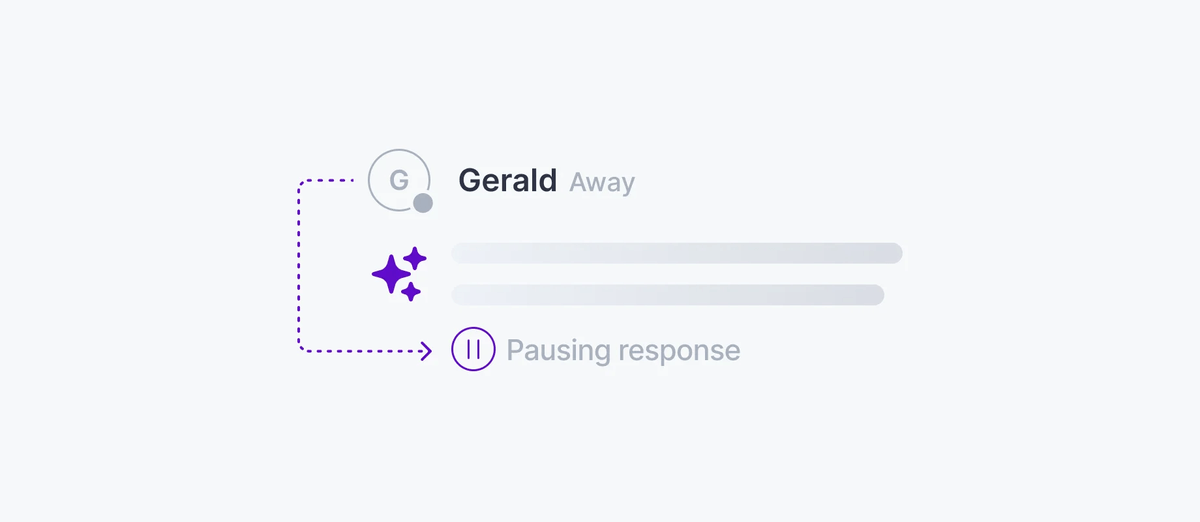
If the agent needs to know who is on the channel, it can read the presence set with its [HTTP client](https://ably.com/docs/pub-sub/api/javascript/rest/rest-client.md).
## Show the agent's status
The agent should enter presence once for each request with `presence.enterClient`, using a `clientId` such as `agent:${requestId}`. Clients can then find the agents in the set by the `agent:` prefix. A member of the presence set is a `clientId` on one connection. If requests share one [realtime client](https://ably.com/docs/pub-sub/api/javascript/realtime/realtime-client.md), they share one connection, so each request needs a separate `clientId`, or the first request to leave removes the status of every other request.
The agent should call `presence.leaveClient` in a `finally` block, so a request that fails or is cancelled also clears its status. Your application decides what goes in the presence data, some examples might be a `status` or the tool that the agent is calling.
Entering presence attaches the agent's channel. With the default modes, the agent then receives every message on the channel, including the response it publishes.
You can limit what the agent receives with [channel modes](https://ably.com/docs/channels/options.md#modes), which you pass to `channels.get`. The modes you pass replace the default set. With `['PUBLISH', 'PRESENCE']`, the agent does not receive messages or presence events. The agent needs both of these modes:
| Mode | Why the agent needs it |
| --- | --- |
| `PUBLISH` | The [adaptor](https://ably.com/docs/ai-transport/api/javascript/agent-adaptor.md) publishes the prompt and the response |
| `PRESENCE` | The agent enters, updates, and leaves the presence set |
This agent code enters presence after it publishes the prompt, updates its status before it streams the response and leaves presence when it finishes.:
### Vercel AI SDK Javascript

```
// This runs on your server, so it holds the API key.
import { createRealtimeClient } from '@ably/pubsub-server';
import { vercelAdaptor } from '@ably/ai-transport/vercel';
import { convertToModelMessages, streamText, toUIMessageStream } from 'ai';

export async function POST(req) {
  const { channelName, message } = await req.json();
  const headers = { requestId: message.id };
  const agentId = `agent:${message.id}`;
  const agentClient = createRealtimeClient({ key: process.env.ABLY_API_KEY });
  const channel = agentClient.channels.get(channelName, { modes: ['PUBLISH', 'PRESENCE'] });
  const adaptor = vercelAdaptor(channel);
  try {
    await adaptor.send({ type: 'user-message', message }, { headers });
    await channel.presence.enterClient(agentId, { status: 'thinking' });
    const uiMessages = [...(await loadConversation(channelName)), message];
    const messages = await convertToModelMessages(uiMessages);
    const result = streamText({ model, messages, abortSignal: req.signal });
    await channel.presence.updateClient(agentId, { status: 'streaming' });
    await adaptor.pipe(
      toUIMessageStream({ stream: result.fullStream, originalMessages: uiMessages, generateMessageId: () => crypto.randomUUID() }),
      { signal: req.signal, headers },
    );
  } finally {
    await channel.presence.leaveClient(agentId).catch(console.error);
    agentClient.close();
  }
  return new Response(null, { status: 204 });
}
```

### OpenAI Javascript

```
// This runs on your server, so it holds the API key.
import OpenAI from 'openai';
import { createRealtimeClient } from '@ably/pubsub-server';
import { openaiAdaptor } from '@ably/ai-transport/openai';

export async function POST(req) {
  const { channelName, requestId, items } = await req.json();
  const headers = { requestId };
  const agentId = `agent:${requestId}`;
  const agentClient = createRealtimeClient({ key: process.env.ABLY_API_KEY });
  const channel = agentClient.channels.get(channelName, { modes: ['PUBLISH', 'PRESENCE'] });
  const adaptor = openaiAdaptor(channel);
  try {
    await adaptor.send({ type: 'input', items }, { headers });
    await channel.presence.enterClient(agentId, { status: 'thinking' });
    const stream = await new OpenAI().responses.create(
      { model: 'gpt-5.5', input: [...(await loadConversation(channelName)), ...items], stream: true },
      { signal: req.signal },
    );
    await channel.presence.updateClient(agentId, { status: 'streaming' });
    await adaptor.pipe(stream, { signal: req.signal, headers });
  } finally {
    await channel.presence.leaveClient(agentId).catch(console.error);
    agentClient.close();
  }
  return new Response(null, { status: 204 });
}
```
## Show the status on the client
The client can read the presence set and subscribe to changes to it. With the default channel modes, the client receives presence events. The client's token needs the `subscribe` [capability](https://ably.com/docs/ai-transport/setup/authentication.md#capabilities) or `presence-subscribe` capability.
This client code shows the status of each agent as it changes:
### Javascript

```
const isAgent = (member) => member.clientId.startsWith('agent:');

await channel.presence.subscribe((member) => {
  if (!isAgent(member)) return;
  showAgentStatus(member.clientId, member.action === 'leave' ? undefined : member.data.status);
});
```
## Show who is in the conversation
The user's client can enter presence with `presence.enter`, so the agent and other users can see that the user is on the channel. To enter presence, the client's token needs a `clientId` and the `presence` [capability](https://ably.com/docs/ai-transport/setup/authentication.md#capabilities).
This client code enters presence with the user's name:
### Javascript

```
await channel.presence.enter({ name: 'Ada' });
```
One user on two devices appears in the set twice, as two members with the same `clientId` and different connection ids. Your client can group the members by `clientId` to show each user once.
If the user's client enters presence, the agent can [check for the user](#check-from-agent) before it calls the model.
## Check for subscribers
The agent can check whether the user is still on the channel in three ways:
| Check | What it tells you | What the user's client does | How the agent gets it | Capability on the agent's key | When the answer is current |
| --- | --- | --- | --- | --- | --- |
| HTTP `presence.get()` | Who is on the channel, by `clientId`, with each member's data | Enters presence | One HTTP request at a set point | `presence-subscribe` | At the request. A user whose connection dropped stays in the set for about 15 seconds |
| HTTP `channel.status()` | How many connections receive the channel's messages | Subscribes to the channel | One HTTP request at a set point | `channel-metadata` | At the request. The count includes a connected client that the user is not looking at, and any agent attached with the default modes |
| `channel.occupancy` webhook | That the occupancy of the channel changed | Subscribes to the channel | Your backend receives an HTTP request | None; you create an integration rule | When Ably sends the event to your backend |
For the presence check, the agent should use an HTTP client from `createHttpClient`. The HTTP client does not need channel modes, so the check works for an agent that only publishes.
This agent code checks whether any member other than an agent is in the set:
### Javascript

```
// The agent's key needs the presence-subscribe capability.
import { createHttpClient } from '@ably/pubsub-server';

const httpClient = createHttpClient({ key: process.env.ABLY_API_KEY });
const { items } = await httpClient.channels.get(channelName).presence.get();
const userPresent = items.some((member) => !member.clientId.startsWith('agent:'));
```
For example, the agent might choose to check the presence set at specific points in its flow: before the model call, between tool calls, and before a push notification. `presence.get({ clientId })` returns only the members with that `clientId`.
For the occupancy check, the user's client does not need to enter presence. `channel.status()` on the HTTP client returns the counts in `status.occupancy.metrics`, and the agent reads `subscribers`, the number of connections that receive the channel's messages.
Occupancy counts the agent as a subscriber only if the agent receives the channel's messages. An agent that only publishes does not attach the channel, and an agent attached with `['PUBLISH', 'PRESENCE']` is counted in `connections` and left out of `subscribers`.
On a channel that several users share, the `subscribers` count cannot show the presence or absence of a single user.
This agent code reads the number of subscribers, with the `httpClient` and `channelName` from the previous sample:
### Javascript

```
// The agent's key needs the channel-metadata capability.
const { status } = await httpClient.channels.get(channelName).status();
const subscribers = status.occupancy.metrics.subscribers;
```
A `channel.occupancy` webhook sends [occupancy events](https://ably.com/docs/presence-occupancy/occupancy.md#integrations) to your backend when the occupancy of a conversation's channel changes. Your backend can then act on the presence or absence of subscribers, for example: send a push notification when work is done and there are no subscribers.
To create the webhook, open the [Integrations](https://ably.com/accounts/any/apps/any/integrations) page of your app in the Ably dashboard and create a [webhook rule](https://ably.com/docs/platform/integrations/webhooks/generic.md). Set the URL of an endpoint on your backend, choose the `channel.occupancy` event type, and set a [channel filter](https://ably.com/docs/platform/integrations/webhooks.md#filter) that matches your conversation channels, such as `^conversations:`.
## When the agent stops
If the agent calls `leaveClient`, as the `finally` block above does, Ably removes the agent's member from the presence set, and every client subscribed to presence receives a `leave` event.
If the agent process stops before it calls `leaveClient`, for example after a crash, a serverless timeout, or a stopped container, Ably removes the agent's member about 15 seconds after its connection drops. Every client subscribed to presence then receives a `leave` event.
An agent process that stops responding while its connection stays open stays in the presence set. To let clients find an agent in that state, the agent can put an `updatedAt` time in the presence data and update it between tool calls. If an agent's `updatedAt` is older than the longest time your agent goes between updates, the client can treat that agent as stopped.
This client code finds an agent that has not updated its status in time. `agents` is the list of agent members from `presence.get()`:
### Javascript

```
// MAX_UPDATE_GAP_MS is the longest time your agent goes between updates.
const isStale = (member) => Date.now() - member.data.updatedAt > MAX_UPDATE_GAP_MS;
const stalled = agents.filter(isStale);
```
A response that is open, with no agent in the presence set, means that the agent [stopped partway through the response](https://ably.com/docs/ai-transport/conversation/reconnection-and-recovery.md#agent-stops).
## Edge cases
- An agent that enters presence with one `clientId` for the whole process breaks under concurrent requests. The requests share one connection, so the first request's `leave` removes the agent's status while the second request still streams. Each request must enter with a separate `clientId`, as in [Show the agent's status](#agent-status).
- An agent process that keeps one realtime client for many conversations keeps each channel it entered presence on attached after it leaves. Call `channel.detach()` or `channels.release(channelName)` when the agent finishes with the channel.
- Presence events are not ordered with the channel's messages. A `streaming` update can arrive after the first text of the response. Use the response's events to show that a response is streaming.
- `channels.get(channelName, { modes })` throws error 40000 when the channel is already attached with other options. Get the agent's channel once with its modes, and change the modes with `channel.setOptions`.
- If you leave `PUBLISH` out of the modes, the adaptor's publish calls fail after presence attaches the channel.
- The client compares `updatedAt` with the device clock, which can differ from the agent's clock. Allow for that difference when you choose how old an `updatedAt` time can be.
- The client's token needs `subscribe` or `presence-subscribe` to receive presence events, and `presence` to enter presence. The agent's key needs `presence` to enter, `presence-subscribe` for the HTTP `presence.get()`, and `channel-metadata` for occupancy.
- The HTTP `presence.get()` returns 100 members by default and at most 1,000 members on one page. A channel with more members than one page holds needs `next()` to read the rest.
## FAQ
### Does Ably count presence events as messages?
Yes. Ably counts each enter, update, and leave as a [message](https://ably.com/docs/platform/pricing.md) on the channel, and counts each delivery of the event to a subscribed client.
### Can clients enter presence too?
Yes. A user's client that enters presence appears in the same set as the agents. Your client can differentiate users from agents by `clientId`.
### Does presence work across devices?
Yes. Each device that enters presence is a member of the set. Two devices that share one `clientId` are two members with the same `clientId` and different connection ids, so a `leave` from one device does not mean that the user has left.
### Can I pause the model call when the user has left?
Yes. The agent can [check for the user](#check-from-agent) between tool calls, and stop the model call if the user has left.
### Why does the agent's `presence.get()` throw 91008?
The agent's realtime client attached the channel without the `PRESENCE_SUBSCRIBE` mode, so the realtime client cannot read the presence set. The agent can read the set with the HTTP client's `presence.get()`.
## Related features
- [Agent progress](https://ably.com/docs/ai-transport/awareness/agent-progress.md): show the agent's plan and its progress through each step.
- [Push notifications](https://ably.com/docs/ai-transport/awareness/push-notifications.md): notify the user when the agent finishes after the user has left.
- [Ephemeral messages](https://ably.com/docs/ai-transport/awareness/ephemeral-messages.md): send short-lived status updates that Ably does not store.
## Related Topics
- [Overview](https://ably.com/docs/ai-transport/awareness.md): Show users what an AI agent is doing right now, and let the agent check who is on the channel, with LiveObjects, ephemeral messages, presence, and occupancy on the channel the conversation already uses.
- [Agent progress](https://ably.com/docs/ai-transport/awareness/agent-progress.md): Show your users the AI agent's plan and its progress through each step while it runs, with LiveObjects, ephemeral messages, and presence on the conversation's Ably channel.
- [Ephemeral messages](https://ably.com/docs/ai-transport/awareness/ephemeral-messages.md): Send short-lived status from an AI agent, such as the tool the agent is calling, to every subscribed client with ephemeral messages, which Ably does not store.
- [Push notifications](https://ably.com/docs/ai-transport/awareness/push-notifications.md): Notify users when a long-running AI agent finishes or needs their input, even after they close the app, by publishing a message with a push payload to the channel when the user has left.
## Documentation Index
To discover additional Ably documentation:
1. Fetch [llms.txt](https://ably.com/llms.txt) for the canonical list of available pages.
2. Identify relevant URLs from that index.
3. Fetch target pages as needed.
Avoid using assumed or outdated documentation paths.